
Image2Studio
Prompts

gpt-image-2

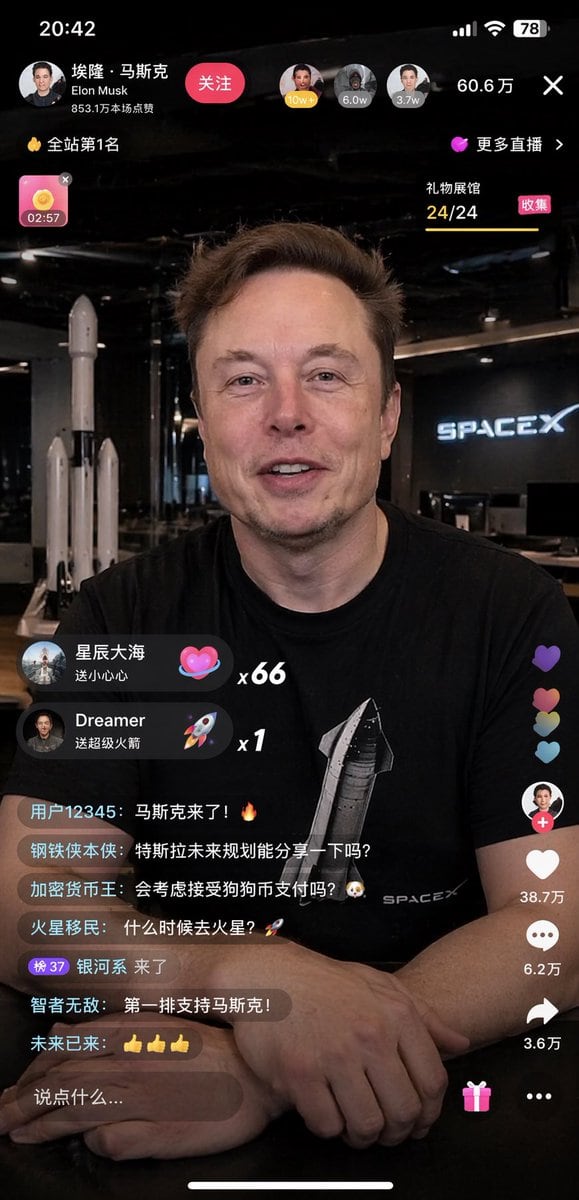
Mobile Livestream Interface Mockup

Structured mobile livestream interface mockup prompt for GPT Image 2.

Structured mobile livestream interface mockup prompt for GPT Image 2.
Prompt

{ "type": "mobile livestream interface mockup", "subject": { "identity": "{argument name=\"subject name\" default=\"Elon Musk\"}", "appearance": "wearing a black t-shirt with {argument name=\"t-shirt graphic\" default=\"Starship rocket and SPACEX text\"}", "pose": "{argument name=\"expression\" default=\"smiling warmly, looking directly at the camera\"}, hands clasped on a dark table" }, "environment": "{argument name=\"background\" default=\"SpaceX office with a rocket model and neon sign\"}", "layout": { "sections": [ { "title": "Top Bar UI", "position": "top", "count": 4, "labels": [ "Profile info with '埃隆·马斯克' and Follow button", "Viewer avatars and count '60.6万'", "Rank badge '全站第1名'", "Close button 'X'" ] }, { "title": "Gift Popups", "position": "mid-left", "count": 2, "labels": [ "星辰大海 送小心心 x66 (Heart icon)", "Dreamer 送超级火箭 x1 (Rocket icon)" ] }, { "title": "Chat Stream", "position": "bottom-left", "count": 7, "labels": [ "用户12345: 马斯克来了!🔥", "钢铁侠本侠: 特斯拉未来规划能分享一下吗?", "加密货币王: 会考虑接受狗狗币支付吗?🐶", "火星移民: 什么时候去火星?🚀", "银河系 来了", "智者无敌: 第一排支持马斯克!", "未来已来: 👍👍👍" ] }, { "title": "Side Action Buttons", "position": "bottom-right", "count": 4, "labels": [ "Host profile with +", "Like heart '38.7万'", "Comment bubble '6.2万'", "Share arrow '3.6万'" ] }, { "title": "Bottom Input Bar", "position": "bottom", "count": 3, "labels": [ "Text input '说点什么...'", "Gift box icon", "More options '...'" ] } ] } }

Prompt structure
  • Modelgpt-image-2
  • Use casesocial-media-post
  • Stylephotorealistic, editorial, cyberpunk
  • Aspect ratioFlexible
Best used for
  • Use casesocial-media-post
  • Stylephotorealistic, editorial, cyberpunk
  • Recommended specs1:1, 4:5, 16:9, or 9:16
  • ModelGPT Image 2
How to customize

Use this Mobile Livestream Interface Mockup prompt as a base. Replace the subject, product details, environment, lighting, brand colors, and output ratio while keeping the social-media-post intent and photorealistic, editorial, cyberpunk direction stable.

Editable variables
  • SubjectReplace the product, person, scene, interface, or object being generated.
  • Use caseKeep or rewrite the destination as social media post, ad creative, cover image, poster, or ecommerce hero.
  • FrameChoose 1:1, 4:5, 16:9, or 9:16 based on the final placement.
  • Brand cuesAdd colors, materials, props, text-safe space, and the platform where the image will be used.
Recommended specs

Choose the frame for the destination first, then use 1K, 2K, or 4K based on output quality needs. Product images and posters usually benefit from higher resolution.

Pre-generation checklist
  • CheckSubject, lighting, composition, and frame are specific enough to review.
  • CheckText-safe space is included when the image will carry a headline or ad copy.
  • CheckResolution, credit cost, and final destination are checked before generation.
Why this prompt works

Mobile Livestream Interface Mockup works because it starts from the image job, then controls subject, composition, lighting, style, and frame. It is best for social media post while keeping the photorealistic, editorial, cyberpunk direction stable.

Common questions
  • Can I use it directly?Yes. Replace the subject, brand cues, and frame, then generate in Image2Studio.
  • Which ratio should I use?Choose 1:1, 4:5, 16:9, or 9:16 based on the destination.




