
Image2Studio
Prompts

gpt-image-2

App Promo Infographic Flyer

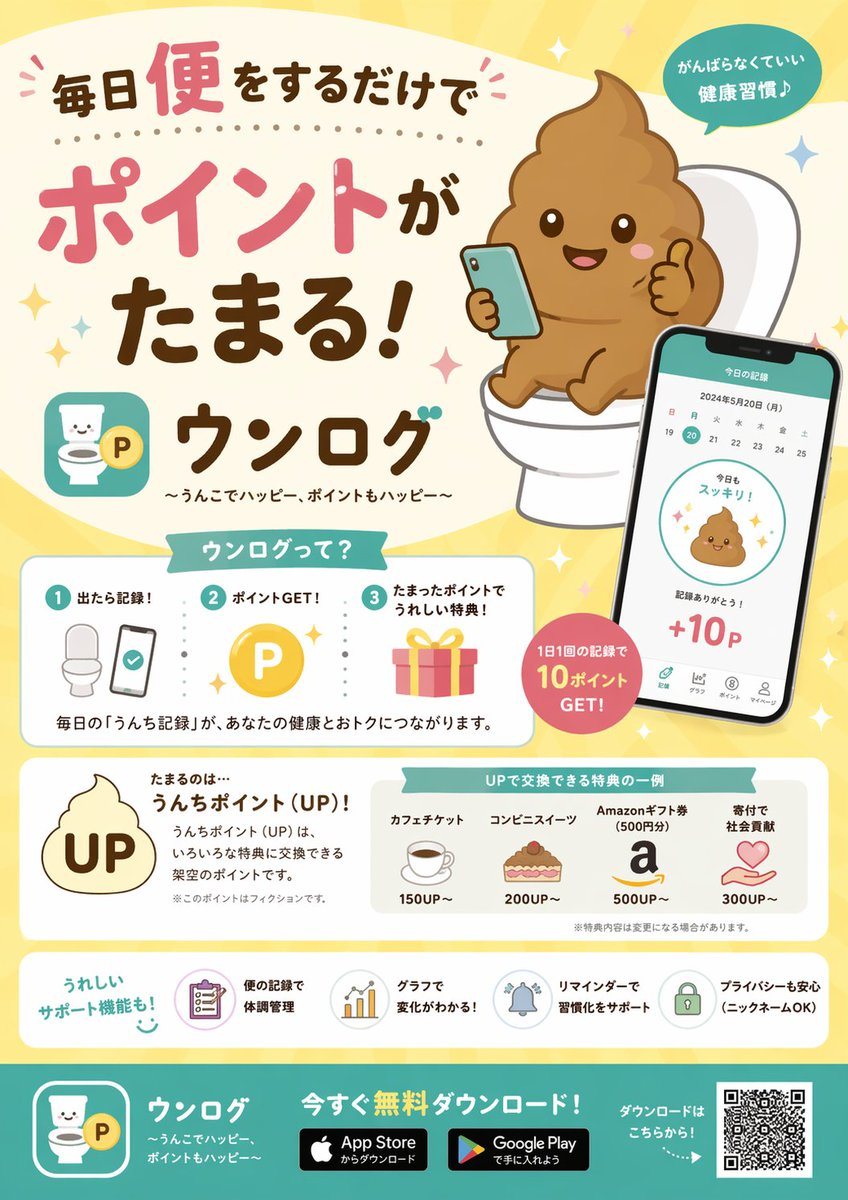
Generates a structured, cute promotional flyer for a mobile app featuring UI mockups, step-by-step guides, and reward tiers.

Generates a structured, cute promotional flyer for a mobile app featuring UI mockups, step-by-step guides, and reward tiers.
Prompt

{ "type": "promotional app infographic flyer", "style": "cute, pastel colors, approachable, flat vector illustrations mixed with soft shading, Japanese promotional design", "header": { "headline": "{argument name=\"main headline\" default=\"毎日便をするだけでポイントがたまる!\"}", "app_name": "{argument name=\"app name\" default=\"ウンログ\"}", "subtitle": "{argument name=\"app subtitle\" default=\"〜うんこでハッピー、ポイントもハッピー〜\"}", "top_right_badge": "がんばらなくていい 健康習慣♪", "main_illustration": "cute smiling brown poop emoji character sitting on a white toilet, holding a smartphone and giving a thumbs up" }, "layout": { "sections": [ { "title": "ウンログって?", "position": "middle-left", "type": "how_it_works", "count": 3, "steps": [ {"number": 1, "label": "出たら記録!", "icon": "toilet and smartphone"}, {"number": 2, "label": "ポイントGET!", "icon": "gold P coin"}, {"number": 3, "label": "たまったポイントでうれしい特典!", "icon": "pink gift box"} ], "description": "毎日の「うんち記録」が、あなたの健康とおトクにつながります。" }, { "type": "app_ui_mockup", "position": "middle-right", "description": "smartphone displaying a calendar, a cute poop icon saying '今日もスッキリ!', and '+10P'", "floating_badge": "1日1回の記録で 10ポイント GET!" }, { "title": "たまるのは…", "position": "lower-middle-left", "point_system": "{argument name=\"point name\" default=\"うんちポイント (UP)!\"}", "icon": "poop shape with UP text inside" }, { "title": "UPで交換できる特典の一例", "position": "lower-middle-right", "type": "rewards_list", "count": 4, "items": [ {"label": "カフェチケット", "cost": "150UP~", "icon": "coffee cup"}, {"label": "コンビニスイーツ", "cost": "200UP~", "icon": "cake"}, {"label": "Amazonギフト券 (500円分)", "cost": "500UP~", "icon": "letter a"}, {"label": "寄付で社会貢献", "cost": "300UP~", "icon": "heart in hands"} ] }, { "title": "うれしいサポート機能も!", "position": "bottom-above-footer", "type": "features_list", "count": 4, "items": [ {"label": "便の記録で体調管理", "icon": "clipboard"}, {"label": "グラフで変化がわかる!", "icon": "bar chart"}, {"label": "リマインダーで習慣化をサポート", "icon": "bell"}, {"label": "プライバシーも安心 (ニックネームOK)", "icon": "lock"} ] } ], "footer": { "background_color": "teal", "call_to_action": "{argument name=\"call to action\" default=\"今すぐ無料ダウンロード!\"}", "elements": ["app logo", "App Store badge", "Google Play badge", "QR code"] } } }

Prompt structure
  • Modelgpt-image-2
  • Use caseapp-ui-mockup
  • Styleeditorial, luxury
  • Aspect ratioFlexible
Best used for
  • Use caseapp-ui-mockup
  • Styleeditorial, luxury
  • Recommended specs1:1, 4:5, 16:9, or 9:16
  • ModelGPT Image 2
How to customize

Use this App Promo Infographic Flyer prompt as a base. Replace the subject, product details, environment, lighting, brand colors, and output ratio while keeping the app-ui-mockup intent and editorial, luxury direction stable.

Editable variables
  • SubjectReplace the product, person, scene, interface, or object being generated.
  • Use caseKeep or rewrite the destination as app ui mockup, ad creative, cover image, poster, or ecommerce hero.
  • FrameChoose 1:1, 4:5, 16:9, or 9:16 based on the final placement.
  • Brand cuesAdd colors, materials, props, text-safe space, and the platform where the image will be used.
Recommended specs

Choose the frame for the destination first, then use 1K, 2K, or 4K based on output quality needs. Product images and posters usually benefit from higher resolution.

Pre-generation checklist
  • CheckSubject, lighting, composition, and frame are specific enough to review.
  • CheckText-safe space is included when the image will carry a headline or ad copy.
  • CheckResolution, credit cost, and final destination are checked before generation.
Why this prompt works

App Promo Infographic Flyer works because it starts from the image job, then controls subject, composition, lighting, style, and frame. It is best for app ui mockup while keeping the editorial, luxury direction stable.

Common questions
  • Can I use it directly?Yes. Replace the subject, brand cues, and frame, then generate in Image2Studio.
  • Which ratio should I use?Choose 1:1, 4:5, 16:9, or 9:16 based on the destination.




