
Image2Studio
Prompts

gpt-image-2

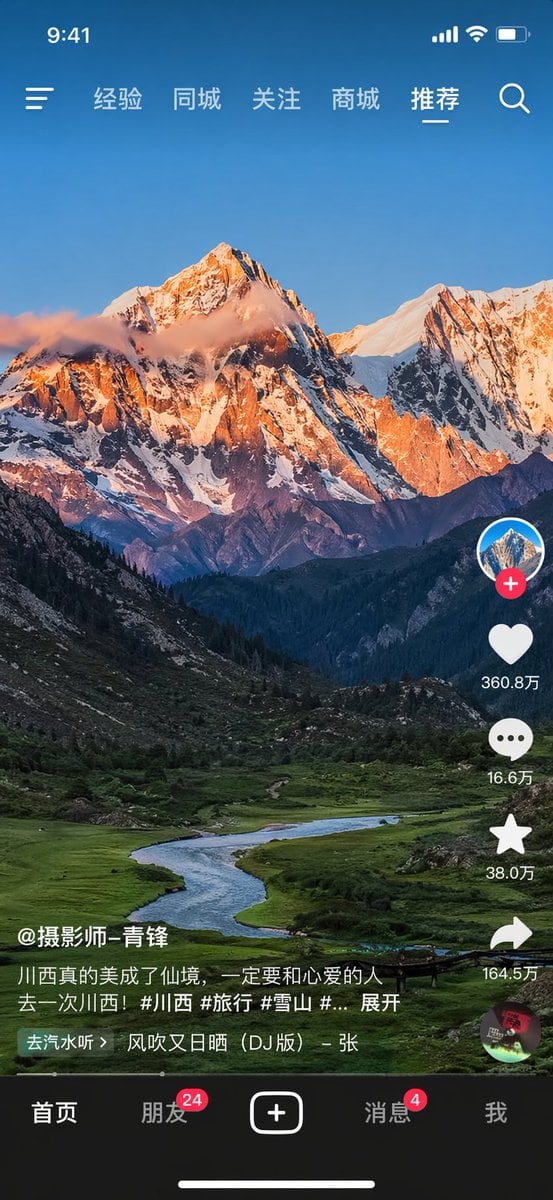
Mobile Short-video App Interface Mockup

Structured mobile short-video app interface mockup prompt for GPT Image 2.

Structured mobile short-video app interface mockup prompt for GPT Image 2.
Prompt

{ "type": "mobile short-video app interface mockup", "background_image": "{argument name=\"landscape subject\" default=\"majestic snow-capped mountain peak illuminated by golden hour sunlight with a winding river in a lush green valley\"}", "layout": { "top_status_bar": { "time": "9:41", "icons": ["cellular signal", "wifi", "battery"] }, "top_navigation": { "left_icon": "hamburger menu", "right_icon": "search magnifying glass", "center_labels": ["经验", "同城", "关注", "商城", "{argument name=\"active tab\" default=\"推荐\"}"] }, "right_interaction_bar": { "count": 6, "items": [ {"icon": "profile picture with red plus button"}, {"icon": "heart", "label": "{argument name=\"like count\" default=\"360.8万\"}"}, {"icon": "speech bubble", "label": "16.6万"}, {"icon": "star", "label": "38.0万"}, {"icon": "share arrow", "label": "164.5万"}, {"icon": "spinning music record"} ] }, "bottom_left_info": { "username": "{argument name=\"username\" default=\"@摄影师-青锋\"}", "caption": "{argument name=\"video caption\" default=\"川西真的美成了仙境,一定要和心爱的人去一次川西!#川西 #旅行 #雪山 #... 展开\"}", "music_ticker": "去汽水听 > 风吹又日晒 (DJ版) - 张" }, "bottom_navigation": { "count": 5, "items": [ {"label": "首页"}, {"label": "朋友", "badge": "24"}, {"icon": "square plus button"}, {"label": "消息", "badge": "4"}, {"label": "我"} ], "home_indicator": "horizontal line at bottom" } } }

Prompt structure
  • Modelgpt-image-2
  • Use caseapp-ui-mockup
  • Stylephotorealistic, editorial
  • Aspect ratioFlexible
Best used for
  • Use caseapp-ui-mockup
  • Stylephotorealistic, editorial
  • Recommended specs1:1, 4:5, 16:9, or 9:16
  • ModelGPT Image 2
How to customize

Use this Mobile Short-video App Interface Mockup prompt as a base. Replace the subject, product details, environment, lighting, brand colors, and output ratio while keeping the app-ui-mockup intent and photorealistic, editorial direction stable.

Editable variables
  • SubjectReplace the product, person, scene, interface, or object being generated.
  • Use caseKeep or rewrite the destination as app ui mockup, ad creative, cover image, poster, or ecommerce hero.
  • FrameChoose 1:1, 4:5, 16:9, or 9:16 based on the final placement.
  • Brand cuesAdd colors, materials, props, text-safe space, and the platform where the image will be used.
Recommended specs

Choose the frame for the destination first, then use 1K, 2K, or 4K based on output quality needs. Product images and posters usually benefit from higher resolution.

Pre-generation checklist
  • CheckSubject, lighting, composition, and frame are specific enough to review.
  • CheckText-safe space is included when the image will carry a headline or ad copy.
  • CheckResolution, credit cost, and final destination are checked before generation.
Why this prompt works

Mobile Short-video App Interface Mockup works because it starts from the image job, then controls subject, composition, lighting, style, and frame. It is best for app ui mockup while keeping the photorealistic, editorial direction stable.

Common questions
  • Can I use it directly?Yes. Replace the subject, brand cues, and frame, then generate in Image2Studio.
  • Which ratio should I use?Choose 1:1, 4:5, 16:9, or 9:16 based on the destination.




