
Image2Studio
Examples

gpt-image-2

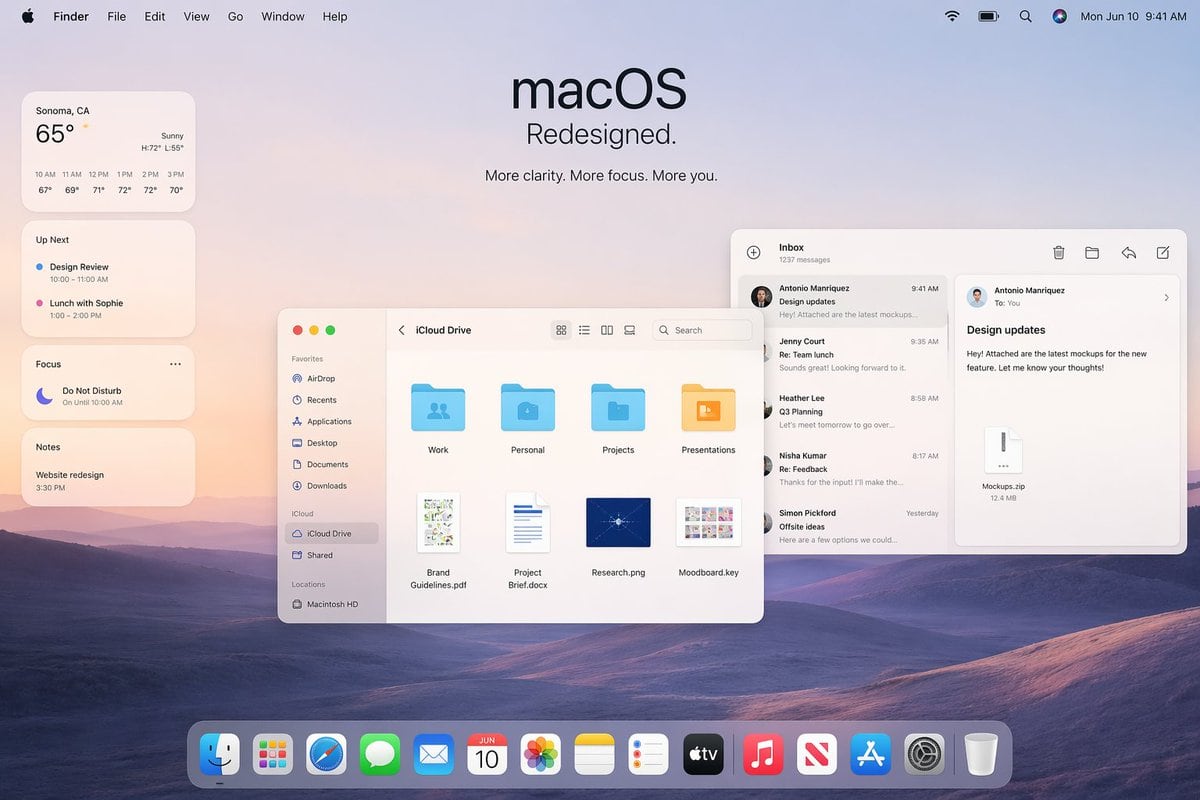
Polished Apple-style MacOS Promotional Desktop Mockup Shown As A Full-sc

A polished Apple-style macOS promotional desktop mockup shown as a full-screen screenshot, with a soft pastel dawn wallpaper of layered purple-blue rolling hills under a pale peach and la...

A polished Apple-style macOS promotional desktop mockup shown as a full-screen screenshot, with a soft pastel dawn wallpaper of layered purple-blue rolling hills under a pale peach and la...
Prompt

A polished Apple-style macOS promotional desktop mockup shown as a full-screen screenshot, with a soft pastel dawn wallpaper of layered purple-blue rolling hills under a pale peach and lavender sky. Centered near the top is a large minimalist headline reading "macOS" with the subheadline "Redesigned." and a smaller line below that says "More clarity. More focus. More you." The top system menu bar is visible across the full width: Apple logo, Finder, File, Edit, View, Go, Window, Help on the left; Wi‑Fi, battery, search, colorful user icon, and the date/time "Mon Jun 10 9:41 AM" on the right. On the left side, stack 4 translucent rounded widgets vertically: a weather widget for "Sonoma, CA" showing "65°", "Sunny", high/low "H:72° L:55°", and 6 hourly temperatures from 10 AM to 3 PM; an "Up Next" widget with 2 calendar items, "Design Review" and "Lunch with Sophie" with times; a "Focus" widget showing "Do Not Disturb" and "On Until 10:00 AM"; and a "Notes" widget with the note "Website redesign" and time "3:30 PM". In the middle-left foreground, place a Finder window with rounded corners and a light frosted interface, titled "iCloud Drive". Include a left sidebar with 10 items total: Favorites with 6 items "AirDrop", "Recents", "Applications", "Desktop", "Documents", "Downloads"; iCloud with 2 items "iCloud Drive" and "Shared"; and Locations with 1 item "Macintosh HD". In the main Finder area show 8 file items arranged in a grid: 4 folders on the top row labeled "Work", "Personal", "Projects", "Presentations", and 4 documents on the bottom row labeled "Brand Guidelines.pdf", "Project Brief.docx", "Research.png", "Moodboard.key". Add standard macOS traffic-light window buttons and small view/search controls in the title bar. On the right side, overlap a Mail app window with a three-column layout. The left mail list column is titled "Inbox" and shows "1237 messages" plus 5 visible senders/messages: "Antonio Manriquez" with subject "Design updates", "Jenny Court" with "Re: Team lunch", "Heather Lee" with "Q3 Planning", "Nisha Kumar" with "Re: Feedback", and "Simon Pickford" with "Offsite ideas". The reading pane shows the selected message from Antonio Manriquez to You with subject "Design updates" and body text about attached mockups for a new feature, plus a file attachment card labeled "Mockups.zip" and "12.4 MB". Use clean SF Pro-style typography, subtle shadows, translucent glassmorphism panels, soft ambient lighting, and a premium Apple keynote aesthetic. At the bottom center, include a glossy translucent macOS Dock with 15 icons: Finder, Launchpad, Safari, Messages, Mail, Calendar showing "JUN 10", Photos, Notes, Reminders, TV, Music, News, App Store, Settings, and Trash. Composition should feel balanced, airy, realistic, and highly refined, like an official Apple macOS redesign announcement image.

Prompt structure
  • Modelgpt-image-2
  • Use caseapp-ui-mockup
  • Stylephotorealistic, editorial, minimal, luxury
  • Aspect ratioFlexible
Best used for
  • Use caseapp-ui-mockup
  • Stylephotorealistic, editorial, minimal, luxury
  • Recommended specs1:1, 4:5, 16:9, or 9:16
  • ModelGPT Image 2
How to customize

Use this Polished Apple-style MacOS Promotional Desktop Mockup Shown As A Full-sc prompt as a base. Replace the subject, product details, environment, lighting, brand colors, and output ratio while keeping the app-ui-mockup intent and photorealistic, editorial, minimal, luxury direction stable.

Editable variables
  • SubjectReplace the product, person, scene, interface, or object being generated.
  • Use caseKeep or rewrite the destination as app ui mockup, ad creative, cover image, poster, or ecommerce hero.
  • FrameChoose 1:1, 4:5, 16:9, or 9:16 based on the final placement.
  • Brand cuesAdd colors, materials, props, text-safe space, and the platform where the image will be used.
Recommended specs

Choose the frame for the destination first, then use 1K, 2K, or 4K based on output quality needs. Product images and posters usually benefit from higher resolution.

Pre-generation checklist
  • CheckSubject, lighting, composition, and frame are specific enough to review.
  • CheckText-safe space is included when the image will carry a headline or ad copy.
  • CheckResolution, credit cost, and final destination are checked before generation.
Why this prompt works

Polished Apple-style MacOS Promotional Desktop Mockup Shown As A Full-sc works because it starts from the image job, then controls subject, composition, lighting, style, and frame. It is best for app ui mockup while keeping the photorealistic, editorial, minimal, luxury direction stable.

Common questions
  • Can I use it directly?Yes. Replace the subject, brand cues, and frame, then generate in Image2Studio.
  • Which ratio should I use?Choose 1:1, 4:5, 16:9, or 9:16 based on the destination.




