
Image2Studio
Examples

gpt-image-2

Autumn Leaves with Handwritten Japanese Text

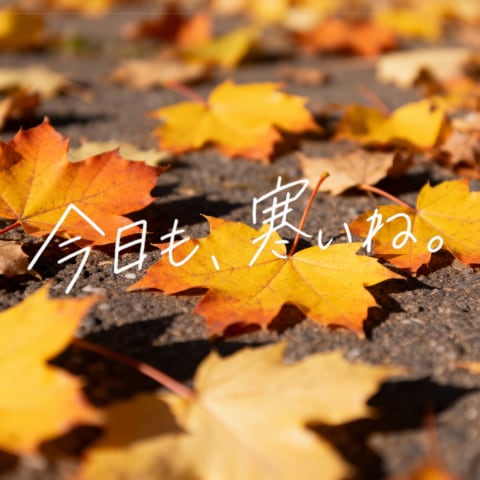
This prompt generates a cozy autumn close-up photo of fallen maple leaves on pavement with expressive white handwritten Japanese text, ideal for seasonal quote posts or poetic social media visuals.

This prompt generates a cozy autumn close-up photo of fallen maple leaves on pavement with expressive white handwritten Japanese text, ideal for seasonal quote posts or poetic social media visuals.
Prompt

A warm, shallow-depth-of-field autumn photograph of multiple fallen maple leaves scattered across dark asphalt pavement in bright golden sunlight. The leaves are mostly yellow, orange, and amber, with one prominent vivid orange leaf in the left foreground and several yellow leaves stretching diagonally into the distance. The camera is low to the ground, close-up, with crisp focus on the central foreground leaves and soft bokeh blur in the background and extreme foreground. Across the middle of the image, overlay large delicate handwritten Japanese text in white, thin brush-pen style, slightly irregular and emotional, reading {argument name="overlay text" default="今日も、寒いね。"}. Natural outdoor lighting, cozy seasonal mood, realistic textures, high contrast between sunlit leaves and rough pavement, square composition, poetic social-media aesthetic.

Prompt structure
  • Modelgpt-image-2
  • Use casesocial-media-post
  • Stylephotorealistic
  • Aspect ratioFlexible
Best used for
  • Use casesocial-media-post
  • Stylephotorealistic
  • Recommended specs1:1, 4:5, 16:9, or 9:16
  • ModelGPT Image 2
How to customize

Use this Autumn Leaves with Handwritten Japanese Text prompt as a base. Replace the subject, product details, environment, lighting, brand colors, and output ratio while keeping the social-media-post intent and photorealistic direction stable.

Editable variables
  • SubjectReplace the product, person, scene, interface, or object being generated.
  • Use caseKeep or rewrite the destination as social media post, ad creative, cover image, poster, or ecommerce hero.
  • FrameChoose 1:1, 4:5, 16:9, or 9:16 based on the final placement.
  • Brand cuesAdd colors, materials, props, text-safe space, and the platform where the image will be used.
Recommended specs

Choose the frame for the destination first, then use 1K, 2K, or 4K based on output quality needs. Product images and posters usually benefit from higher resolution.

Pre-generation checklist
  • CheckSubject, lighting, composition, and frame are specific enough to review.
  • CheckText-safe space is included when the image will carry a headline or ad copy.
  • CheckResolution, credit cost, and final destination are checked before generation.
Why this prompt works

Autumn Leaves with Handwritten Japanese Text works because it starts from the image job, then controls subject, composition, lighting, style, and frame. It is best for social media post while keeping the photorealistic direction stable.

Common questions
  • Can I use it directly?Yes. Replace the subject, brand cues, and frame, then generate in Image2Studio.
  • Which ratio should I use?Choose 1:1, 4:5, 16:9, or 9:16 based on the destination.




