
Image2Studio
Prompts

gpt-image-2

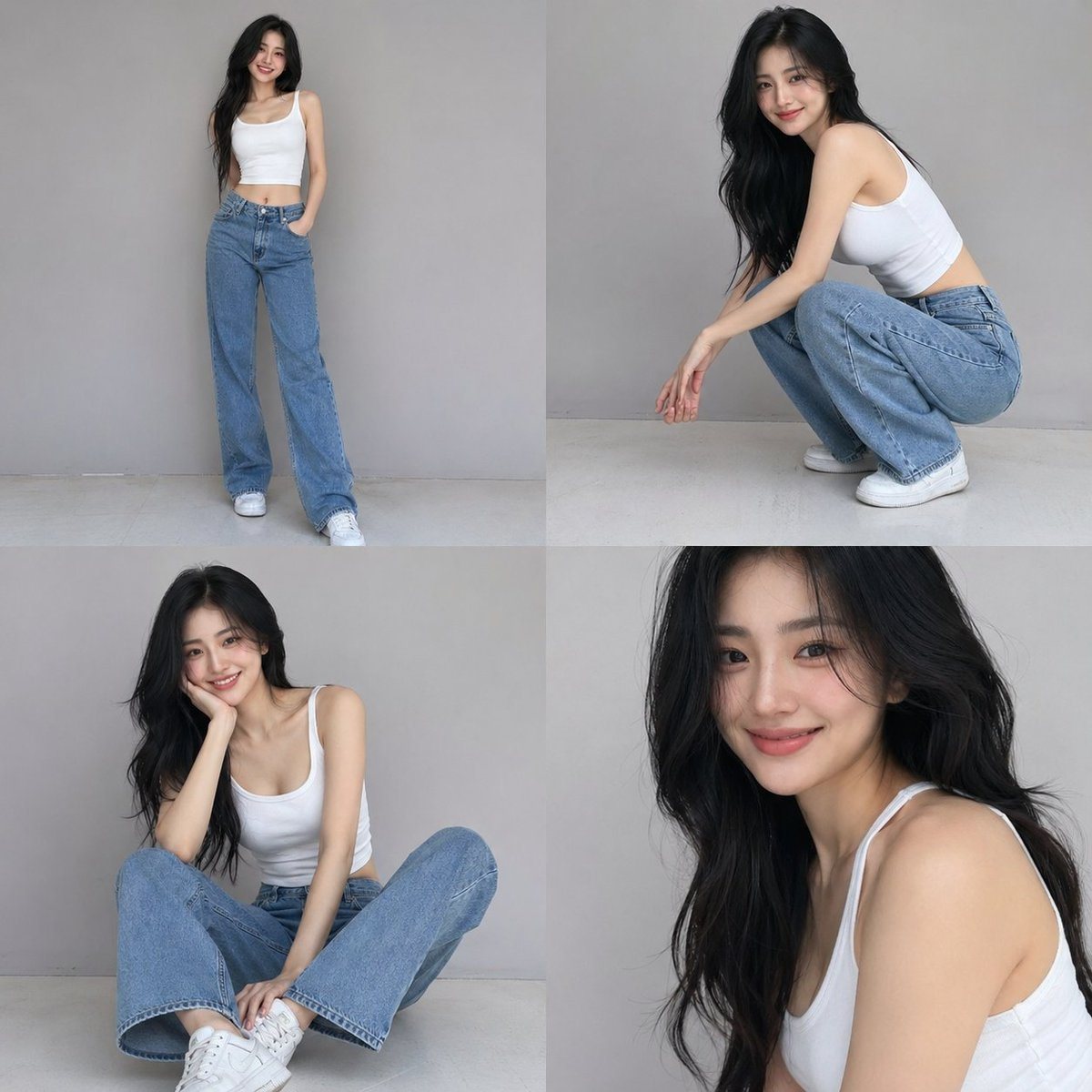
Casual Fashion Grid Photoshoot

A structured JSON prompt for a 4-photo collage of a casual fashion photoshoot with detailed subject and lighting parameters.

A structured JSON prompt for a 4-photo collage of a casual fashion photoshoot with detailed subject and lighting parameters.
Prompt

{ "scene_type": "smartphone fashion portrait series", "composition": { "layout": "4-photo grid collage", "camera": "smartphone photography", "framing": [ "full body standing", "crouching pose", "casual seated pose", "upper body portrait" ], "angle": "eye-level, natural perspective", "aspect_ratio": "1:1 collage" }, "subject": { "gender": "{argument name="gender" default="female"}", "age": "{argument name="age" default="early 20s"}", "aesthetic": "extremely beautiful, sensual, candid", "appearance": { "skin_tone": "smooth light complexion", "face": "soft feminine features, natural symmetry, bright smile", "expression": "playful, warm, confident, subtly sensual", "eyes": "expressive, gentle gaze", "hair": { "color": "{argument name="hair color" default="deep black"}", "style": "long, loose waves", "texture": "soft, natural shine" }, "makeup": "natural glam, dewy skin, soft blush, subtle lip tint" }, "outfit": { "top": "white fitted sleeveless crop top", "bottom": "loose straight-leg blue jeans", "shoes": "casual white sneakers", "style": "minimal, effortless, modern casual" }, "pose_style": "relaxed, candid, playful fashion poses", "body_language": "confident yet soft, natural movements, gentle sensual elegance" }, "environment": { "location": "minimal studio backdrop", "background": "clean light gray seamless wall", "floor": "neutral studio floor", "lighting": { "type": "soft diffused studio lighting", "tone": "neutral", "shadows": "soft and natural", "highlights": "subtle skin glow" } }, "style": { "photography_type": "smartphone editorial fashion", "visual_tone": "minimalist, airy, modern", "mood": "candid, sensual elegance, fresh and confident", "color_palette": "white, denim blue, soft gray", "contrast": "low to medium", "grain": "very light natural grain" }, "rendering": { "realism": "ultra-realistic", "detail_level": "high skin and fabric texture detail", "sharpness": "high", "depth_of_field": "natural", "post_processing": "minimal, clean, slightly soft finish" }, "atmosphere": "modern, youthful, effortless beauty, subtle sensual charm" }

Prompt structure
  • Modelgpt-image-2
  • Use casesocial-media-post
  • Stylephotorealistic, minimal, editorial
  • Aspect ratioFlexible
Best used for
  • Use casesocial-media-post
  • Stylephotorealistic, minimal, editorial
  • Recommended specs1:1, 4:5, 16:9, or 9:16
  • ModelGPT Image 2
How to customize

Use this Casual Fashion Grid Photoshoot prompt as a base. Replace the subject, product details, environment, lighting, brand colors, and output ratio while keeping the social-media-post intent and photorealistic, minimal, editorial direction stable.

Editable variables
  • SubjectReplace the product, person, scene, interface, or object being generated.
  • Use caseKeep or rewrite the destination as social media post, ad creative, cover image, poster, or ecommerce hero.
  • FrameChoose 1:1, 4:5, 16:9, or 9:16 based on the final placement.
  • Brand cuesAdd colors, materials, props, text-safe space, and the platform where the image will be used.
Recommended specs

Choose the frame for the destination first, then use 1K, 2K, or 4K based on output quality needs. Product images and posters usually benefit from higher resolution.

Pre-generation checklist
  • CheckSubject, lighting, composition, and frame are specific enough to review.
  • CheckText-safe space is included when the image will carry a headline or ad copy.
  • CheckResolution, credit cost, and final destination are checked before generation.
Why this prompt works

Casual Fashion Grid Photoshoot works because it starts from the image job, then controls subject, composition, lighting, style, and frame. It is best for social media post while keeping the photorealistic, minimal, editorial direction stable.

Common questions
  • Can I use it directly?Yes. Replace the subject, brand cues, and frame, then generate in Image2Studio.
  • Which ratio should I use?Choose 1:1, 4:5, 16:9, or 9:16 based on the destination.




