
Image2Studio
Examples

gpt-image-2

Create A Polished Square Advertising Image

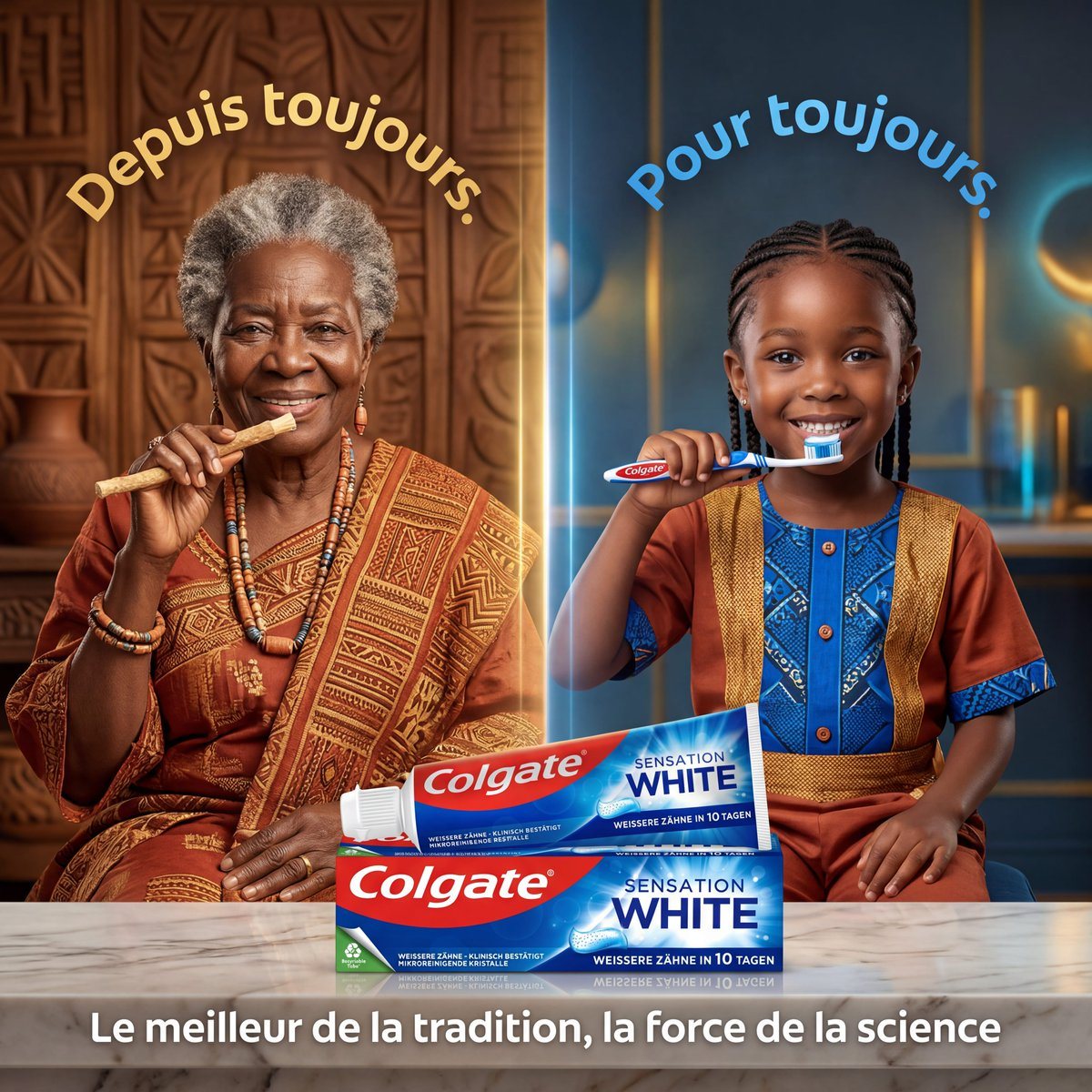
Create a polished square advertising image for Colgate Sensation White, split vertically into two equal halves with a glowing divider line in the center, showing a side-by-side contrast b...

Create a polished square advertising image for Colgate Sensation White, split vertically into two equal halves with a glowing divider line in the center, showing a side-by-side contrast b...
Prompt

Create a polished square advertising image for Colgate Sensation White, split vertically into two equal halves with a glowing divider line in the center, showing a side-by-side contrast between tradition and modern science. On the left half, place an elderly African woman seated behind a pale marble tabletop in a warm, earthy interior with carved wooden wall panels and a clay pot in the background. She wears a richly patterned traditional rust-orange and gold wrap dress with layered bead necklaces and bracelets, and has short gray natural hair. She holds a natural chewing stick near her mouth in a calm, dignified pose. Curve the French headline text above her head in large warm golden-yellow letters: "Depuis toujours." On the right half, place a young African child seated behind the same tabletop in a sleek modern blue interior with soft glowing lights and vertical gold accents. The child wears a vivid traditional-modern outfit: a copper-brown tunic with bright blue patterned front panel and gold trim, with neat braided hair, and holds a Colgate toothbrush near the mouth. Curve the French headline text above the child in large bright blue letters: "Pour toujours." At the bottom center, spanning both halves and placed prominently on the marble table, show exactly 2 Colgate Sensation White toothpaste boxes stacked slightly offset, with one matching toothbrush resting on top. The packaging must be highly legible and realistic, featuring the red Colgate logo and blue-white Sensation White branding. Add a bold white French tagline centered along the bottom edge: "Le meilleur de la tradition, la force de la science". Use cinematic commercial lighting, premium product-photography realism, rich skin tones, balanced symmetry, and a visual story of heritage meeting innovation.

Prompt structure
  • Modelgpt-image-2
  • Use casesocial-media-post
  • Styleluxury, photorealistic, cinematic, 3d-render
  • Aspect ratioFlexible
Best used for
  • Use casesocial-media-post
  • Styleluxury, photorealistic, cinematic, 3d-render
  • Recommended specs1:1, 4:5, 16:9, or 9:16
  • ModelGPT Image 2
How to customize

Use this Create A Polished Square Advertising Image prompt as a base. Replace the subject, product details, environment, lighting, brand colors, and output ratio while keeping the social-media-post intent and luxury, photorealistic, cinematic, 3d-render direction stable.

Editable variables
  • SubjectReplace the product, person, scene, interface, or object being generated.
  • Use caseKeep or rewrite the destination as social media post, ad creative, cover image, poster, or ecommerce hero.
  • FrameChoose 1:1, 4:5, 16:9, or 9:16 based on the final placement.
  • Brand cuesAdd colors, materials, props, text-safe space, and the platform where the image will be used.
Recommended specs

Choose the frame for the destination first, then use 1K, 2K, or 4K based on output quality needs. Product images and posters usually benefit from higher resolution.

Pre-generation checklist
  • CheckSubject, lighting, composition, and frame are specific enough to review.
  • CheckText-safe space is included when the image will carry a headline or ad copy.
  • CheckResolution, credit cost, and final destination are checked before generation.
Why this prompt works

Create A Polished Square Advertising Image works because it starts from the image job, then controls subject, composition, lighting, style, and frame. It is best for social media post while keeping the luxury, photorealistic, cinematic, 3d-render direction stable.

Common questions
  • Can I use it directly?Yes. Replace the subject, brand cues, and frame, then generate in Image2Studio.
  • Which ratio should I use?Choose 1:1, 4:5, 16:9, or 9:16 based on the destination.




