
Image2Studio
Examples

gpt-image-2

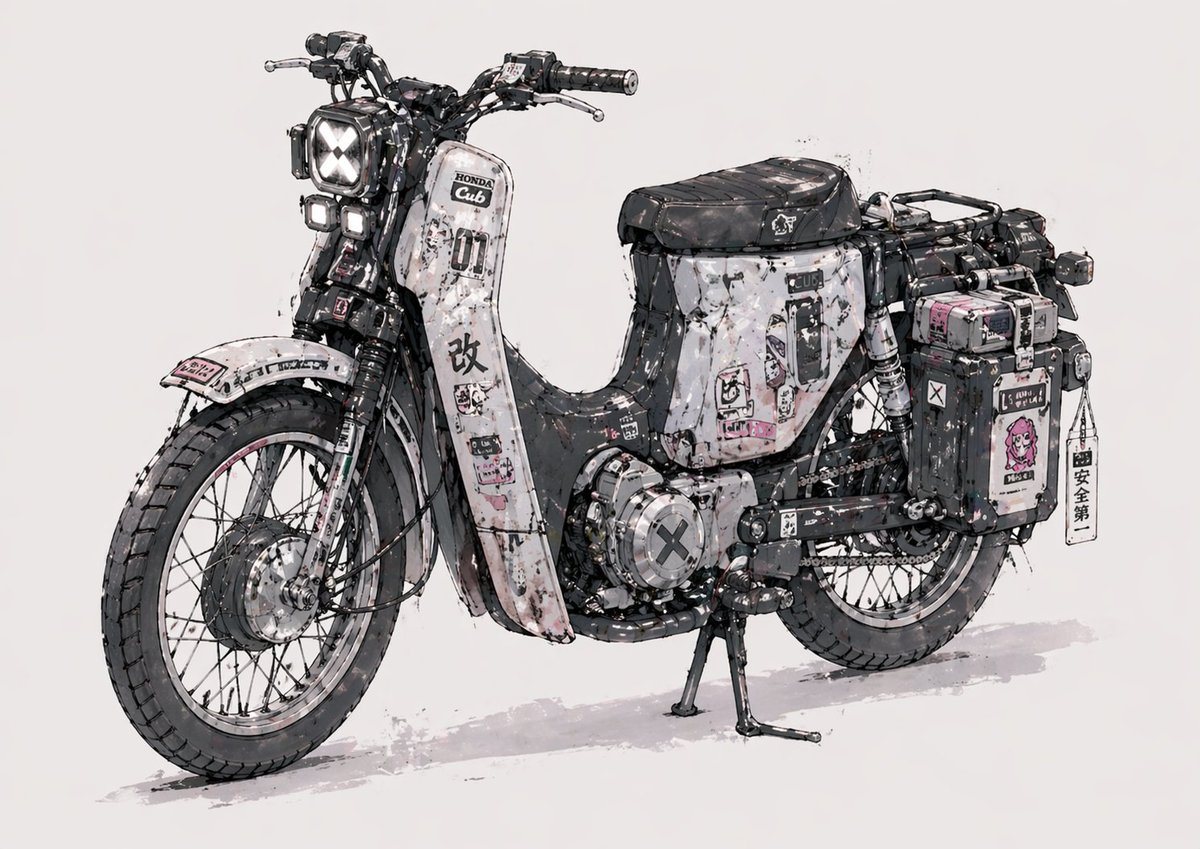
Highly Detailed Concept Illustration Of A Customized Vintage Step-throug

A highly detailed concept illustration of a customized vintage step-through motorcycle inspired by a Honda Super Cub, shown in a clean studio-like three-quarter left side view on a plain...

A highly detailed concept illustration of a customized vintage step-through motorcycle inspired by a Honda Super Cub, shown in a clean studio-like three-quarter left side view on a plain...
Prompt

A highly detailed concept illustration of a customized vintage step-through motorcycle inspired by a Honda Super Cub, shown in a clean studio-like three-quarter left side view on a plain light gray background. The bike has a rugged post-apocalyptic street-build aesthetic with a black, white, and muted gray color scheme accented by small pink stickers and decals. Emphasize heavy weathering: chipped paint, scratches, oil stains, grime, rust flecks, ink splatter, worn edges, and layered sticker residue across the entire body. The front has 1 square headlight with an X-shaped light pattern and 2 smaller stacked auxiliary lights beneath it. Use spoked wheels, thick all-terrain tires, visible front suspension, exposed mechanical detail, chain drive, and a sturdy center stand touching the ground. The leg shield and side panels are covered in graphic decals, Japanese-style warning labels, numbers, symbols, and distressed typography, including a bold large kanji mark on the front fairing. Add 2 hard side cargo boxes on the rear, one larger box on the far side and 1 nearer black box with extra stickers, plus 1 hanging vertical tag charm attached near the rear case. Include 1 long black ribbed seat, rear rack framing, exposed wiring, metal brackets, bolts, and compact utility accessories that make it feel hand-modified and functional. Render it like an industrial design sketch mixed with polished anime mech concept art: precise linework, watercolor wash shadows, soft gray ground shadow, high-detail mechanical realism, slightly messy inked edges, and a collectible custom-bike illustration feel.

Prompt structure
  • Modelgpt-image-2
  • Use casesocial-media-post
  • Stylewatercolor, anime, 3d-render, minimal
  • Aspect ratioFlexible
Best used for
  • Use casesocial-media-post
  • Stylewatercolor, anime, 3d-render, minimal
  • Recommended specs1:1, 4:5, 16:9, or 9:16
  • ModelGPT Image 2
How to customize

Use this Highly Detailed Concept Illustration Of A Customized Vintage Step-throug prompt as a base. Replace the subject, product details, environment, lighting, brand colors, and output ratio while keeping the social-media-post intent and watercolor, anime, 3d-render, minimal direction stable.

Editable variables
  • SubjectReplace the product, person, scene, interface, or object being generated.
  • Use caseKeep or rewrite the destination as social media post, ad creative, cover image, poster, or ecommerce hero.
  • FrameChoose 1:1, 4:5, 16:9, or 9:16 based on the final placement.
  • Brand cuesAdd colors, materials, props, text-safe space, and the platform where the image will be used.
Recommended specs

Choose the frame for the destination first, then use 1K, 2K, or 4K based on output quality needs. Product images and posters usually benefit from higher resolution.

Pre-generation checklist
  • CheckSubject, lighting, composition, and frame are specific enough to review.
  • CheckText-safe space is included when the image will carry a headline or ad copy.
  • CheckResolution, credit cost, and final destination are checked before generation.
Why this prompt works

Highly Detailed Concept Illustration Of A Customized Vintage Step-throug works because it starts from the image job, then controls subject, composition, lighting, style, and frame. It is best for social media post while keeping the watercolor, anime, 3d-render, minimal direction stable.

Common questions
  • Can I use it directly?Yes. Replace the subject, brand cues, and frame, then generate in Image2Studio.
  • Which ratio should I use?Choose 1:1, 4:5, 16:9, or 9:16 based on the destination.




