
Image2Studio
Examples

gpt-image-2

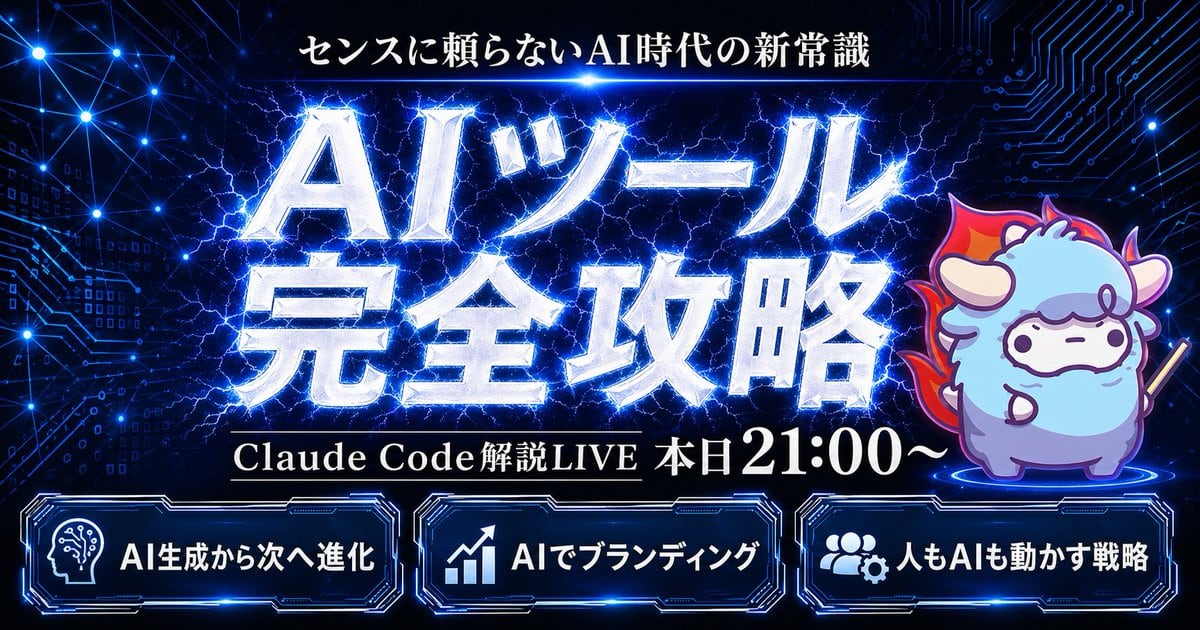
Cyber AI Webinar Thumbnail

This prompt generates a bold Japanese cyber-style livestream thumbnail with electric typography, a mascot character, and three feature panels for tech talks, AI webinars, or promotional streams.

This prompt generates a bold Japanese cyber-style livestream thumbnail with electric typography, a mascot character, and three feature panels for tech talks, AI webinars, or promotional streams.
Prompt

Create a flashy Japanese YouTube thumbnail in a dark futuristic cyber-tech style, 16:9 landscape composition, with a deep navy-to-black background filled with glowing blue circuit-board patterns, connected network nodes, tiny digital squares, and electric energy lines. At the top center, place a small white Japanese headline reading {argument name="headline text" default="センスに頼らないAI時代の新常識"}. In the center, add a massive 2-line Japanese title in metallic silver-white beveled lettering with intense neon-blue outer glow, electric lightning cracking behind and through the letters, reading {argument name="main title" default="AIツール 完全攻略"}. Beneath the main title, place one black horizontal banner with thin gold trim and white serif Japanese text reading {argument name="subheadline text" default="Claude Code 解説LIVE 本日21:00〜"}. On the right side, include 1 cute chibi sheep mascot standing on a glowing blue circular platform, with fluffy light blue and lavender fur, small horns, simple dot eyes, a neutral expression, outlined in purple-blue light, holding a short stick, and surrounded by a red-orange flame aura behind its body. Along the bottom, place 3 glowing futuristic rounded rectangular panels with blue neon borders and dark interiors, evenly spaced left to right. The left panel contains 1 white head-with-circuit icon and the Japanese text {argument name="bottom left label" default="AI生成から次へ進化"}. The center panel contains 1 white upward-trend chart icon and the text "AIでブランディング". The right panel contains 1 white group-and-gear icon and the text "人もAIも動かす戦略". Use extremely high contrast, glossy metallic text effects, layered blue rim lighting, energetic lightning, subtle lens glows, and a premium high-impact webinar thumbnail aesthetic.

Prompt structure
  • Modelgpt-image-2
  • Use caseyoutube-thumbnail
  • Stylecyberpunk, luxury, photorealistic, minimal
  • Aspect ratioFlexible
Best used for
  • Use caseyoutube-thumbnail
  • Stylecyberpunk, luxury, photorealistic, minimal
  • Recommended specs1:1, 4:5, 16:9, or 9:16
  • ModelGPT Image 2
How to customize

Use this Cyber AI Webinar Thumbnail prompt as a base. Replace the subject, product details, environment, lighting, brand colors, and output ratio while keeping the youtube-thumbnail intent and cyberpunk, luxury, photorealistic, minimal direction stable.

Editable variables
  • SubjectReplace the product, person, scene, interface, or object being generated.
  • Use caseKeep or rewrite the destination as youtube thumbnail, ad creative, cover image, poster, or ecommerce hero.
  • FrameChoose 1:1, 4:5, 16:9, or 9:16 based on the final placement.
  • Brand cuesAdd colors, materials, props, text-safe space, and the platform where the image will be used.
Recommended specs

Choose the frame for the destination first, then use 1K, 2K, or 4K based on output quality needs. Product images and posters usually benefit from higher resolution.

Pre-generation checklist
  • CheckSubject, lighting, composition, and frame are specific enough to review.
  • CheckText-safe space is included when the image will carry a headline or ad copy.
  • CheckResolution, credit cost, and final destination are checked before generation.
Why this prompt works

Cyber AI Webinar Thumbnail works because it starts from the image job, then controls subject, composition, lighting, style, and frame. It is best for youtube thumbnail while keeping the cyberpunk, luxury, photorealistic, minimal direction stable.

Common questions
  • Can I use it directly?Yes. Replace the subject, brand cues, and frame, then generate in Image2Studio.
  • Which ratio should I use?Choose 1:1, 4:5, 16:9, or 9:16 based on the destination.




