
Image2Studio
Examples

gpt-image-2

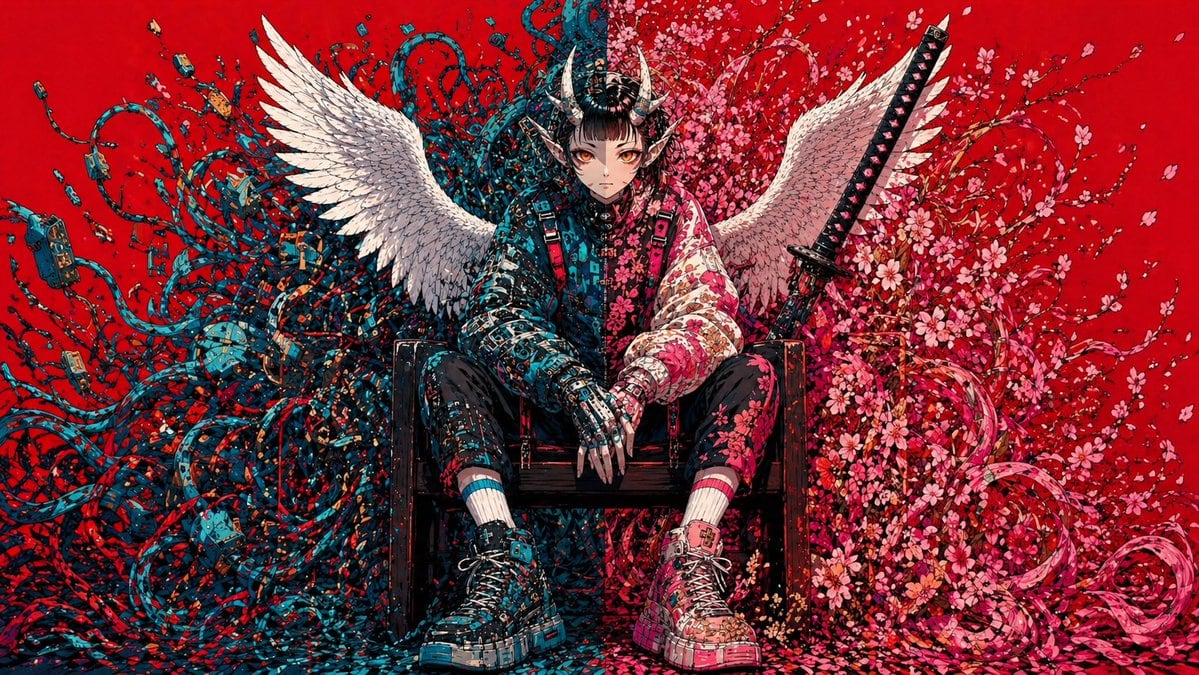
Cyberpunk Fallen Angel Samurai

This prompt generates a dramatic single-character poster illustration for album art, key visuals, or striking social media concept art.

This prompt generates a dramatic single-character poster illustration for album art, key visuals, or striking social media concept art.
Prompt

A hyper-detailed symmetrically composed anime-inspired cyberpunk illustration on a flat, saturated {argument name="background color" default="crimson red"} background. Centered in the frame, a solitary androgynous warrior sits slouched on a dark wooden chair, legs apart, hands relaxed between the knees, projecting calm menace and fallen-divinity energy. The face is intentionally obscured and unreadable, framed by an elaborate black samurai-style horned helmet with 2 curved horns and dense mechanical ornamentation. The figure has 2 large white feathered wings spread outward from the back. Behind and around the seated body, the composition splits into two contrasting organic-tech masses: on the left side, a chaotic storm of 1 dense tangle of teal and dark blue cables, wires, plugs, circuit fragments, and techno-organic tendrils; on the right side, 1 explosive bloom of pink cherry blossoms, petals, curling branches, and ribbon-like floral swirls. Place 1 upright katana behind the figure on the right side, angled slightly inward, with a black handle and visible guard. Dress the character in a mixed streetwear and armored outfit: a split-tone jacket with the left half in dark cyan-black circuitry patterns and the right half in pale pink floral patterns, black fitted pants with asymmetrical detailing, mismatched striped socks in cyan and pink, and chunky high-top sneakers with oversized soles, one predominantly cyan-black and the other predominantly pink-white, both covered in graphic paneling and straps. The hands should look partly mechanical or armored, with long sharp fingers. Flood the image with tiny decorative fragments, petals, paint-like flecks, and micro-details so the entire scene feels intricately hand-inked. Use a high-contrast palette dominated by {argument name="accent color 1" default="teal blue"}, {argument name="accent color 2" default="pink"}, black, and white against the red field. Render in an ultra-detailed manga-meets-graffiti style with crisp linework, dense textures, poster-like frontal framing, and a balanced fusion of angelic, demonic, floral, and cybernetic motifs.

Prompt structure
  • Modelgpt-image-2
  • Use casesocial-media-post
  • Styleanime, cyberpunk, watercolor, cinematic
  • Aspect ratioFlexible
Best used for
  • Use casesocial-media-post
  • Styleanime, cyberpunk, watercolor, cinematic
  • Recommended specs1:1, 4:5, 16:9, or 9:16
  • ModelGPT Image 2
How to customize

Use this Cyberpunk Fallen Angel Samurai prompt as a base. Replace the subject, product details, environment, lighting, brand colors, and output ratio while keeping the social-media-post intent and anime, cyberpunk, watercolor, cinematic direction stable.

Editable variables
  • SubjectReplace the product, person, scene, interface, or object being generated.
  • Use caseKeep or rewrite the destination as social media post, ad creative, cover image, poster, or ecommerce hero.
  • FrameChoose 1:1, 4:5, 16:9, or 9:16 based on the final placement.
  • Brand cuesAdd colors, materials, props, text-safe space, and the platform where the image will be used.
Recommended specs

Choose the frame for the destination first, then use 1K, 2K, or 4K based on output quality needs. Product images and posters usually benefit from higher resolution.

Pre-generation checklist
  • CheckSubject, lighting, composition, and frame are specific enough to review.
  • CheckText-safe space is included when the image will carry a headline or ad copy.
  • CheckResolution, credit cost, and final destination are checked before generation.
Why this prompt works

Cyberpunk Fallen Angel Samurai works because it starts from the image job, then controls subject, composition, lighting, style, and frame. It is best for social media post while keeping the anime, cyberpunk, watercolor, cinematic direction stable.

Common questions
  • Can I use it directly?Yes. Replace the subject, brand cues, and frame, then generate in Image2Studio.
  • Which ratio should I use?Choose 1:1, 4:5, 16:9, or 9:16 based on the destination.




