
Image2Studio
Examples

gpt-image-2

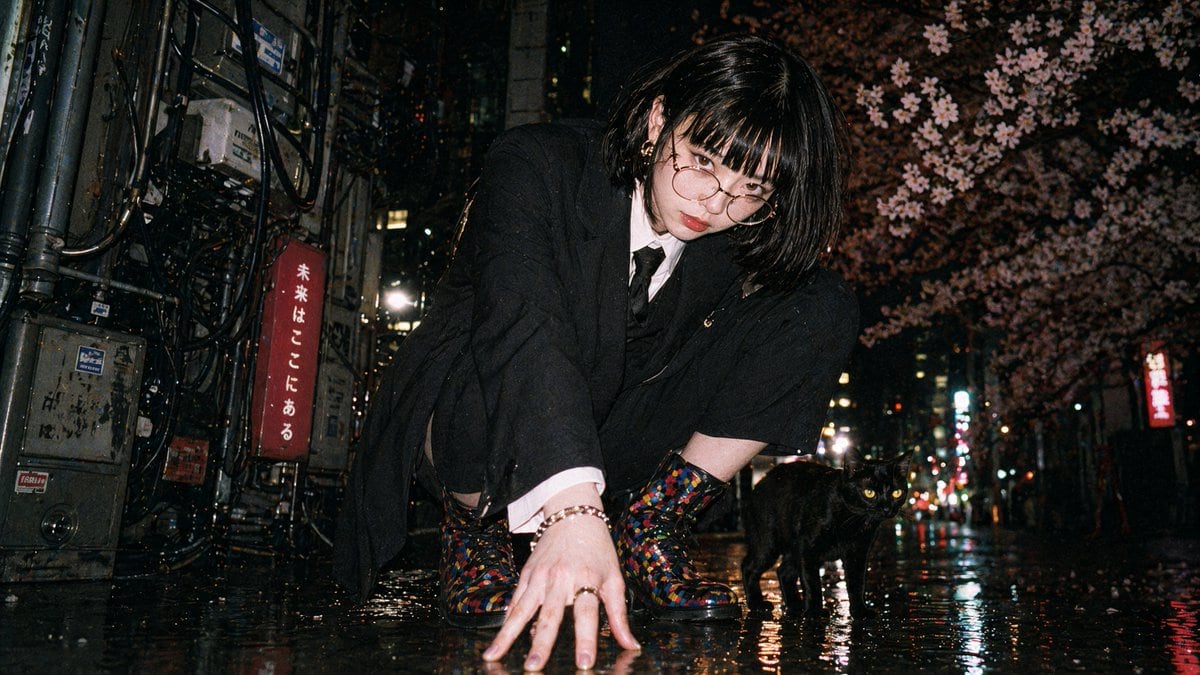
Disposable Flash Tokyo Night Portrait

This prompt generates a gritty low-angle nighttime street portrait with direct-flash film-camera vibes, ideal for recreating candid Japanese urban fashion photography.

This prompt generates a gritty low-angle nighttime street portrait with direct-flash film-camera vibes, ideal for recreating candid Japanese urban fashion photography.
Prompt

A cinematic candid night street photo in Tokyo shot from an extremely low ground-level angle, styled like a disposable film camera snapshot with direct on-camera flash, gritty realism, visible film grain, slight softness, deep shadows, strong contrast, and wet reflective pavement. In the center foreground, a {argument name="character gender presentation" default="androgynous young woman"} with {argument name="hair style" default="straight black bob covering part of the face"} crouches low with one hand pressed to the rain-soaked street, leaning toward the camera in a tense, fashion-editorial pose. The face is intentionally obscured by hair and shadow. She wears 4 visible clothing items: an oversized black blazer, a white dress shirt, a black necktie, and black shorts or a short skirt barely visible beneath the jacket. She also wears 3 visible accessories/details: a ring, a bracelet, and a pair of multicolored glittering lace-up ankle boots with a mosaic sequin look. Beside her on the right stands 1 black cat with bright reflective eyes, fully visible and alert, looking toward the camera. The setting is a narrow urban alley or side street at night with rain, slick asphalt, tangled utility cables and electrical boxes covering the left wall, and 2 vertical illuminated signs with Japanese text in the background. Overhead on the right side, dense blooming {argument name="tree blossoms" default="cherry blossoms"} fill the upper corner, creating a contrast between soft flowers and harsh city textures. Include distant bokeh from streetlights and storefronts, reflections of red, white, and yellow lights on the pavement, and a moody late-night atmosphere that feels spontaneous, raw, and slightly surreal. Use a wide lens perspective, documentary street photography composition, direct flash, disposable camera aesthetic, and {argument name="film mood" default="1990s Japanese nightlife snapshot"} realism.

Prompt structure
  • Modelgpt-image-2
  • Use casesocial-media-post
  • Stylephotorealistic, cinematic, editorial
  • Aspect ratioFlexible
Best used for
  • Use casesocial-media-post
  • Stylephotorealistic, cinematic, editorial
  • Recommended specs1:1, 4:5, 16:9, or 9:16
  • ModelGPT Image 2
How to customize

Use this Disposable Flash Tokyo Night Portrait prompt as a base. Replace the subject, product details, environment, lighting, brand colors, and output ratio while keeping the social-media-post intent and photorealistic, cinematic, editorial direction stable.

Editable variables
  • SubjectReplace the product, person, scene, interface, or object being generated.
  • Use caseKeep or rewrite the destination as social media post, ad creative, cover image, poster, or ecommerce hero.
  • FrameChoose 1:1, 4:5, 16:9, or 9:16 based on the final placement.
  • Brand cuesAdd colors, materials, props, text-safe space, and the platform where the image will be used.
Recommended specs

Choose the frame for the destination first, then use 1K, 2K, or 4K based on output quality needs. Product images and posters usually benefit from higher resolution.

Pre-generation checklist
  • CheckSubject, lighting, composition, and frame are specific enough to review.
  • CheckText-safe space is included when the image will carry a headline or ad copy.
  • CheckResolution, credit cost, and final destination are checked before generation.
Why this prompt works

Disposable Flash Tokyo Night Portrait works because it starts from the image job, then controls subject, composition, lighting, style, and frame. It is best for social media post while keeping the photorealistic, cinematic, editorial direction stable.

Common questions
  • Can I use it directly?Yes. Replace the subject, brand cues, and frame, then generate in Image2Studio.
  • Which ratio should I use?Choose 1:1, 4:5, 16:9, or 9:16 based on the destination.




