
Image2Studio
Examples

gpt-image-2

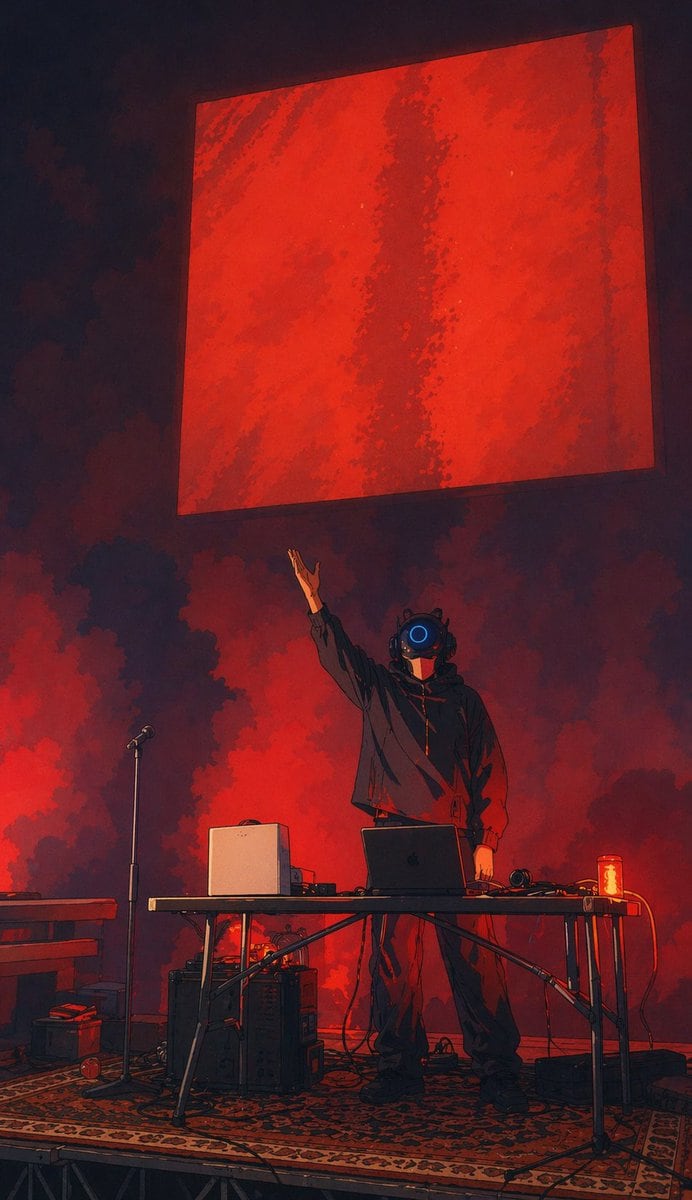
Moody Vertical Concert-stage Illustration In A Dark Futuristic Painterly

A moody vertical concert-stage illustration in a dark futuristic painterly anime style, showing a lone electronic musician or DJ performing on a small platform. The performer stands cente...

A moody vertical concert-stage illustration in a dark futuristic painterly anime style, showing a lone electronic musician or DJ performing on a small platform. The performer stands cente...
Prompt

A moody vertical concert-stage illustration in a dark futuristic painterly anime style, showing a lone electronic musician or DJ performing on a small platform. The performer stands centered behind a folding table, wearing an oversized black hoodie, loose dark pants, and heavy dark shoes, with a glossy black robotic helmet featuring one bright circular blue lens in the middle of the face. One arm is raised dramatically upward toward a massive floating red square panel hanging above the stage, while the other arm rests near the table. The background is filled with thick red and black smoke clouds, creating a dramatic backlit atmosphere with deep crimson glow and heavy shadows. On the table are 5 visible gear elements: an open dark laptop in the center, a white boxy speaker or computer unit on the left, a pair of headphones on the right, a small audio device near the white unit, and a glowing red drink can at the far right edge. Around the stage are 6 additional visible elements: a microphone stand to the left of the performer, a keyboard or piano edge entering from the far left, 2 stacked equipment boxes or amps under and beside the table, a patterned oriental-style rug covering the platform floor, and multiple loose black cables snaking across the stage. Above everything, a huge suspended red square dominates the upper half of the image, slightly tilted in perspective, textured with darker vertical streaks and rough painterly variations. Cinematic low-angle composition, centered subject, dramatic negative space, intense red-and-black palette with one blue accent, soft smoky lighting, high contrast, live experimental music performance energy, mysterious cyberpunk atmosphere.

Prompt structure
  • Modelgpt-image-2
  • Use casesocial-media-post
  • Stylecinematic, minimal, cyberpunk, photorealistic
  • Aspect ratioFlexible
Best used for
  • Use casesocial-media-post
  • Stylecinematic, minimal, cyberpunk, photorealistic
  • Recommended specs1:1, 4:5, 16:9, or 9:16
  • ModelGPT Image 2
How to customize

Use this Moody Vertical Concert-stage Illustration In A Dark Futuristic Painterly prompt as a base. Replace the subject, product details, environment, lighting, brand colors, and output ratio while keeping the social-media-post intent and cinematic, minimal, cyberpunk, photorealistic direction stable.

Editable variables
  • SubjectReplace the product, person, scene, interface, or object being generated.
  • Use caseKeep or rewrite the destination as social media post, ad creative, cover image, poster, or ecommerce hero.
  • FrameChoose 1:1, 4:5, 16:9, or 9:16 based on the final placement.
  • Brand cuesAdd colors, materials, props, text-safe space, and the platform where the image will be used.
Recommended specs

Choose the frame for the destination first, then use 1K, 2K, or 4K based on output quality needs. Product images and posters usually benefit from higher resolution.

Pre-generation checklist
  • CheckSubject, lighting, composition, and frame are specific enough to review.
  • CheckText-safe space is included when the image will carry a headline or ad copy.
  • CheckResolution, credit cost, and final destination are checked before generation.
Why this prompt works

Moody Vertical Concert-stage Illustration In A Dark Futuristic Painterly works because it starts from the image job, then controls subject, composition, lighting, style, and frame. It is best for social media post while keeping the cinematic, minimal, cyberpunk, photorealistic direction stable.

Common questions
  • Can I use it directly?Yes. Replace the subject, brand cues, and frame, then generate in Image2Studio.
  • Which ratio should I use?Choose 1:1, 4:5, 16:9, or 9:16 based on the destination.




