
Image2Studio
Examples

gpt-image-2

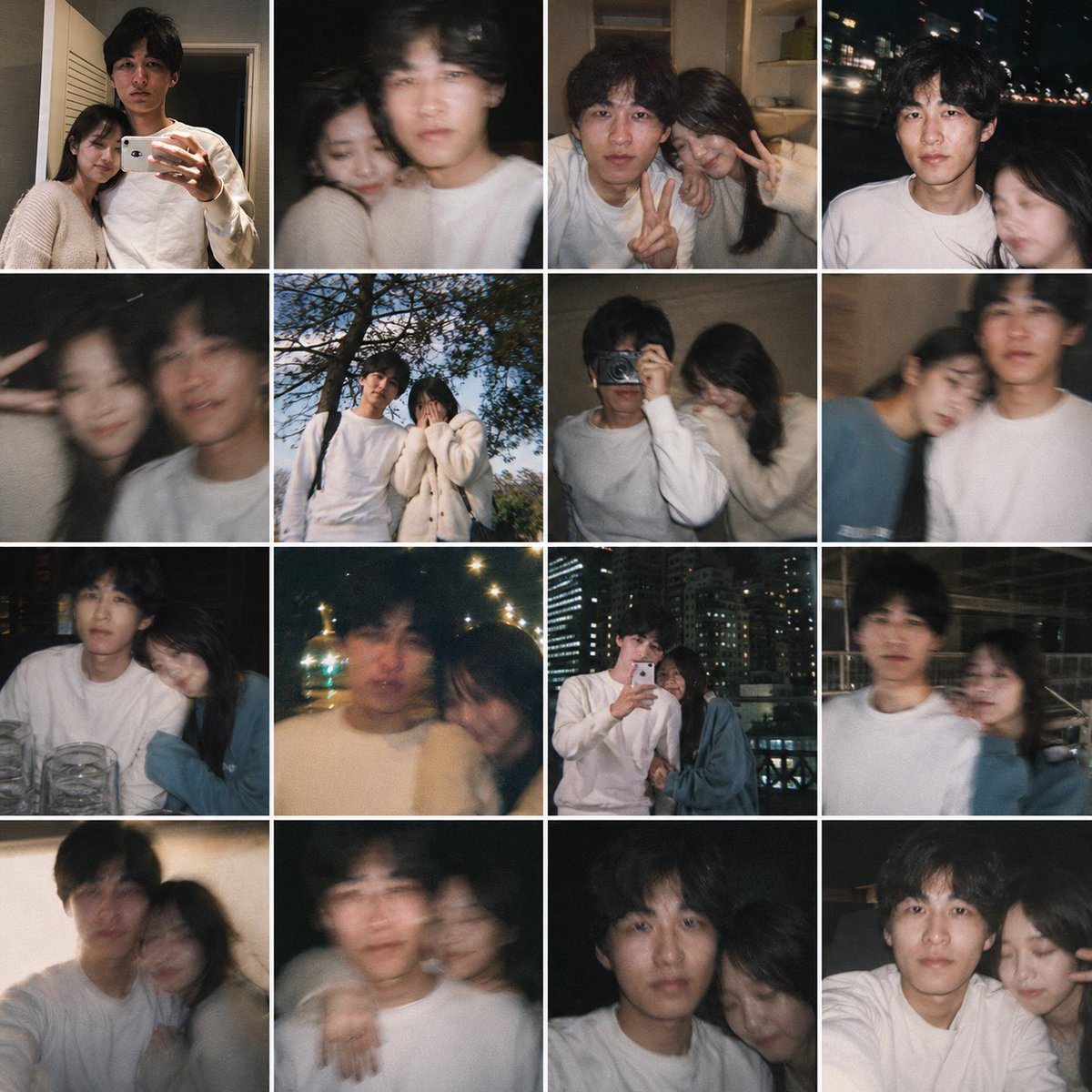
Fake Couple Photo Dump Collage

This prompt turns a single personal reference photo into a believable 16-image smartphone collage of candid couple memories, useful for 'what if' lifestyle edits and fake relationship photo dumps.

This prompt turns a single personal reference photo into a believable 16-image smartphone collage of candid couple memories, useful for 'what if' lifestyle edits and fake relationship photo dumps.
Prompt

Using the provided reference image as the base for the man, transform it into a realistic casual smartphone photo collage showing him as if he has a girlfriend. Keep his identity, hairstyle, age, white sweatshirt, and candid non-model look consistent, but place him together with a young woman across 16 square snapshots arranged in a 4x4 grid with thin white borders. Add exactly 1 recurring female companion with long dark hair, styled like a real person rather than a glam model, and vary her outfits subtly across the collage, including a cream knit cardigan, a dark top, and a muted blue top. Make the photos feel like authentic couple memories shot on a phone: close mirror selfie together, dark blurry selfie, indoor peace-sign selfie, night street selfie, motion-blur closeup, outdoor daytime shot under a tree, indoor shoulder-leaning shot, another blurry affectionate shot, seated restaurant shot with glasses on the table, warm night bokeh shot, rooftop or balcony mirror selfie with city lights, nighttime urban walking shot, cozy leaning-together shot, shoulder-around pose, close side-by-side portrait, and another intimate close crop. Mix indoor home scenes, nighttime city scenes, one daytime outdoor scene, and one restaurant setting. Use imperfect framing, slight blur, flash, grain, and spontaneous candid composition so it feels like a real person's saved couple photo dump, not a polished campaign.

Prompt structure
  • Modelgpt-image-2
  • Use casesocial-media-post
  • Stylephotorealistic
  • Aspect ratioFlexible
Best used for
  • Use casesocial-media-post
  • Stylephotorealistic
  • Recommended specs1:1, 4:5, 16:9, or 9:16
  • ModelGPT Image 2
How to customize

Use this Fake Couple Photo Dump Collage prompt as a base. Replace the subject, product details, environment, lighting, brand colors, and output ratio while keeping the social-media-post intent and photorealistic direction stable.

Editable variables
  • SubjectReplace the product, person, scene, interface, or object being generated.
  • Use caseKeep or rewrite the destination as social media post, ad creative, cover image, poster, or ecommerce hero.
  • FrameChoose 1:1, 4:5, 16:9, or 9:16 based on the final placement.
  • Brand cuesAdd colors, materials, props, text-safe space, and the platform where the image will be used.
Recommended specs

Choose the frame for the destination first, then use 1K, 2K, or 4K based on output quality needs. Product images and posters usually benefit from higher resolution.

Pre-generation checklist
  • CheckSubject, lighting, composition, and frame are specific enough to review.
  • CheckText-safe space is included when the image will carry a headline or ad copy.
  • CheckResolution, credit cost, and final destination are checked before generation.
Why this prompt works

Fake Couple Photo Dump Collage works because it starts from the image job, then controls subject, composition, lighting, style, and frame. It is best for social media post while keeping the photorealistic direction stable.

Common questions
  • Can I use it directly?Yes. Replace the subject, brand cues, and frame, then generate in Image2Studio.
  • Which ratio should I use?Choose 1:1, 4:5, 16:9, or 9:16 based on the destination.




