
Image2Studio
Examples

gpt-image-2

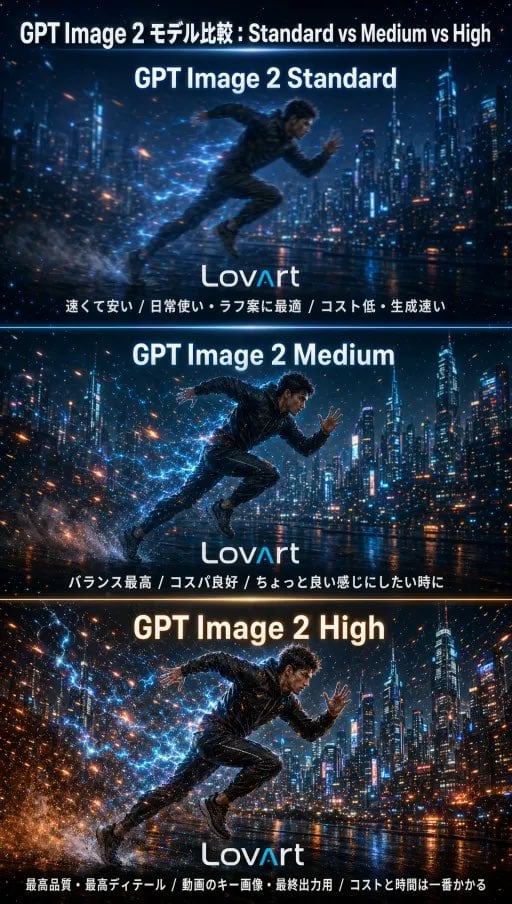
AI Model Comparison Infographic Poster

Ready-to-edit AI model comparison infographic poster image prompt.

Ready-to-edit AI model comparison infographic poster image prompt.
Prompt

{"type":"AI model comparison infographic poster","topic":"GPT Image 2 quality comparison","style":"futuristic cinematic tech ad, polished social-media comparison graphic, high-contrast neon night scene","canvas":{"orientation":"vertical","aspect_ratio":"9:16"},"headline":{"text":"{argument name=\"headline text\" default=\"GPT Image 2 モデル比較 : Standard vs Medium vs High\"}","position":"top center","color":"white","font":"bold sans-serif"},"layout":{"sections":[{"title":"GPT Image 2 Standard","position":"top panel","count":1,"labels":["速くて安い / 日常使い・ラフ案に最適 / コスト低・生成速い"],"divider_color":"cool blue"},{"title":"GPT Image 2 Medium","position":"middle panel","count":1,"labels":["バランス最高 / コスパ良好 / ちょっと良い感じにしたい時に"],"divider_color":"cool blue"},{"title":"GPT Image 2 High","position":"bottom panel","count":1,"labels":["最高品質・最高ディテール / 動画のキー画像・最終出力用 / コストと時間は一番かかる"],"divider_color":"warm orange"}],"panel_count":3},"scene":{"setting":"rainy futuristic city skyline at night beside reflective wet ground or waterfront, dense skyscrapers with glowing windows and blue neon accents","subject":"a single athletic male runner sprinting from left to right in each panel","subject_count":1,"pose":"dynamic mid-stride sprint with one arm forward and one arm back, leaning aggressively into motion","wardrobe":"dark fitted futuristic sportswear, textured jacket and pants, dark shoes","face":"intentionally soft or anonymized, not the focal point","effects":["electric blue particle trails around the body","sparks and light streaks bursting from behind the runner","water spray from footfalls","reflections on wet pavement","motion blur emphasizing speed"]},"comparison":{"top_panel":"slightly softer, simpler detail, cheaper and faster look while keeping the same composition","middle_panel":"more balanced detail and clarity, improved rendering and lighting while preserving the same scene","bottom_panel":"highest detail, richest texture, strongest lighting contrast, densest particles and reflections, most cinematic polish"},"branding":{"logo_text":"{argument name=\"brand text\" default=\"LovArt\"}","count":3,"placement":"bottom center of each panel","color":"white with subtle blue accent"},"color_palette":{"primary":["deep navy","electric blue","cyan","white"],"accent":["orange sparks","amber highlights"]},"rendering":{"finish":"premium digital illustration with semi-photoreal detail","sharpness":"increasing from top to bottom","lighting":"glowing neon rim light, city backlight, reflective wet-surface highlights"}}

Prompt structure
  • Modelgpt-image-2
  • Use casebrand-identity
  • Stylecyberpunk, cinematic, editorial, watercolor
  • Aspect ratioFlexible
Best used for
  • Use casebrand-identity
  • Stylecyberpunk, cinematic, editorial, watercolor
  • Recommended specs1:1, 4:5, 16:9, or 9:16
  • ModelGPT Image 2
How to customize

Use this AI Model Comparison Infographic Poster prompt as a base. Replace the subject, product details, environment, lighting, brand colors, and output ratio while keeping the brand-identity intent and cyberpunk, cinematic, editorial, watercolor direction stable.

Editable variables
  • SubjectReplace the product, person, scene, interface, or object being generated.
  • Use caseKeep or rewrite the destination as brand identity, ad creative, cover image, poster, or ecommerce hero.
  • FrameChoose 1:1, 4:5, 16:9, or 9:16 based on the final placement.
  • Brand cuesAdd colors, materials, props, text-safe space, and the platform where the image will be used.
Recommended specs

Choose the frame for the destination first, then use 1K, 2K, or 4K based on output quality needs. Product images and posters usually benefit from higher resolution.

Pre-generation checklist
  • CheckSubject, lighting, composition, and frame are specific enough to review.
  • CheckText-safe space is included when the image will carry a headline or ad copy.
  • CheckResolution, credit cost, and final destination are checked before generation.
Why this prompt works

AI Model Comparison Infographic Poster works because it starts from the image job, then controls subject, composition, lighting, style, and frame. It is best for brand identity while keeping the cyberpunk, cinematic, editorial, watercolor direction stable.

Common questions
  • Can I use it directly?Yes. Replace the subject, brand cues, and frame, then generate in Image2Studio.
  • Which ratio should I use?Choose 1:1, 4:5, 16:9, or 9:16 based on the destination.




