
Image2Studio
Examples

gpt-image-2

Using The Provided Reference Image

Using the provided reference image, recreate the same business meeting as a polished, high-end corporate publicity photo from a new angle. Move the viewpoint closer to the presentation sc...

Using the provided reference image, recreate the same business meeting as a polished, high-end corporate publicity photo from a new angle. Move the viewpoint closer to the presentation sc...
Prompt

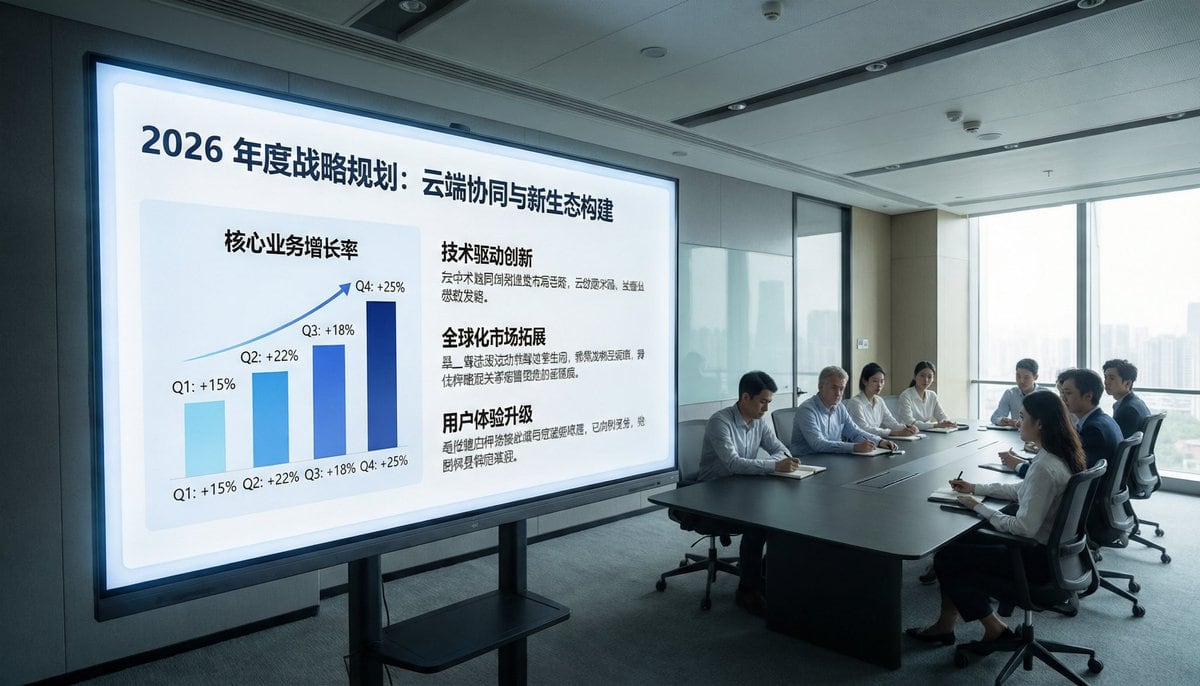
Using the provided reference image, recreate the same business meeting as a polished, high-end corporate publicity photo from a new angle. Move the viewpoint closer to the presentation screen and shift to a wide front-left perspective so the display dominates the left side and the meeting table with the attendees sits on the right near large floor-to-ceiling windows. Replace the dim surveillance-camera look with bright natural daylight, clean modern office lighting, and a professional architectural interior feel. Remove all CCTV overlays, timestamps, recording indicators, floor/device text, and other security-camera artifacts. Upgrade the display content into a sleek keynote-style strategy slide in Chinese with the headline "2026年度战略规划:云端协同与新生态构建". On the left side of the slide, show 1 upward-trending quarterly bar chart labeled with 4 bars: Q1 +15%, Q2 +22%, Q3 +18%, Q4 +25%. On the right side, show 3 text sections with bold headings: "技术驱动创新", "全球化市场拓展", and "用户体验升级", each with short Chinese body copy beneath. Keep the scene photorealistic, with a premium corporate brand aesthetic, neat seating arrangement, and subtle face anonymization/soft blur on the people.

Prompt structure
  • Modelgpt-image-2
  • Use caseapp-ui-mockup
  • Stylephotorealistic, luxury, minimal
  • Aspect ratioFlexible
Best used for
  • Use caseapp-ui-mockup
  • Stylephotorealistic, luxury, minimal
  • Recommended specs1:1, 4:5, 16:9, or 9:16
  • ModelGPT Image 2
How to customize

Use this Using The Provided Reference Image prompt as a base. Replace the subject, product details, environment, lighting, brand colors, and output ratio while keeping the app-ui-mockup intent and photorealistic, luxury, minimal direction stable.

Editable variables
  • SubjectReplace the product, person, scene, interface, or object being generated.
  • Use caseKeep or rewrite the destination as app ui mockup, ad creative, cover image, poster, or ecommerce hero.
  • FrameChoose 1:1, 4:5, 16:9, or 9:16 based on the final placement.
  • Brand cuesAdd colors, materials, props, text-safe space, and the platform where the image will be used.
Recommended specs

Choose the frame for the destination first, then use 1K, 2K, or 4K based on output quality needs. Product images and posters usually benefit from higher resolution.

Pre-generation checklist
  • CheckSubject, lighting, composition, and frame are specific enough to review.
  • CheckText-safe space is included when the image will carry a headline or ad copy.
  • CheckResolution, credit cost, and final destination are checked before generation.
Why this prompt works

Using The Provided Reference Image works because it starts from the image job, then controls subject, composition, lighting, style, and frame. It is best for app ui mockup while keeping the photorealistic, luxury, minimal direction stable.

Common questions
  • Can I use it directly?Yes. Replace the subject, brand cues, and frame, then generate in Image2Studio.
  • Which ratio should I use?Choose 1:1, 4:5, 16:9, or 9:16 based on the destination.




