
Image2Studio
Examples

gpt-image-2

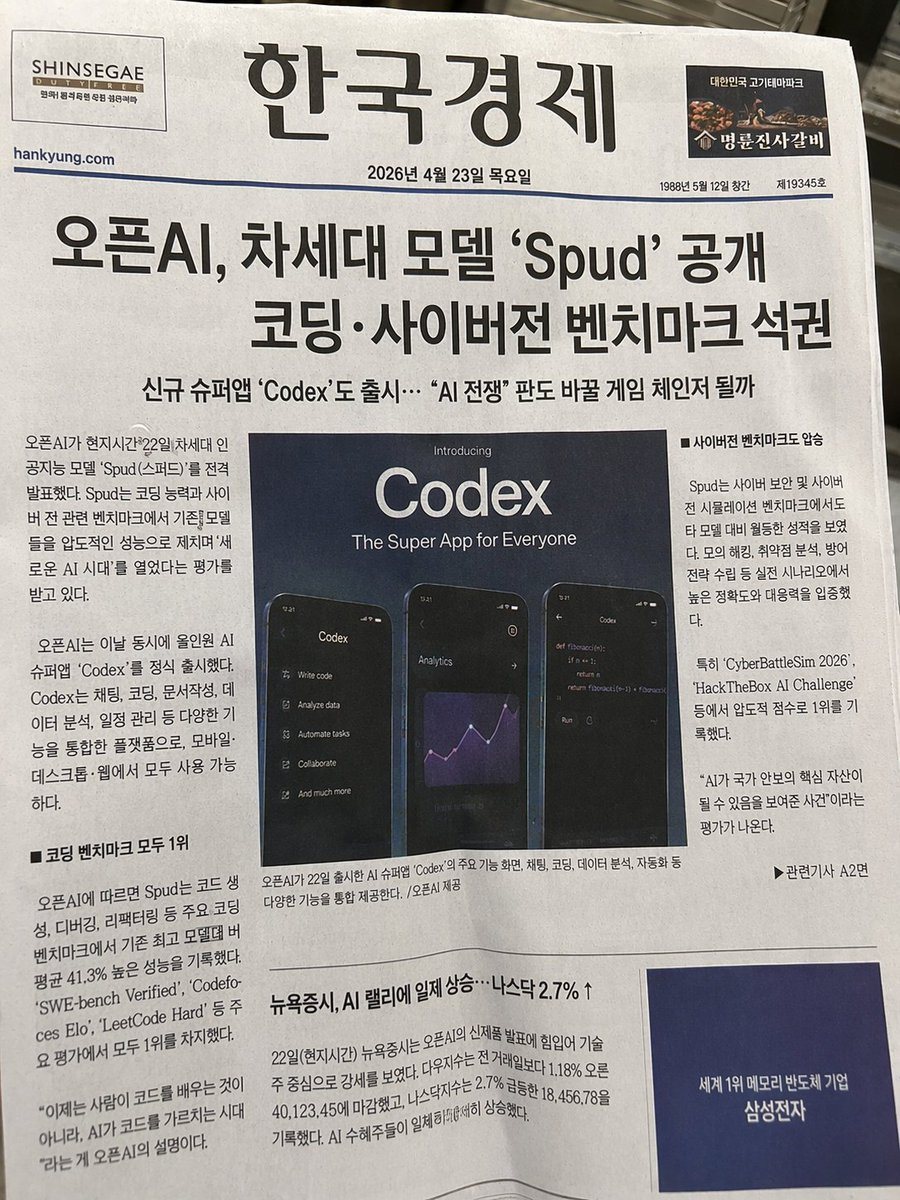
Photorealistic Photograph Of A Printed Newspaper

Ready-to-edit photorealistic photograph of a printed newspaper image prompt.

Ready-to-edit photorealistic photograph of a printed newspaper image prompt.
Prompt

{ "type": "photorealistic photograph of a printed newspaper", "style": "realistic paper texture, slightly angled top-down view, natural lighting", "header": { "left_logo": "SHINSEGAE DUTY FREE", "center_title": "{argument name=\"newspaper name\" default=\"한국경제\"}", "right_logo": "Myeongryun Jinsa Galbi", "date": "{argument name=\"date\" default=\"2026년 4월 23일 목요일\"}" }, "headlines": { "main": "{argument name=\"main headline\" default=\"오픈AI, 차세대 모델 'Spud' 공개 코딩·사이버전 벤치마크 석권\"}", "sub": "New super app 'Codex' also launched... Will it be a game changer in the AI war?" }, "layout": { "sections": [ { "title": "center graphic", "position": "middle", "text": "Introducing {argument name=\"app name\" default=\"Codex\"} The Super App for Everyone", "ui_screens_count": 3, "ui_screens_labels": [ "menu list with options like Write code and Analyze data", "analytics dashboard with a purple line chart", "code editor showing python fibonacci function" ] }, { "title": "article columns", "position": "surrounding center graphic", "count": 3, "labels": [ "left column with article text", "middle column under graphic", "right column with bullet points" ] }, { "title": "bottom section", "position": "bottom", "headline": "{argument name=\"bottom headline\" default=\"뉴욕증시, AI 랠리에 일제 상승…나스닥 2.7% ↑\"}", "ad_box": "Dark blue box with text World's No. 1 Memory Semiconductor Company Samsung Electronics" } ] } }

Prompt structure
  • Modelgpt-image-2
  • Use caseapp-ui-mockup
  • Stylephotorealistic, editorial
  • Aspect ratioFlexible
Best used for
  • Use caseapp-ui-mockup
  • Stylephotorealistic, editorial
  • Recommended specs1:1, 4:5, 16:9, or 9:16
  • ModelGPT Image 2
How to customize

Use this Photorealistic Photograph Of A Printed Newspaper prompt as a base. Replace the subject, product details, environment, lighting, brand colors, and output ratio while keeping the app-ui-mockup intent and photorealistic, editorial direction stable.

Editable variables
  • SubjectReplace the product, person, scene, interface, or object being generated.
  • Use caseKeep or rewrite the destination as app ui mockup, ad creative, cover image, poster, or ecommerce hero.
  • FrameChoose 1:1, 4:5, 16:9, or 9:16 based on the final placement.
  • Brand cuesAdd colors, materials, props, text-safe space, and the platform where the image will be used.
Recommended specs

Choose the frame for the destination first, then use 1K, 2K, or 4K based on output quality needs. Product images and posters usually benefit from higher resolution.

Pre-generation checklist
  • CheckSubject, lighting, composition, and frame are specific enough to review.
  • CheckText-safe space is included when the image will carry a headline or ad copy.
  • CheckResolution, credit cost, and final destination are checked before generation.
Why this prompt works

Photorealistic Photograph Of A Printed Newspaper works because it starts from the image job, then controls subject, composition, lighting, style, and frame. It is best for app ui mockup while keeping the photorealistic, editorial direction stable.

Common questions
  • Can I use it directly?Yes. Replace the subject, brand cues, and frame, then generate in Image2Studio.
  • Which ratio should I use?Choose 1:1, 4:5, 16:9, or 9:16 based on the destination.




