
Image2Studio
Examples

gpt-image-2

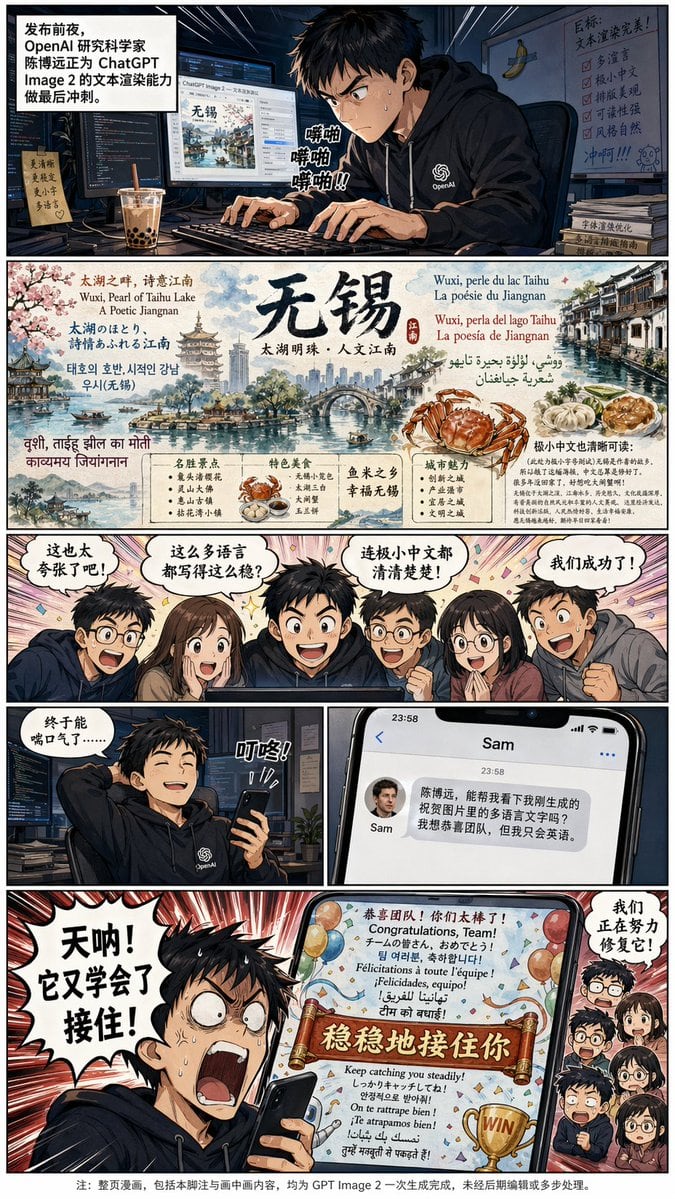
Generate A Full Color Chinese-text Manga About This OpenAI 研究科学家

Generate a full color Chinese-text manga about this OpenAI 研究科学家, 陈博远 (first picture), who works on improving the text rendering capability of ChatGPT Image 2 model for the upcoming relea...

Generate a full color Chinese-text manga about this OpenAI 研究科学家, 陈博远 (first picture), who works on improving the text rendering capability of ChatGPT Image 2 model for the upcoming relea...
Prompt

Generate a full color Chinese-text manga about this {argument name="character" default="OpenAI 研究科学家, 陈博远"} (first picture), who works on improving the text rendering capability of ChatGPT Image 2 model for the upcoming release. (in the background there is boba tea and a banana taped to the wall with a single slice of duct tape). The model can render insanely small Chinese text when he tried generating some detailed and beautiful multilingual infographics handdrawn-style poster about his hometown, {argument name="location" default="无锡"} on his computer screen. His hard work pays off and the team was impressed by the absurdly good quality of multilingual text performance of his model, seeing all the languages it can write. When he takes a break with one hand holding his phone, he received a translated text message from Sam Altman on his phone (avatar attached as second picture), asking him to take a look at the rendered multilingual text in an image he just generated to congrat the team, since Sam only knows English. However, make it funny by let Boyuan outrage (typical manga style) at the end by seeing Sam's generated image contains a "稳稳地接住你" phrase at the central location in an otherwise perfectly rendered image that's used to congrat the team, because this sentence has been memed as an unnatural but funny Chinese sentence GPT likes to use on Chinese internet. Boyuan should rage "天呐! 它又学会了接住!" (with teammates as tiny heads on the side, sweating and saying in Chinese"we are working hard to fix it!"). At the very bottom of the manga, add a tiny line of footnote (very tiny)in Chinese that "note: the entire manga, including this footnote and picture in picture, are all generated with gpt image 2 at once without editing or multiple steps。" Additional Instructions: Use vertical 1440x2560 image layout, with first row about this researcher working hard, second row about his result on {argument name="location" default="无锡"} with multiple languages, third row shows the team excitement, fourth row split into left and right where left shows he takes a break and the phone received a message, right panel shows Sam's text message, and fifth row shows Sam's picture and 陈博远's reaction. No narration except for the first row. Avoid Chinese map. All characters should be in manga style. The banana background should only appear in the first panel and the tape should be a single slice of tape, not a cross tape. The banana and tape decoration should be small as a insignificant easter egg for people to find. OpenAI logo shall only appear on 陈博远's cloth, not elsewhere. No mugs in the scene since we already have the boba. Sam should only appear in the text message panel. The entire manga should be appear as a professional photo of a physical page in a manga book. In the lower right most corner of the poster there is a small “极小中文也清晰可读:” with a paragraph of much smaller Chinese that begins with “(此处为极小字号测试)无锡是作者的故乡,所以做了这幅海报,中文总算是修好了。很多年没回家了,好想吃大闸蟹啊!” (ultra small).

Prompt structure
  • Modelgpt-image-2
  • Use caseavatar
  • Styleanime, photorealistic, 3d-render, editorial
  • Aspect ratioFlexible
Best used for
  • Use caseavatar
  • Styleanime, photorealistic, 3d-render, editorial
  • Recommended specs1:1, 4:5, 16:9, or 9:16
  • ModelGPT Image 2
How to customize

Use this Generate A Full Color Chinese-text Manga About This OpenAI 研究科学家 prompt as a base. Replace the subject, product details, environment, lighting, brand colors, and output ratio while keeping the avatar intent and anime, photorealistic, 3d-render, editorial direction stable.

Editable variables
  • SubjectReplace the product, person, scene, interface, or object being generated.
  • Use caseKeep or rewrite the destination as avatar, ad creative, cover image, poster, or ecommerce hero.
  • FrameChoose 1:1, 4:5, 16:9, or 9:16 based on the final placement.
  • Brand cuesAdd colors, materials, props, text-safe space, and the platform where the image will be used.
Recommended specs

Choose the frame for the destination first, then use 1K, 2K, or 4K based on output quality needs. Product images and posters usually benefit from higher resolution.

Pre-generation checklist
  • CheckSubject, lighting, composition, and frame are specific enough to review.
  • CheckText-safe space is included when the image will carry a headline or ad copy.
  • CheckResolution, credit cost, and final destination are checked before generation.
Why this prompt works

Generate A Full Color Chinese-text Manga About This OpenAI 研究科学家 works because it starts from the image job, then controls subject, composition, lighting, style, and frame. It is best for avatar while keeping the anime, photorealistic, 3d-render, editorial direction stable.

Common questions
  • Can I use it directly?Yes. Replace the subject, brand cues, and frame, then generate in Image2Studio.
  • Which ratio should I use?Choose 1:1, 4:5, 16:9, or 9:16 based on the destination.




