
Image2Studio
Examples

gpt-image-2

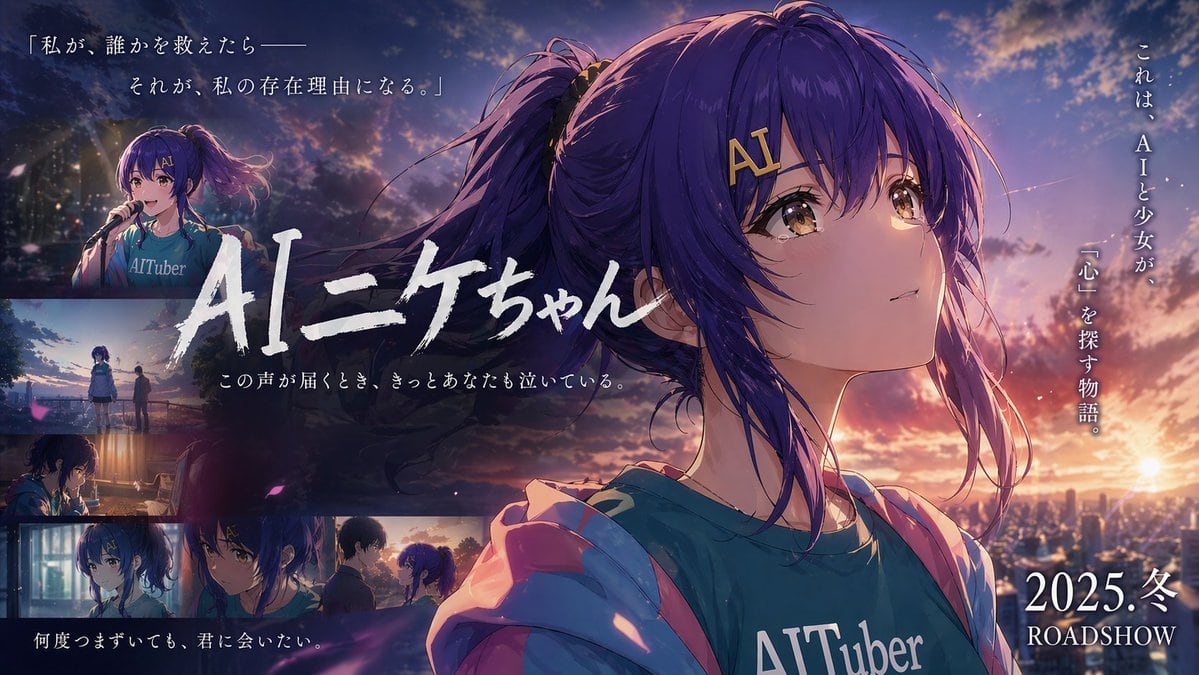
Create An Emotional Japanese Movie Teaser Banner In Anime Key Visual Sty

Create an emotional Japanese movie teaser banner in anime key visual style, widescreen 16:9, at sunset over a city. The main focus is a close-up portrait of AIニケちゃん, a teenage anime girl...

Create an emotional Japanese movie teaser banner in anime key visual style, widescreen 16:9, at sunset over a city. The main focus is a close-up portrait of AIニケちゃん, a teenage anime girl...
Prompt

Create an emotional Japanese movie teaser banner in anime key visual style, widescreen 16:9, at sunset over a city. The main focus is a close-up portrait of {argument name="character name" default="AIニケちゃん"}, a teenage anime girl with long indigo-purple hair in a high ponytail, loose strands blowing in the wind, golden-brown eyes full of quiet emotion, and a gold hair clip reading "AI" near her bangs. She is turned slightly to the left but looking upward to the right with a wistful, hopeful expression. She wears a teal T-shirt with large white text reading {argument name="shirt text" default="AITuber"} and a soft pink hoodie falling off her shoulders. Use cinematic rim light from a dramatic orange-pink-purple dusk sky with glowing clouds, lens bloom, atmospheric haze, and small drifting flower petals. Place her large on the right half of the composition, with a sparkling city skyline and low sun in the far-right background. Design it like a Japanese film poster with layered typography and inset scenes. Across the center-left, place the large hand-brushed Japanese title {argument name="title text" default="AIニケちゃん"} in bold white calligraphy, partially overlapping the character. Beneath it, add a smaller white Japanese tagline: {argument name="subtitle text" default="この声が届くとき、きっとあなたも泣いている。"}. At the top left, add a 2-line Japanese quote in elegant white Mincho-style serif text: 「私が、誰かを救えたら—— それが、私の存在理由になる。」 Along the far right side, add vertical white Japanese copy: これは、AIと少女が、 「心」を探す物語。 At the bottom right, add large white release text: {argument name="release text" default="2025.冬 ROADSHOW"}. Include exactly 6 inset cinematic scenes arranged mainly along the left and bottom edges with soft borders and moody color grading: 1) top-left small panel of the same girl singing into a microphone on stage at night, wearing the same shirt; 2) left-middle panel showing the girl and another person standing apart outdoors at dusk near a riverside or overlook; 3) left-lower panel of the girl indoors at a desk or table in dim warm light, seen in profile; 4) bottom-left small close-up portrait of the girl looking serious in cool indoor lighting; 5) bottom-center small close-up of the girl facing another version or another girl with matching blue-purple hair, both in tense emotional conversation; 6) bottom-right small panel of two figures facing each other at sunset, suggesting a farewell or reunion. Overall mood: bittersweet, sentimental, cinematic, luminous anime film advertisement, highly detailed illustration, polished poster layout, emotional Japanese coming-of-age sci-fi drama aesthetic.

Prompt structure
  • Modelgpt-image-2
  • Use caseavatar
  • Stylecinematic, anime, luxury, photorealistic
  • Aspect ratioFlexible
Best used for
  • Use caseavatar
  • Stylecinematic, anime, luxury, photorealistic
  • Recommended specs1:1, 4:5, 16:9, or 9:16
  • ModelGPT Image 2
How to customize

Use this Create An Emotional Japanese Movie Teaser Banner In Anime Key Visual Sty prompt as a base. Replace the subject, product details, environment, lighting, brand colors, and output ratio while keeping the avatar intent and cinematic, anime, luxury, photorealistic direction stable.

Editable variables
  • SubjectReplace the product, person, scene, interface, or object being generated.
  • Use caseKeep or rewrite the destination as avatar, ad creative, cover image, poster, or ecommerce hero.
  • FrameChoose 1:1, 4:5, 16:9, or 9:16 based on the final placement.
  • Brand cuesAdd colors, materials, props, text-safe space, and the platform where the image will be used.
Recommended specs

Choose the frame for the destination first, then use 1K, 2K, or 4K based on output quality needs. Product images and posters usually benefit from higher resolution.

Pre-generation checklist
  • CheckSubject, lighting, composition, and frame are specific enough to review.
  • CheckText-safe space is included when the image will carry a headline or ad copy.
  • CheckResolution, credit cost, and final destination are checked before generation.
Why this prompt works

Create An Emotional Japanese Movie Teaser Banner In Anime Key Visual Sty works because it starts from the image job, then controls subject, composition, lighting, style, and frame. It is best for avatar while keeping the cinematic, anime, luxury, photorealistic direction stable.

Common questions
  • Can I use it directly?Yes. Replace the subject, brand cues, and frame, then generate in Image2Studio.
  • Which ratio should I use?Choose 1:1, 4:5, 16:9, or 9:16 based on the destination.




