
Image2Studio
Examples

gpt-image-2

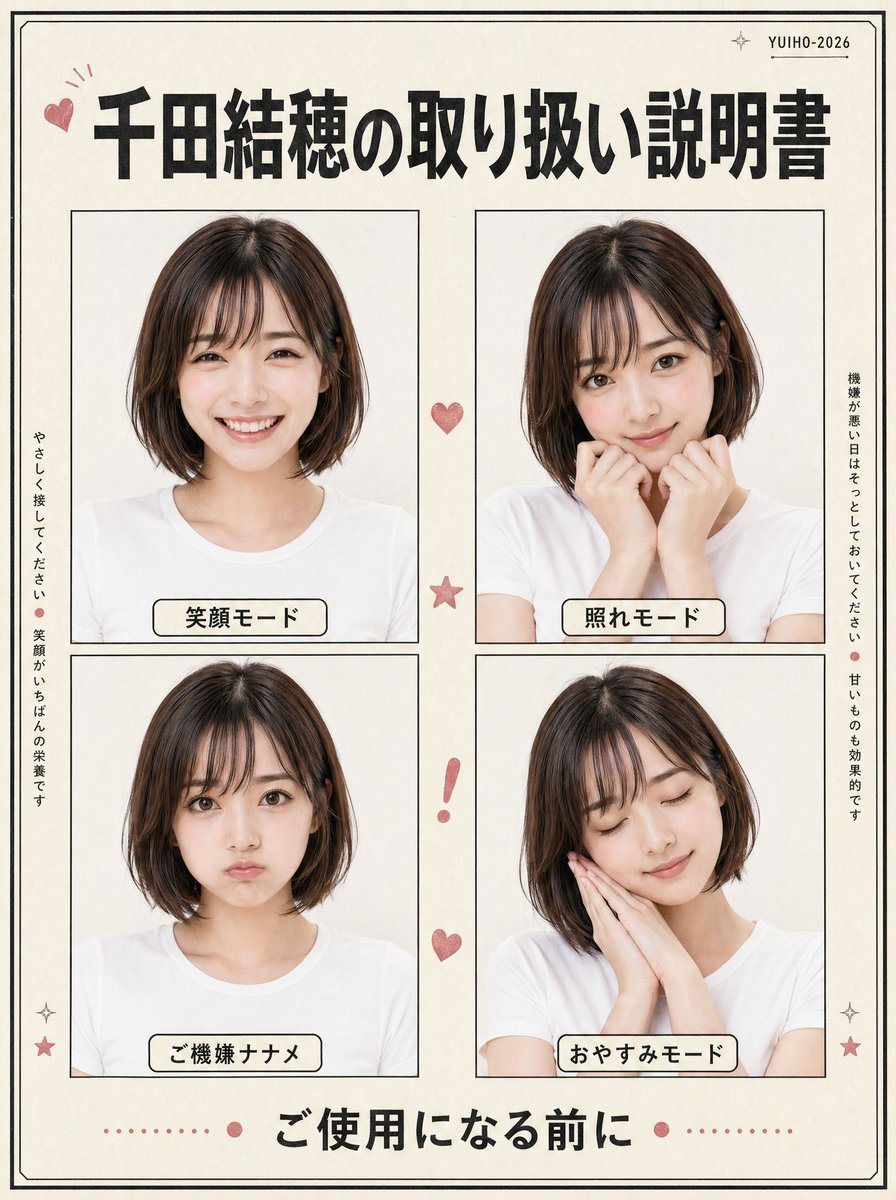
Japanese Retro-style Character Instruction Poster

Ready-to-edit Japanese retro-style character instruction poster image prompt.

Ready-to-edit Japanese retro-style character instruction poster image prompt.
Prompt

{"type":"Japanese retro-style character instruction poster","subject":{"person":"young Japanese woman","appearance":{"hair":{"color":"{argument name=\"hair color\" default=\"dark brown\"}","style":"smooth chin-length bob with a side part"},"clothing":"plain white crew-neck T-shirt"},"photo_style":"clean studio portrait, soft even lighting, off-white background, natural skin tones, minimal shadows"},"design":{"paper":"warm ivory paper with subtle vintage texture","border":"thin double-line black border around the full page","accent_color":"dusty pink","overall_style":"cute manual booklet or handling guide layout, neat editorial collage, slightly retro Japanese print aesthetic"},"layout":{"header":{"count":3,"items":["small pink heart doodle at top left","large bold Japanese title centered","small text at top right reading YUIHO-2026 with tiny sparkle marks"],"title":"{argument name=\"headline text\" default=\"千田結穂の取り扱い説明書\"}"},"main_grid":{"rows":2,"columns":2,"count":4,"panels":[{"position":"top left","label":"笑顔モード","pose":"front-facing bust portrait, relaxed shoulders, gentle pleasant expression"},{"position":"top right","label":"照れモード","pose":"slightly shy pose, both hands raised near the mouth and cheeks"},{"position":"bottom left","label":"ご機嫌ナナメ","pose":"front-facing bust portrait, moodier or displeased mode, restrained expression"},{"position":"bottom right","label":"おやすみモード","pose":"head tilted slightly, both hands together against one cheek as if sleepy"}]},"side_text":{"count":2,"items":[{"position":"left vertical","text":"やさしく接してください。笑顔がいちばんの栄養です"},{"position":"right vertical","text":"機嫌が悪い日はそっとしておいてください。甘いものも効果的です"}]},"decorations":{"count":7,"items":["1 small pink heart between the top panels","1 pink star between the middle of the two rows","1 pink exclamation mark between the lower panels","1 pink heart below the exclamation mark","2 small sparkle/star icons near the bottom left and bottom right corners","1 dotted pink divider with centered dots around the footer text"]},"footer":{"count":1,"text":"{argument name=\"footer text\" default=\"ご使用になる前に\"}","style":"large bold Japanese text centered at the bottom"}},"composition":"square poster, symmetrical spacing, four equal portrait frames with thin black outlines, rounded cream labels with black outlines beneath each portrait inside the panels","rendering":"photorealistic portrait photos embedded in a graphic poster layout, high resolution, crisp typography, balanced margins"}

Prompt structure
  • Modelgpt-image-2
  • Use caseavatar
  • Styleeditorial, minimal, photorealistic
  • Aspect ratioFlexible
Best used for
  • Use caseavatar
  • Styleeditorial, minimal, photorealistic
  • Recommended specs1:1, 4:5, 16:9, or 9:16
  • ModelGPT Image 2
How to customize

Use this Japanese Retro-style Character Instruction Poster prompt as a base. Replace the subject, product details, environment, lighting, brand colors, and output ratio while keeping the avatar intent and editorial, minimal, photorealistic direction stable.

Editable variables
  • SubjectReplace the product, person, scene, interface, or object being generated.
  • Use caseKeep or rewrite the destination as avatar, ad creative, cover image, poster, or ecommerce hero.
  • FrameChoose 1:1, 4:5, 16:9, or 9:16 based on the final placement.
  • Brand cuesAdd colors, materials, props, text-safe space, and the platform where the image will be used.
Recommended specs

Choose the frame for the destination first, then use 1K, 2K, or 4K based on output quality needs. Product images and posters usually benefit from higher resolution.

Pre-generation checklist
  • CheckSubject, lighting, composition, and frame are specific enough to review.
  • CheckText-safe space is included when the image will carry a headline or ad copy.
  • CheckResolution, credit cost, and final destination are checked before generation.
Why this prompt works

Japanese Retro-style Character Instruction Poster works because it starts from the image job, then controls subject, composition, lighting, style, and frame. It is best for avatar while keeping the editorial, minimal, photorealistic direction stable.

Common questions
  • Can I use it directly?Yes. Replace the subject, brand cues, and frame, then generate in Image2Studio.
  • Which ratio should I use?Choose 1:1, 4:5, 16:9, or 9:16 based on the destination.




