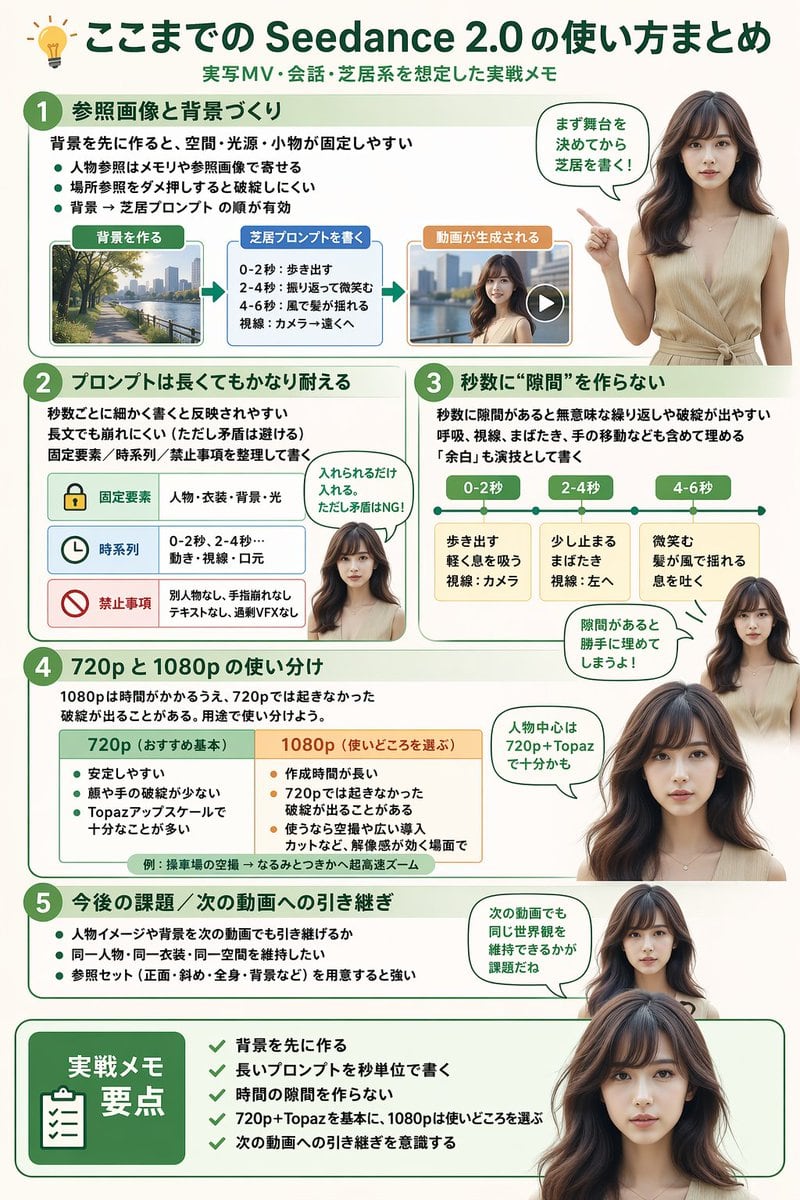
Prompt{
"type": "infographic",
"style": "clean, modern, professional, soft green and beige color palette, photorealistic character integration",
"header": {
"icon": "lightbulb",
"title": "{argument name=\"main title\" default=\"ここまでの Seedance 2.0 の使い方まとめ\"}",
"subtitle": "{argument name=\"subtitle\" default=\"実写MV・会話・芝居系を想定した実践メモ\"}"
},
"presenter_character": "{argument name=\"presenter description\" default=\"photorealistic young Japanese woman with long dark brown hair wearing a beige sleeveless top\"}",
"total_presenter_cutouts": 6,
"layout": {
"sections": [
{
"number": 1,
"title": "{argument name=\"section 1 title\" default=\"参照画像と背景づくり\"}",
"elements": "3 bullet points, 1 horizontal 3-step flowchart with thumbnail images (cityscape, text box, video player)",
"presenter_pose": "pointing left towards the flowchart, with a speech bubble"
},
{
"number": 2,
"title": "{argument name=\"section 2 title\" default=\"プロンプトは長くてもかなり耐える\"}",
"elements": "2 bullet points, 1 table with 3 rows featuring icons (lock, clock, prohibition sign)",
"presenter_pose": "neutral expression, looking forward, with a speech bubble"
},
{
"number": 3,
"title": "秒数に“隙間”を作らない",
"elements": "2 bullet points, 1 horizontal timeline graphic with 3 segments",
"presenter_pose": "pointing up, looking slightly left, with a speech bubble"
},
{
"number": 4,
"title": "720p と 1080p の使い分け",
"elements": "text description, 1 two-column comparison table (green column, orange column)",
"presenter_pose": "looking forward, with a speech bubble"
},
{
"number": 5,
"title": "今後の課題 / 次の動画への引き継ぎ",
"elements": "4 bullet points",
"presenter_pose": "looking slightly right, with a speech bubble"
},
{
"type": "summary_box",
"title": "実践メモ 要点",
"elements": "clipboard icon, 5 checklist items with green checkmarks",
"presenter_pose": "large portrait from chest up, looking directly at viewer"
}
]
}
}
Prompt structure- Modelgpt-image-2
- Use caseavatar
- Stylephotorealistic, editorial, minimal
- Aspect ratioFlexible
Best used for- Use caseavatar
- Stylephotorealistic, editorial, minimal
- Recommended specs1:1, 4:5, 16:9, or 9:16
- ModelGPT Image 2
How to customizeUse this Infographic prompt as a base. Replace the subject, product details, environment, lighting, brand colors, and output ratio while keeping the avatar intent and photorealistic, editorial, minimal direction stable.
Editable variables- SubjectReplace the product, person, scene, interface, or object being generated.
- Use caseKeep or rewrite the destination as avatar, ad creative, cover image, poster, or ecommerce hero.
- FrameChoose 1:1, 4:5, 16:9, or 9:16 based on the final placement.
- Brand cuesAdd colors, materials, props, text-safe space, and the platform where the image will be used.
Recommended specsChoose the frame for the destination first, then use 1K, 2K, or 4K based on output quality needs. Product images and posters usually benefit from higher resolution.
Pre-generation checklist- CheckSubject, lighting, composition, and frame are specific enough to review.
- CheckText-safe space is included when the image will carry a headline or ad copy.
- CheckResolution, credit cost, and final destination are checked before generation.
Why this prompt worksInfographic works because it starts from the image job, then controls subject, composition, lighting, style, and frame. It is best for avatar while keeping the photorealistic, editorial, minimal direction stable.
Common questions- Can I use it directly?Yes. Replace the subject, brand cues, and frame, then generate in Image2Studio.
- Which ratio should I use?Choose 1:1, 4:5, 16:9, or 9:16 based on the destination.