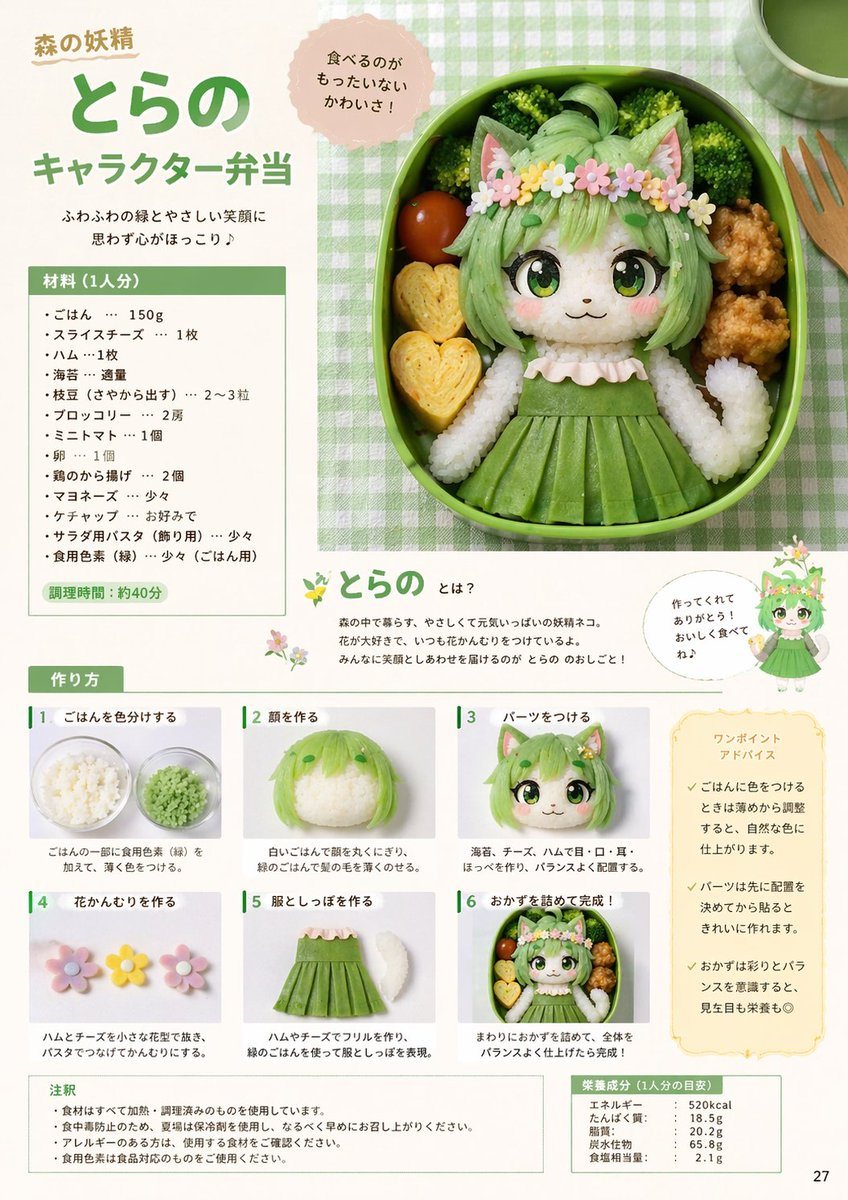
Prompt{
"type": "magazine recipe page layout",
"theme": "character bento (kyaraben)",
"main_visual": {
"description": "Large top-right circular photo of a bento box featuring a {argument name=\"character type\" default=\"forest fairy cat-girl\"} made of rice and food. The character has {argument name=\"main color\" default=\"green\"} hair made of colored rice, cat ears, large anime eyes made of nori and cheese, a flower crown, and a {argument name=\"main color\" default=\"green\"} dress. Surrounded by broccoli, a cherry tomato, fried chicken, and 2 heart-shaped rolled omelets.",
"callout_bubble": "食べるのがもったいないかわいさ!"
},
"header": {
"supertitle": "森の妖精",
"title": "{argument name=\"character name\" default=\"とらの\"}",
"subtitle": "{argument name=\"recipe title\" default=\"キャラクター弁当\"}",
"catchphrase": "ふわふわの緑とやさしい笑顔に思わず心がほっこり♪"
},
"sidebar_left": {
"ingredients_section": {
"title": "材料 (1人分)",
"item_count": 13,
"prep_time": "調理時間:約40分"
}
},
"middle_section": {
"character_intro": {
"title": "とらの とは?",
"description": "Text explaining the character.",
"illustration": "Small full-body 2D anime illustration of the character.",
"speech_bubble": "作ってくれてありがとう!おいしく食べてね♪"
}
},
"bottom_section": {
"instructions": {
"title": "作り方",
"step_count": 6,
"steps": [
{"number": 1, "label": "ごはんを色分けする", "image": "bowl of green colored rice"},
{"number": 2, "label": "顔を作る", "image": "rice shaped into a head with green hair"},
{"number": 3, "label": "パーツをつける", "image": "face with nori eyes, mouth, and cat ears added"},
{"number": 4, "label": "花かんむりを作る", "image": "small flower shapes made of ham and cheese"},
{"number": 5, "label": "服としっぽを作る", "image": "green dress shape and white rice tail"},
{"number": 6, "label": "おかずを詰めて完成!", "image": "completed bento box"}
]
},
"advice_box": {
"title": "ワンポイントアドバイス",
"bullet_points_count": 3
}
},
"footer": {
"notes": {
"title": "注釈",
"bullet_points_count": 4
},
"nutrition": {
"title": "栄養成分 (1人分の目安)",
"stats": ["エネルギー", "たんぱく質", "脂質", "炭水化物", "食塩相当量"]
},
"page_number": "27"
}
}
Prompt structure- Modelgpt-image-2
- Use caseavatar
- Stylephotorealistic, anime, editorial, watercolor
- Aspect ratioFlexible
Best used for- Use caseavatar
- Stylephotorealistic, anime, editorial, watercolor
- Recommended specs1:1, 4:5, 16:9, or 9:16
- ModelGPT Image 2
How to customizeUse this Magazine Recipe Page Layout prompt as a base. Replace the subject, product details, environment, lighting, brand colors, and output ratio while keeping the avatar intent and photorealistic, anime, editorial, watercolor direction stable.
Editable variables- SubjectReplace the product, person, scene, interface, or object being generated.
- Use caseKeep or rewrite the destination as avatar, ad creative, cover image, poster, or ecommerce hero.
- FrameChoose 1:1, 4:5, 16:9, or 9:16 based on the final placement.
- Brand cuesAdd colors, materials, props, text-safe space, and the platform where the image will be used.
Recommended specsChoose the frame for the destination first, then use 1K, 2K, or 4K based on output quality needs. Product images and posters usually benefit from higher resolution.
Pre-generation checklist- CheckSubject, lighting, composition, and frame are specific enough to review.
- CheckText-safe space is included when the image will carry a headline or ad copy.
- CheckResolution, credit cost, and final destination are checked before generation.
Why this prompt worksMagazine Recipe Page Layout works because it starts from the image job, then controls subject, composition, lighting, style, and frame. It is best for avatar while keeping the photorealistic, anime, editorial, watercolor direction stable.
Common questions- Can I use it directly?Yes. Replace the subject, brand cues, and frame, then generate in Image2Studio.
- Which ratio should I use?Choose 1:1, 4:5, 16:9, or 9:16 based on the destination.