
Image2Studio
Examples

gpt-image-2

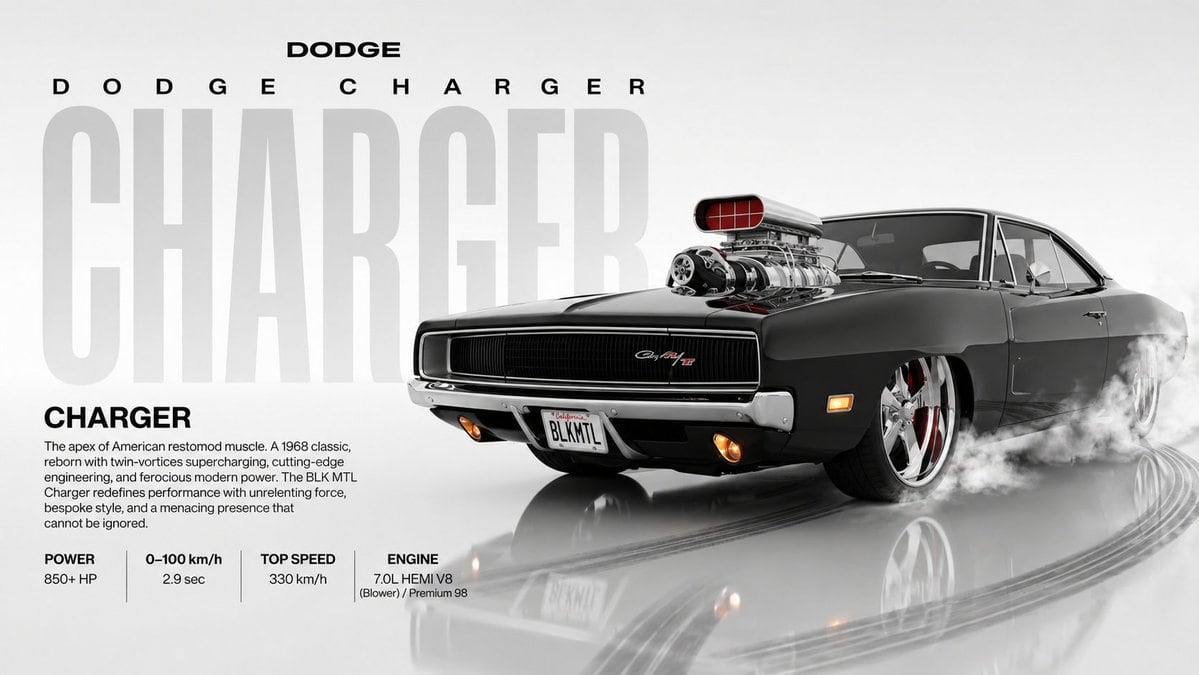
Ultra-clean Automotive Poster

Ultra-clean automotive poster featuring the exact same car as the photo that will be provided later. The AI must replicate the car from the uploaded photo with identical body shape, propo...

Ultra-clean automotive poster featuring the exact same car as the photo that will be provided later. The AI must replicate the car from the uploaded photo with identical body shape, propo...
Prompt

Ultra-clean automotive poster featuring the exact same car as the photo that will be provided later. The AI must replicate the car from the uploaded photo with identical body shape, proportions, stance, color, trims, wheels, and all visible exterior details. The car is presented in a front three-quarter angle facing right, matching the perspective of the original reference layout, but now depicted in a subtle drifting action. The drift is expressed through realistic weight transfer, slight body lift, controlled smoke plumes from the rear tires, and faint curved tire marks behind the vehicle, without distorting the original car’s geometry. Headlights follow the exact style from the reference photo of the car, with optional warm fog lights glowing if the provided car has them. All decals, emblems, plates, and window tints must match the car from the uploaded photo. The car drifts on a glossy white reflective studio-like floor that maintains soft reflections and realistic shadows, enhanced with light drift skid reflections and directional smudges. Background remains a clean white-to-light-gray gradient with a giant semi-transparent bold typography of the car model name (auto-extracted from the uploaded photo) vertically dominating the background. At the very top: clean branding text “{argument name="brand" default="SUZUKI"}” (or the brand detected from the uploaded car photo). Under it, spaced-out stylized tracking text containing the same brand and model name. Below the car: centered title of the exact model name from the uploaded photo. Under that, a short descriptive paragraph about the car’s character. Bottom section shows a clean grid layout of specifications. Entire poster is minimalist, editorial, high-key studio lighting with ultra-sharp reflections, crisp shadows, modern typography, and 4K believability, blending clean design with dynamic drifting energy, Ar 16:9

Prompt structure
  • Modelgpt-image-2
  • Use casebrand-identity
  • Stylephotorealistic, minimal, editorial
  • Aspect ratioFlexible
Best used for
  • Use casebrand-identity
  • Stylephotorealistic, minimal, editorial
  • Recommended specs1:1, 4:5, 16:9, or 9:16
  • ModelGPT Image 2
How to customize

Use this Ultra-clean Automotive Poster prompt as a base. Replace the subject, product details, environment, lighting, brand colors, and output ratio while keeping the brand-identity intent and photorealistic, minimal, editorial direction stable.

Editable variables
  • SubjectReplace the product, person, scene, interface, or object being generated.
  • Use caseKeep or rewrite the destination as brand identity, ad creative, cover image, poster, or ecommerce hero.
  • FrameChoose 1:1, 4:5, 16:9, or 9:16 based on the final placement.
  • Brand cuesAdd colors, materials, props, text-safe space, and the platform where the image will be used.
Recommended specs

Choose the frame for the destination first, then use 1K, 2K, or 4K based on output quality needs. Product images and posters usually benefit from higher resolution.

Pre-generation checklist
  • CheckSubject, lighting, composition, and frame are specific enough to review.
  • CheckText-safe space is included when the image will carry a headline or ad copy.
  • CheckResolution, credit cost, and final destination are checked before generation.
Why this prompt works

Ultra-clean Automotive Poster works because it starts from the image job, then controls subject, composition, lighting, style, and frame. It is best for brand identity while keeping the photorealistic, minimal, editorial direction stable.

Common questions
  • Can I use it directly?Yes. Replace the subject, brand cues, and frame, then generate in Image2Studio.
  • Which ratio should I use?Choose 1:1, 4:5, 16:9, or 9:16 based on the destination.




