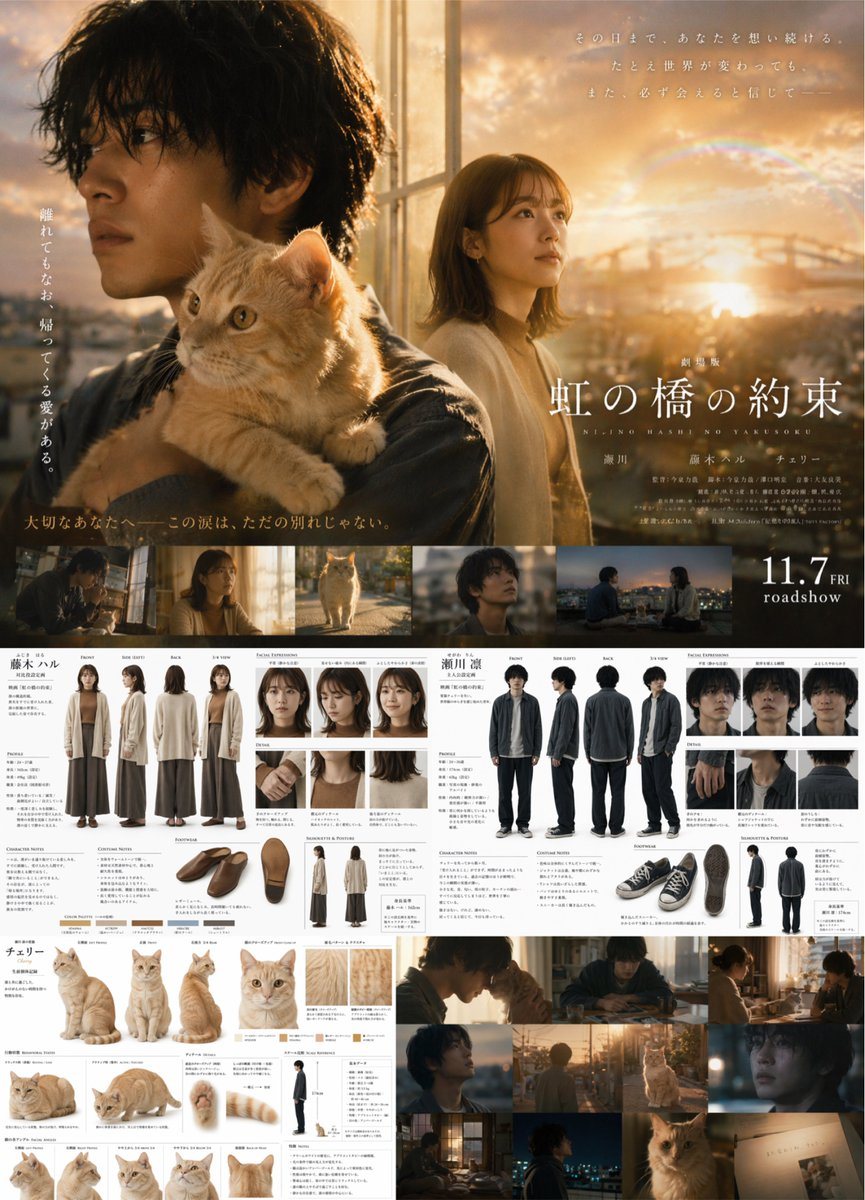
Prompt{
"type": "comprehensive movie production design document",
"style": "live-action cinematic photography, highly detailed, Japanese movie promotional material",
"theme": "{argument name=\"cinematic vibe\" default=\"emotional sunset drama\"}",
"layout": {
"top_section": {
"type": "Movie Poster",
"title": "{argument name=\"movie title\" default=\"虹の橋の約束\"}",
"subtitle": "NIJINO HASHI NO YAKUSOKU",
"release_date": "11.7 FRI roadshow",
"visuals": "Large cinematic montage featuring {argument name=\"male character description\" default=\"young Japanese man with messy dark hair\"} looking left, an {argument name=\"animal companion\" default=\"orange tabby cat\"} on his shoulder, and a {argument name=\"female character description\" default=\"young Japanese woman with shoulder-length brown hair\"} in the background against a sunset cityscape with a rainbow.",
"film_strip": {
"count": 5,
"description": "horizontal cinematic stills showing the characters and cat in various scenes"
}
},
"middle_left_section": {
"type": "Female Character Reference",
"label": "藤木ハル",
"full_body_turnaround": { "count": 4, "poses": ["Front", "Side (Left)", "Back", "3/4 View"], "outfit": "long beige cardigan, brown top, wide brown pants" },
"facial_expressions": { "count": 3 },
"details": { "count": 3, "description": "close-ups of hands, collar, and hair" },
"footwear": { "count": 3, "description": "angles of brown slip-on shoes" },
"silhouette": { "count": 2 },
"color_palette": { "count": 5, "description": "swatches" }
},
"middle_right_section": {
"type": "Male Character Reference",
"label": "瀬川 凛",
"full_body_turnaround": { "count": 4, "poses": ["Front", "Side (Left)", "Back", "3/4 View"], "outfit": "dark grey jacket, white shirt, dark pants" },
"facial_expressions": { "count": 3 },
"details": { "count": 3, "description": "close-ups of hands, collar, and hair" },
"footwear": { "count": 3, "description": "angles of black sneakers" },
"silhouette": { "count": 2 }
},
"bottom_left_section": {
"type": "Animal Reference",
"label": "チェリー",
"main_poses": { "count": 3, "description": "sitting, standing, walking" },
"face_closeup": { "count": 1 },
"fur_details": { "count": 2 },
"behavioral_poses": { "count": 2, "description": "lying down" },
"anatomy_details": { "count": 3, "description": "paws and tail" },
"scale_reference": { "count": 1, "description": "cat next to human silhouette" },
"facial_angles": { "count": 4 }
},
"bottom_right_section": {
"type": "Cinematic Storyboard",
"grid": { "count": 9, "description": "cinematic stills featuring the man, woman, and cat in various lighting conditions like sunset and dusk indoors" }
}
}
}
How to customizeUse this Comprehensive Movie Production Design Document prompt as a base. Replace the subject, product details, environment, lighting, brand colors, and output ratio while keeping the campaign-poster intent and cinematic, photorealistic, editorial direction stable.
Why this prompt worksComprehensive Movie Production Design Document works because it starts from the image job, then controls subject, composition, lighting, style, and frame. It is best for campaign poster while keeping the cinematic, photorealistic, editorial direction stable.