
Image2Studio
Prompts

gpt-image-2

Banner Design Variations

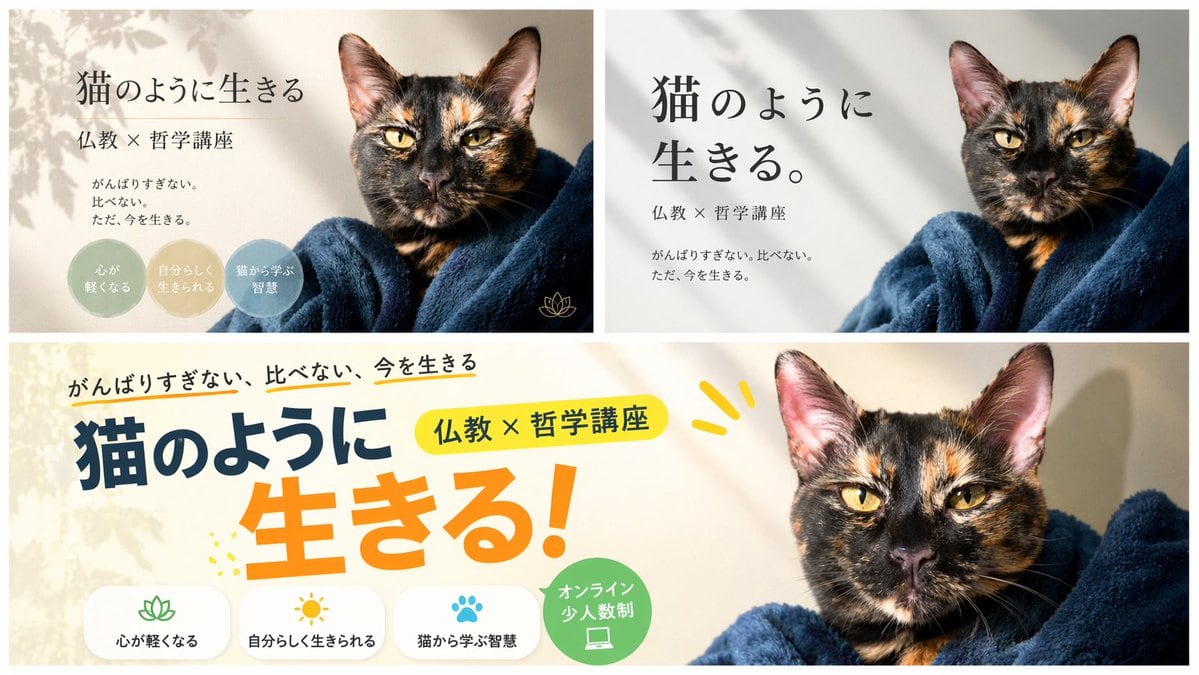
Structured banner design variations prompt for GPT Image 2.

Structured banner design variations prompt for GPT Image 2.
Prompt

{ "type": "banner design variations", "subject": "{argument name=\"subject\" default=\"tortoiseshell cat wrapped in a dark blue blanket\"}", "layout": { "description": "A composite image displaying 3 different banner design variations for the same course, arranged with two smaller banners on top and one wide banner on the bottom.", "sections": [ { "position": "top-left", "style": "elegant and calm with soft leaf shadows", "text_elements": [ "{argument name=\"main headline\" default=\"猫のように生きる\"}", "{argument name=\"subheading\" default=\"仏教 × 哲学講座\"}", "{argument name=\"body text\" default=\"がんばりすぎない。比べない。ただ、今を生きる。\"}" ], "design_elements": { "badges": { "count": 3, "shape": "circular", "labels": [ "{argument name=\"badge text 1\" default=\"心が軽くなる\"}", "自分らしく生きられる", "猫から学ぶ智慧" ] }, "icons": { "count": 1, "description": "small gold lotus icon" } } }, { "position": "top-right", "style": "minimalist and modern with clean typography", "text_elements": [ "猫のように生きる。", "仏教 × 哲学講座", "がんばりすぎない。比べない。ただ、今を生きる。" ] }, { "position": "bottom", "style": "pop, energetic, and casual with colorful accents", "text_elements": [ "がんばりすぎない、比べない、今を生きる", "猫のように", "生きる!", "仏教 × 哲学講座" ], "design_elements": { "icon_text_pairs": { "count": 3, "descriptions": [ "lotus icon with text 心が軽くなる", "sun icon with text 自分らしく生きられる", "paw print icon with text 猫から学ぶ智慧" ] }, "badges": { "count": 1, "shape": "circular green badge", "label": "オンライン 少人数制", "icon": "laptop" } } } ] } }

Prompt structure
  • Modelgpt-image-2
  • Use casecampaign-poster
  • Styleeditorial, luxury, photorealistic, minimal
  • Aspect ratioFlexible
Best used for
  • Use casecampaign-poster
  • Styleeditorial, luxury, photorealistic, minimal
  • Recommended specs1:1, 4:5, 16:9, or 9:16
  • ModelGPT Image 2
How to customize

Use this Banner Design Variations prompt as a base. Replace the subject, product details, environment, lighting, brand colors, and output ratio while keeping the campaign-poster intent and editorial, luxury, photorealistic, minimal direction stable.

Editable variables
  • SubjectReplace the product, person, scene, interface, or object being generated.
  • Use caseKeep or rewrite the destination as campaign poster, ad creative, cover image, poster, or ecommerce hero.
  • FrameChoose 1:1, 4:5, 16:9, or 9:16 based on the final placement.
  • Brand cuesAdd colors, materials, props, text-safe space, and the platform where the image will be used.
Recommended specs

Choose the frame for the destination first, then use 1K, 2K, or 4K based on output quality needs. Product images and posters usually benefit from higher resolution.

Pre-generation checklist
  • CheckSubject, lighting, composition, and frame are specific enough to review.
  • CheckText-safe space is included when the image will carry a headline or ad copy.
  • CheckResolution, credit cost, and final destination are checked before generation.
Why this prompt works

Banner Design Variations works because it starts from the image job, then controls subject, composition, lighting, style, and frame. It is best for campaign poster while keeping the editorial, luxury, photorealistic, minimal direction stable.

Common questions
  • Can I use it directly?Yes. Replace the subject, brand cues, and frame, then generate in Image2Studio.
  • Which ratio should I use?Choose 1:1, 4:5, 16:9, or 9:16 based on the destination.




