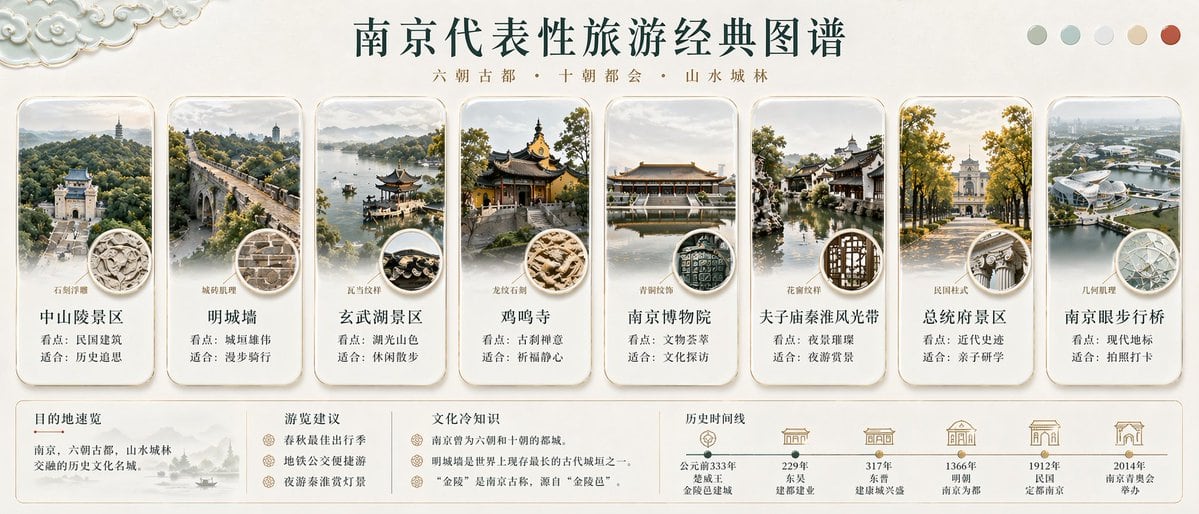
Prompt{"type":"Chinese travel infographic poster","topic":"{argument name=\"city name\" default=\"南京\"} representative classic tourism atlas","style":"elegant editorial infographic with Jiangnan cultural aesthetics, clean beige rice-paper background, subtle ink-wash texture, refined gold-gray typography, soft natural lighting, polished travel-magazine layout","format":"wide horizontal poster","header":{"title":"{argument name=\"headline text\" default=\"南京代表性旅游经典图谱\"}","subtitle":"六朝古都 · 十朝都会 · 山水城林","decorations":{"top_left":"ornamental cloud pattern relief in pale celadon and ivory","top_right":"5 circular color swatches in muted sage, light gray-green, pale gray, warm beige, terracotta"}},"layout":{"main_cards_count":8,"main_cards":[{"position":"far left","title":"中山陵景区","subtitle":"石阶拱殿","description_lines":["看点:历史建筑","适合:历史巡思"],"image":"grand ceremonial stairway and memorial arch/building rising through forested hills, symmetrical aerial perspective, misty atmosphere","badge":"round inset showing carved stone relief detail"},{"position":"left 2","title":"明城墙","subtitle":"城砖肌理","description_lines":["看点:城垣雄伟","适合:漫步骑行"],"image":"ancient city wall and gate stretching diagonally through green trees, elevated viewpoint","badge":"round inset showing weathered gray brick texture"},{"position":"left 3","title":"玄武湖景区","subtitle":"瓦当纹样","description_lines":["看点:湖光山色","适合:休闲散步"],"image":"lakeside pavilion on the water with boats, distant wooded hills, soft haze","badge":"round inset showing dark traditional roof tiles"},{"position":"left 4","title":"鸡鸣寺","subtitle":"龙纹石刻","description_lines":["看点:古刹禅意","适合:祈福静心"],"image":"golden-roofed Buddhist temple courtyard framed by autumn trees, slightly elevated angle","badge":"round inset showing carved dragon stone motif"},{"position":"center-right 1","title":"南京博物院","subtitle":"青铜纹饰","description_lines":["看点:文物荟萃","适合:文化探访"],"image":"formal museum building reflected in a calm pool, frontal symmetrical composition","badge":"round inset showing dark green bronze pattern texture"},{"position":"center-right 2","title":"夫子庙秦淮风光带","subtitle":"花窗纹样","description_lines":["看点:夜景璀璨","适合:夜游赏景"],"image":"traditional waterside architecture and covered walkways along canal, white walls and dark roofs","badge":"round inset showing geometric Chinese lattice window pattern"},{"position":"right 2","title":"总统府景区","subtitle":"民国柱式","description_lines":["看点:近代史迹","适合:亲子研学"],"image":"tree-lined boulevard leading toward a neoclassical historic government building, golden autumn leaves","badge":"round inset showing classical column capital detail"},{"position":"far right","title":"南京眼步行桥","subtitle":"几何肌理","description_lines":["看点:现代地标","适合:拍照打卡"],"image":"modern white eye-shaped pedestrian bridge over river, aerial cityscape view","badge":"round inset showing faceted geometric steel or glass structure"}],"bottom_sections_count":4,"bottom_sections":[{"title":"目的地速览","position":"bottom left","count":1,"content":"南京,六朝古都,山水城林交融的历史文化名城。","visual":"small monochrome ink landscape vignette with boat and hills"},{"title":"游览建议","position":"bottom left-center","count":3,"items":["春秋最佳出行季","地铁公交便捷游","夜游秦淮赏灯景"]},{"title":"文化冷知识","position":"bottom center","count":2,"items":["南京曾为六朝和十朝的都城。","明城墙是世界上现存最长的古代城垣之一。"]},{"title":"历史时间线","position":"bottom right","count":5,"items":[{"year":"公元前333年","label":"楚威王 金陵邑建城"},{"year":"229年","label":"东吴 建都建业"},{"year":"317年","label":"东晋 建康兴盛"},{"year":"1366年","label":"明初 南京为都"},{"year":"1912年","label":"民国 定都南京"}]}]},"card_design":{"shape":"rounded vertical panels with soft shadows and thin gold-beige borders","count_per_card_elements":4,"elements":["main scenic image","small subtitle above title","round material-detail inset overlapping lower image area","two short recommendation lines"]},"color_palette":{"background":"warm ivory and light parchment","text":"deep teal and muted brown","accents":"stone gray, sage green, antique gold, autumn yellow"},"rendering":"high-detail semi-photorealistic collage, cohesive atmospheric grading, premium tourism brochure quality, balanced spacing, crisp Chinese typography"}