
Image2Studio
Prompts

gpt-image-2

Using The Provided Reference Image Of The Curry In The Pan

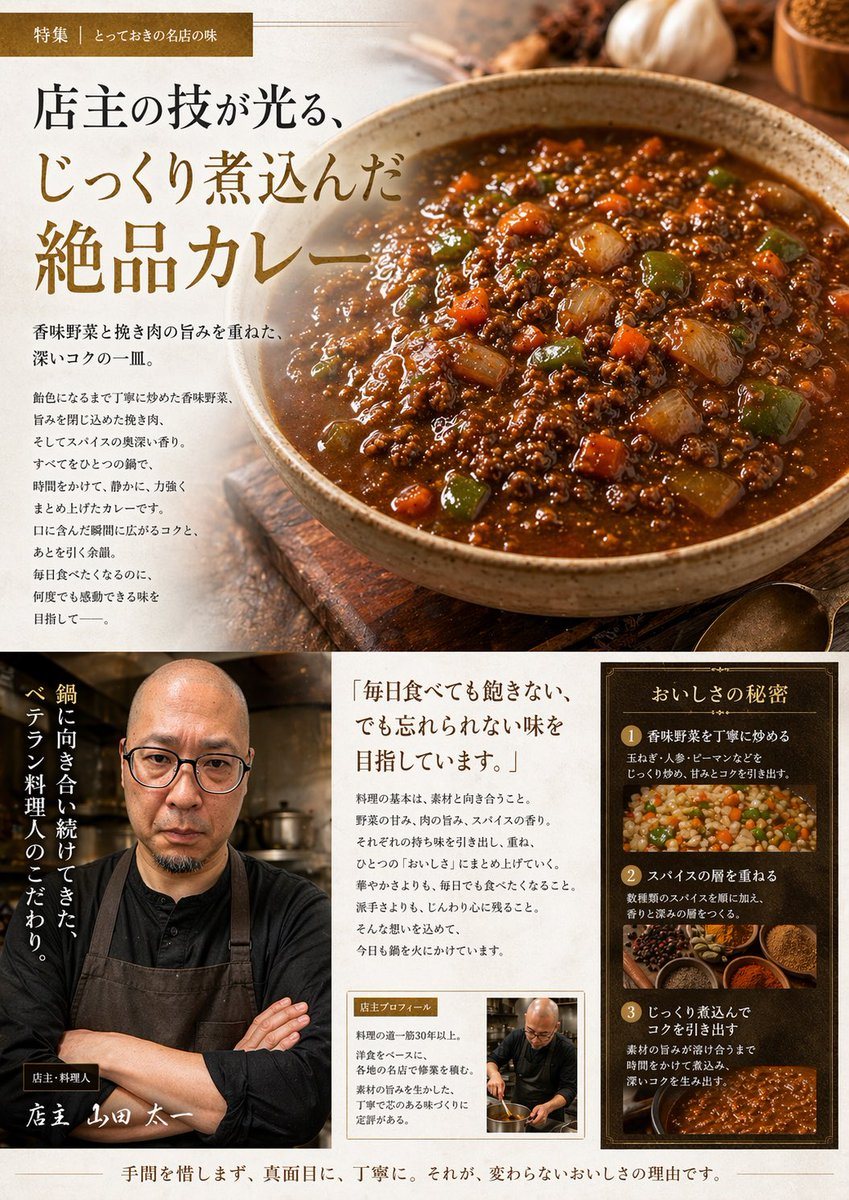
Using the provided reference image of the curry in the pan, transform it into a polished Japanese gourmet magazine advertisement page for キーマカレー. Keep the curry recognizable as the same d...

Using the provided reference image of the curry in the pan, transform it into a polished Japanese gourmet magazine advertisement page for キーマカレー. Keep the curry recognizable as the same d...
Prompt

Using the provided reference image of the curry in the pan, transform it into a polished Japanese gourmet magazine advertisement page for {argument name="dish name" default="キーマカレー"}. Keep the curry recognizable as the same dish, but restyle it as a premium food photograph served in a rustic ceramic bowl on a wooden tabletop, with richer gloss, deeper color contrast, and more appetizing texture. Create a full editorial layout with 3 main content areas: 1) a large hero section at the top featuring the plated curry on the right and Japanese promotional copy on the left, including a small top banner label and a large headline; 2) a bottom-left chef profile area with 1 portrait of a chef in dark workwear and apron, arms crossed in a restaurant kitchen, plus vertical Japanese copy and a handwritten-style name caption; 3) a bottom-right information area containing 1 quote block and 1 framed “secret of deliciousness” panel with exactly 3 numbered steps, each paired with a food or cooking image. Add warm ambient lighting, shallow depth of field, spices and garlic props around the hero dish, and an upscale traditional restaurant branding feel. Include Japanese text throughout, with the main headline emphasizing slow-cooked, exquisite curry, and use elegant Mincho-style typography in brown, cream, and gold tones. The final composition should look like a high-end restaurant feature article or promotional brochure page.

Prompt structure
  • Modelgpt-image-2
  • Use casefood-menu-visual
  • Styleluxury, editorial, photorealistic
  • Aspect ratioFlexible
Best used for
  • Use casefood-menu-visual
  • Styleluxury, editorial, photorealistic
  • Recommended specs1:1, 4:5, 16:9, or 9:16
  • ModelGPT Image 2
How to customize

Use this Using The Provided Reference Image Of The Curry In The Pan prompt as a base. Replace the subject, product details, environment, lighting, brand colors, and output ratio while keeping the food-menu-visual intent and luxury, editorial, photorealistic direction stable.

Editable variables
  • SubjectReplace the product, person, scene, interface, or object being generated.
  • Use caseKeep or rewrite the destination as food menu visual, ad creative, cover image, poster, or ecommerce hero.
  • FrameChoose 1:1, 4:5, 16:9, or 9:16 based on the final placement.
  • Brand cuesAdd colors, materials, props, text-safe space, and the platform where the image will be used.
Recommended specs

Choose the frame for the destination first, then use 1K, 2K, or 4K based on output quality needs. Product images and posters usually benefit from higher resolution.

Pre-generation checklist
  • CheckSubject, lighting, composition, and frame are specific enough to review.
  • CheckText-safe space is included when the image will carry a headline or ad copy.
  • CheckResolution, credit cost, and final destination are checked before generation.
Why this prompt works

Using The Provided Reference Image Of The Curry In The Pan works because it starts from the image job, then controls subject, composition, lighting, style, and frame. It is best for food menu visual while keeping the luxury, editorial, photorealistic direction stable.

Common questions
  • Can I use it directly?Yes. Replace the subject, brand cues, and frame, then generate in Image2Studio.
  • Which ratio should I use?Choose 1:1, 4:5, 16:9, or 9:16 based on the destination.




