
Image2Studio
Prompts

gpt-image-2

UI/UX Landing Page Mockup

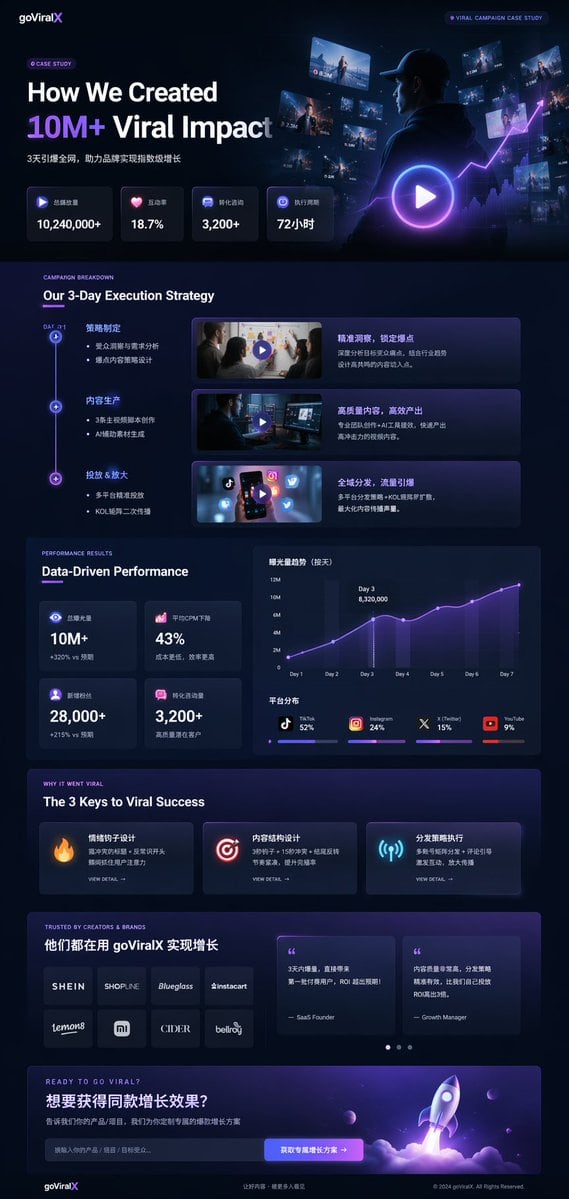
Structured UI/UX landing page mockup prompt for GPT Image 2.

Structured UI/UX landing page mockup prompt for GPT Image 2.
Prompt

{ "type": "UI/UX landing page mockup", "theme": "dark mode, sleek modern aesthetic, glassmorphism, {argument name=\"primary accent color\" default=\"neon purple and blue\"} glowing accents", "header": { "logo": "{argument name=\"brand name\" default=\"goViralX\"}", "top_right_tag": "VIRAL CAMPAIGN CASE STUDY" }, "layout": { "sections": [ { "name": "Hero", "headline": "{argument name=\"hero headline\" default=\"How We Created 10M+ Viral Impact\"}", "subheadline": "3天引爆全网, 助力品牌实现指数级增长", "stats_row": { "count": 4, "labels": ["总播放量", "互动率", "转化咨询", "执行周期"], "values": ["{argument name=\"main statistic\" default=\"10,240,000+\"}", "18.7%", "3,200+", "72小时"] }, "visual": "cinematic shot of a person in a hoodie looking at glowing digital screens and graphs, large play button overlay" }, { "name": "Strategy", "title": "Our 3-Day Execution Strategy", "layout_type": "vertical timeline", "steps_count": 3, "elements_per_step": ["timeline node", "title", "bullet points", "video thumbnail with play button", "description box"] }, { "name": "Performance", "title": "Data-Driven Performance", "left_column": { "stat_cards_count": 4, "values": ["10M+", "43%", "28,000+", "3,200+"] }, "right_column": { "charts_count": 2, "chart_1": "line graph showing 7-day growth peaking at Day 3", "chart_2": "horizontal segmented bar chart showing platform distribution (TikTok 52%, Instagram 24%, X 15%, YouTube 9%)" } }, { "name": "Keys to Success", "title": "The 3 Keys to Viral Success", "cards_count": 3, "card_elements": ["glowing icon (fire, target, antenna)", "title", "description", "VIEW DETAIL link"] }, { "name": "Social Proof", "title": "TRUSTED BY CREATORS & BRANDS", "left_column": { "logos_count": 8, "grid": "2x4", "brands": ["SHEIN", "SHOPLINE", "Blueglass", "instacart", "lemon8", "mi", "CIDER", "bellroy"] }, "right_column": { "testimonial_cards_count": 2, "elements": ["quote", "author title (SaaS Founder, Growth Manager)"] } }, { "name": "Call to Action", "title": "READY TO GO VIRAL?", "interactive_elements": ["text input field", "glowing button with text '{argument name=\"call to action text\" default=\"获取专属增长方案 ->\"}'"], "visual": "3D render of a rocket ship taking off with purple and blue flames" } ] } }

Prompt structure
  • Modelgpt-image-2
  • Use caseproduct-hero-shot
  • Style3d-render, cinematic, editorial, cyberpunk
  • Aspect ratioFlexible
Best used for
  • Use caseproduct-hero-shot
  • Style3d-render, cinematic, editorial, cyberpunk
  • Recommended specs1:1, 4:5, 16:9, or 9:16
  • ModelGPT Image 2
How to customize

Use this UI/UX Landing Page Mockup prompt as a base. Replace the subject, product details, environment, lighting, brand colors, and output ratio while keeping the product-hero-shot intent and 3d-render, cinematic, editorial, cyberpunk direction stable.

Editable variables
  • SubjectReplace the product, person, scene, interface, or object being generated.
  • Use caseKeep or rewrite the destination as product hero shot, ad creative, cover image, poster, or ecommerce hero.
  • FrameChoose 1:1, 4:5, 16:9, or 9:16 based on the final placement.
  • Brand cuesAdd colors, materials, props, text-safe space, and the platform where the image will be used.
Recommended specs

Choose the frame for the destination first, then use 1K, 2K, or 4K based on output quality needs. Product images and posters usually benefit from higher resolution.

Pre-generation checklist
  • CheckSubject, lighting, composition, and frame are specific enough to review.
  • CheckText-safe space is included when the image will carry a headline or ad copy.
  • CheckResolution, credit cost, and final destination are checked before generation.
Why this prompt works

UI/UX Landing Page Mockup works because it starts from the image job, then controls subject, composition, lighting, style, and frame. It is best for product hero shot while keeping the 3d-render, cinematic, editorial, cyberpunk direction stable.

Common questions
  • Can I use it directly?Yes. Replace the subject, brand cues, and frame, then generate in Image2Studio.
  • Which ratio should I use?Choose 1:1, 4:5, 16:9, or 9:16 based on the destination.