
Image2Studio
Examples

gpt-image-2

Using The Provided Reference Image

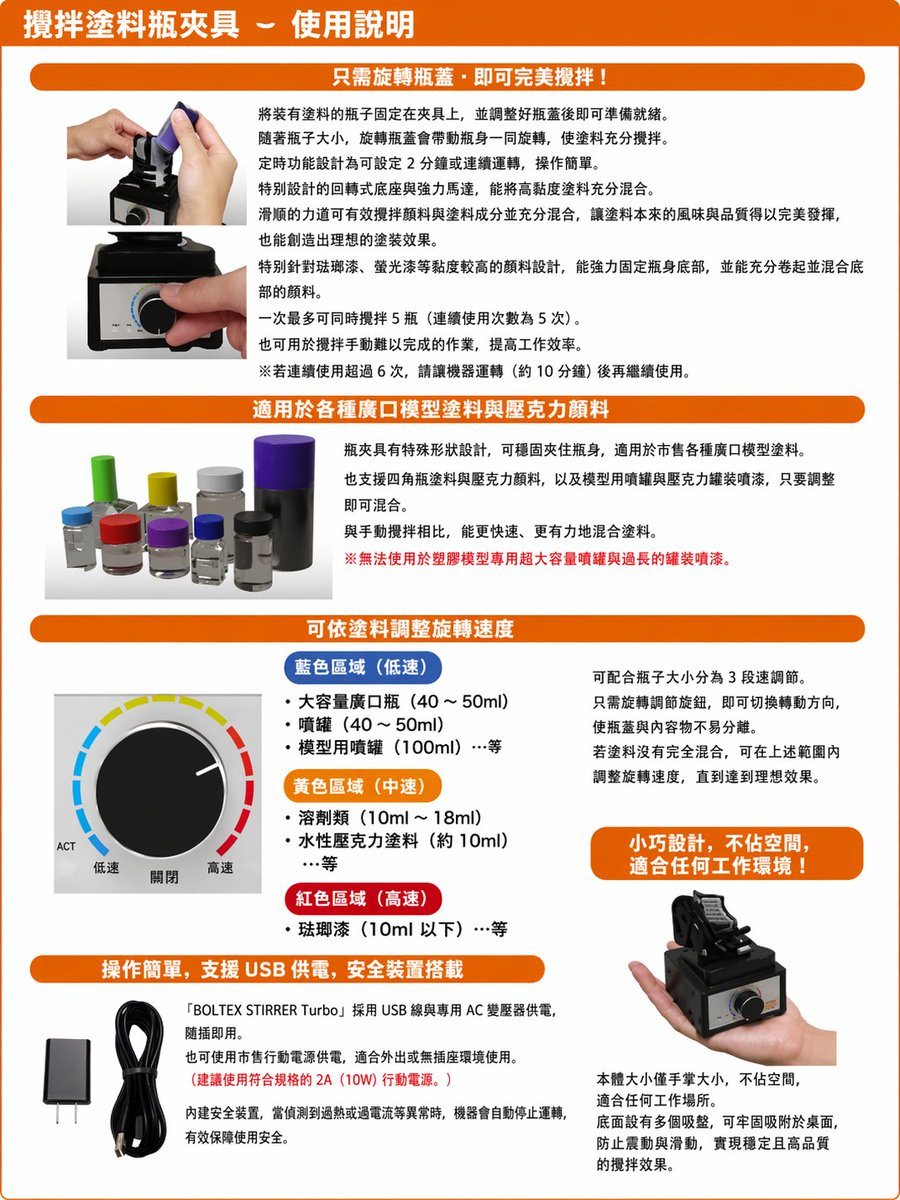
Using the provided reference image, recreate the same product instruction leaflet as a clean, professionally typeset Traditional Chinese version. Keep the overall brochure layout, orange...

Using the provided reference image, recreate the same product instruction leaflet as a clean, professionally typeset Traditional Chinese version. Keep the overall brochure layout, orange...
Prompt

Using the provided reference image, recreate the same product instruction leaflet as a clean, professionally typeset Traditional Chinese version. Keep the overall brochure layout, orange header bars, section structure, product photos, knob diagram, USB accessories, and handheld product shot in the same approximate positions, but replace all Japanese text with natural Traditional Chinese copy and make it look like a polished localized manual. Preserve the 4 main content sections plus the top title banner. Use these Chinese headings: 1) top title: 「攪拌塗料瓶夾具-使用說明」, 2) section header: 「只需旋轉瓶蓋,即可完美攪拌!」, 3) section header: 「適用於各種廣口模型塗料與壓克力顏料」, 4) section header: 「可依塗料調整旋轉速度」, 5) section header: 「操作簡單,支援 USB 供電,安全裝置搭載」. In the speed section, keep the knob illustration and relabel the 3 color-coded ranges in Traditional Chinese with exactly 3 categories: 「藍色區域(低速)」, 「黃色區域(中速)」, 「紅色區域(高速)」, and keep the knob labels as exactly 3 labels: 「低速」, 「關閉」, 「高速」. Add 1 orange callout box on the right side of the speed section reading: 「小巧設計,不佔空間,適合任何工作環境!」. In the bottom-left text block, include the product name in English as 「BOLTEX STIRRER Turbo」 within the Chinese paragraph. Make the page cleaner, brighter, and easier to read than the reference, with crisp print graphics, corrected perspective, and high-resolution catalog/manual styling.

Prompt structure
  • Modelgpt-image-2
  • Use caseproduct-hero-shot
  • Styleeditorial, photorealistic, minimal, watercolor
  • Aspect ratioFlexible
Best used for
  • Use caseproduct-hero-shot
  • Styleeditorial, photorealistic, minimal, watercolor
  • Recommended specs1:1, 4:5, 16:9, or 9:16
  • ModelGPT Image 2
How to customize

Use this Using The Provided Reference Image prompt as a base. Replace the subject, product details, environment, lighting, brand colors, and output ratio while keeping the product-hero-shot intent and editorial, photorealistic, minimal, watercolor direction stable.

Editable variables
  • SubjectReplace the product, person, scene, interface, or object being generated.
  • Use caseKeep or rewrite the destination as product hero shot, ad creative, cover image, poster, or ecommerce hero.
  • FrameChoose 1:1, 4:5, 16:9, or 9:16 based on the final placement.
  • Brand cuesAdd colors, materials, props, text-safe space, and the platform where the image will be used.
Recommended specs

Choose the frame for the destination first, then use 1K, 2K, or 4K based on output quality needs. Product images and posters usually benefit from higher resolution.

Pre-generation checklist
  • CheckSubject, lighting, composition, and frame are specific enough to review.
  • CheckText-safe space is included when the image will carry a headline or ad copy.
  • CheckResolution, credit cost, and final destination are checked before generation.
Why this prompt works

Using The Provided Reference Image works because it starts from the image job, then controls subject, composition, lighting, style, and frame. It is best for product hero shot while keeping the editorial, photorealistic, minimal, watercolor direction stable.

Common questions
  • Can I use it directly?Yes. Replace the subject, brand cues, and frame, then generate in Image2Studio.
  • Which ratio should I use?Choose 1:1, 4:5, 16:9, or 9:16 based on the destination.




