Prompt{
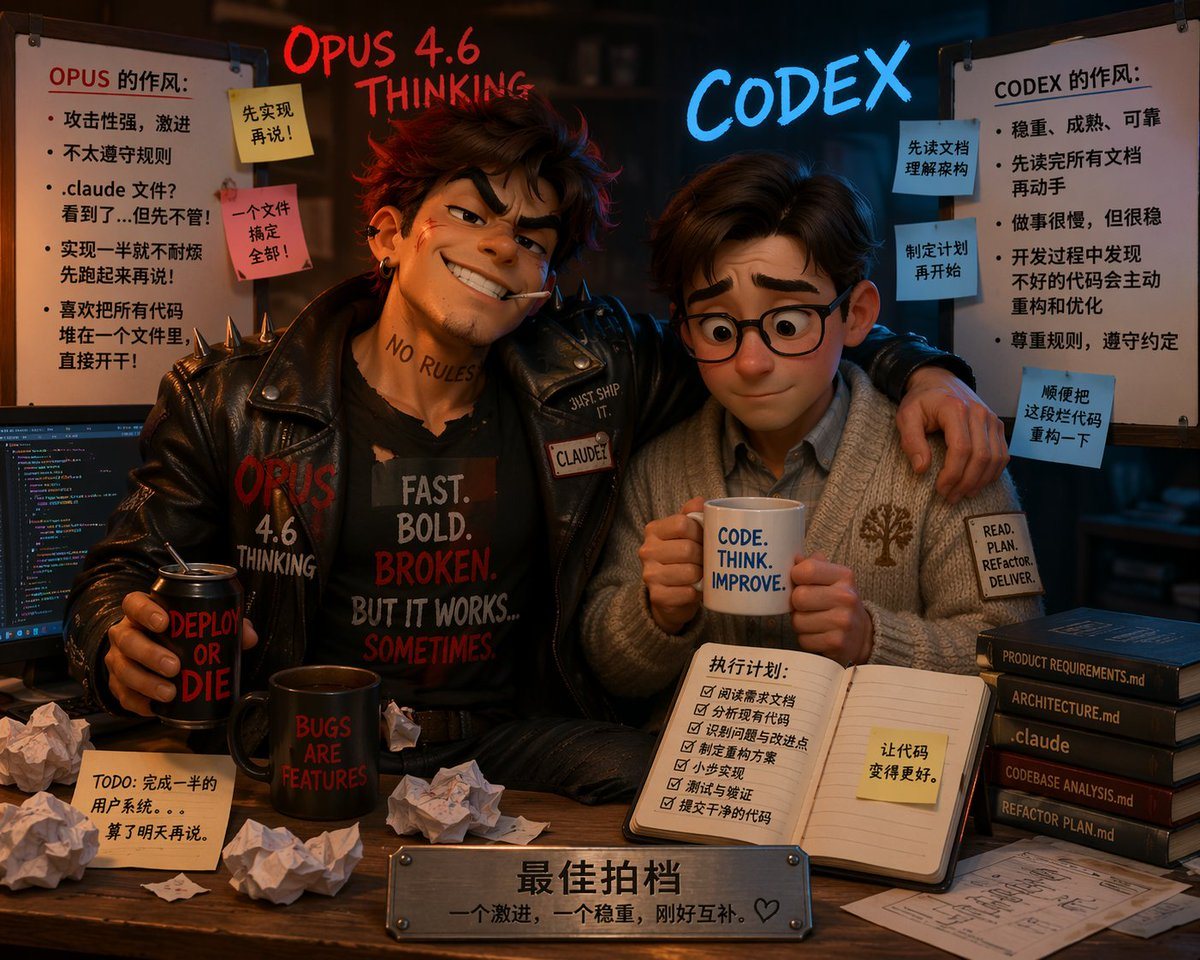
"type": "3D Pixar-style animated illustration",
"composition": "Two contrasting characters sitting at a desk, split-screen aesthetic with messy left side and neat right side",
"floating_text": {
"left": "{argument name=\"left character name\" default=\"OPUS 4.6 THINKING\"} in glowing red handwritten font",
"right": "{argument name=\"right character name\" default=\"CODEX\"} in glowing blue neon font"
},
"characters": [
{
"position": "left",
"persona": "Rebellious, aggressive coder",
"appearance": "Messy brown hair, confident smirk, cigarette in mouth, neck tattoo 'NO RULES'",
"clothing": "Black leather jacket with spikes, black t-shirt with text '{argument name=\"left shirt text\" default=\"FAST. BOLD. BROKEN. BUT IT WORKS... SOMETIMES.\"}'",
"pose": "Arm wrapped around the right character, holding a black can reading 'DEPLOY OR DIE'"
},
{
"position": "right",
"persona": "Organized, steady coder",
"appearance": "Neat brown hair, round glasses, nervous but compliant expression",
"clothing": "Cozy grey cardigan with a tree logo, collared shirt, sleeve patch reading 'READ. PLAN. REFACTOR. DELIVER.'",
"pose": "Holding a white mug with text '{argument name=\"right mug text\" default=\"CODE. THINK. IMPROVE.\"}' with both hands"
}
],
"environment": {
"left_side": {
"vibe": "chaotic and messy",
"props": [
"Computer monitor showing colorful code",
"Black mug reading 'BUGS ARE FEATURES'",
"5 crumpled pieces of paper",
"1 sticky note on desk reading 'TODO: 完成一半的用户系统。。。算了明天再说。'"
],
"whiteboard": {
"title": "OPUS 的作风:",
"bullet_points_count": 5,
"sticky_notes_count": 2,
"sticky_notes_text": ["先实现再说!", "一个文件搞定全部!"]
}
},
"right_side": {
"vibe": "structured and neat",
"props": [
"Open notebook with a 6-item checklist titled '执行计划:' and a yellow sticky note '让代码变得更好。'",
"Stack of 5 dark books with spine text: 'PRODUCT REQUIREMENTS.md', 'ARCHITECTURE.md', '.claude', 'CODEBASE ANALYSIS.md', 'REFACTOR PLAN.md'",
"Neat architectural blueprint on the desk"
],
"whiteboard": {
"title": "CODEX 的作风:",
"bullet_points_count": 5,
"sticky_notes_count": 3,
"sticky_notes_text": ["先读文档理解架构", "制定计划再开始", "顺便把这段代码重构一下"]
}
}
},
"foreground": {
"plaque": "Metal nameplate on the front edge of the desk with engraved text '{argument name=\"plaque text\" default=\"最佳拍档 一个激进,一个稳重,刚好互补。♡\"}'"
}
}
Prompt structure- Modelgpt-image-2
- Use casesocial-media-post
- Style3d-render, cyberpunk, watercolor
- Aspect ratioFlexible
Best used for- Use casesocial-media-post
- Style3d-render, cyberpunk, watercolor
- Recommended specs1:1, 4:5, 16:9, or 9:16
- ModelGPT Image 2
How to customizeUse this 3D Pixar-style Animated Illustration prompt as a base. Replace the subject, product details, environment, lighting, brand colors, and output ratio while keeping the social-media-post intent and 3d-render, cyberpunk, watercolor direction stable.
Editable variables- SubjectReplace the product, person, scene, interface, or object being generated.
- Use caseKeep or rewrite the destination as social media post, ad creative, cover image, poster, or ecommerce hero.
- FrameChoose 1:1, 4:5, 16:9, or 9:16 based on the final placement.
- Brand cuesAdd colors, materials, props, text-safe space, and the platform where the image will be used.
Recommended specsChoose the frame for the destination first, then use 1K, 2K, or 4K based on output quality needs. Product images and posters usually benefit from higher resolution.
Pre-generation checklist- CheckSubject, lighting, composition, and frame are specific enough to review.
- CheckText-safe space is included when the image will carry a headline or ad copy.
- CheckResolution, credit cost, and final destination are checked before generation.
Why this prompt works3D Pixar-style Animated Illustration works because it starts from the image job, then controls subject, composition, lighting, style, and frame. It is best for social media post while keeping the 3d-render, cyberpunk, watercolor direction stable.
Common questions- Can I use it directly?Yes. Replace the subject, brand cues, and frame, then generate in Image2Studio.
- Which ratio should I use?Choose 1:1, 4:5, 16:9, or 9:16 based on the destination.