
Image2Studio
Examples

gpt-image-2

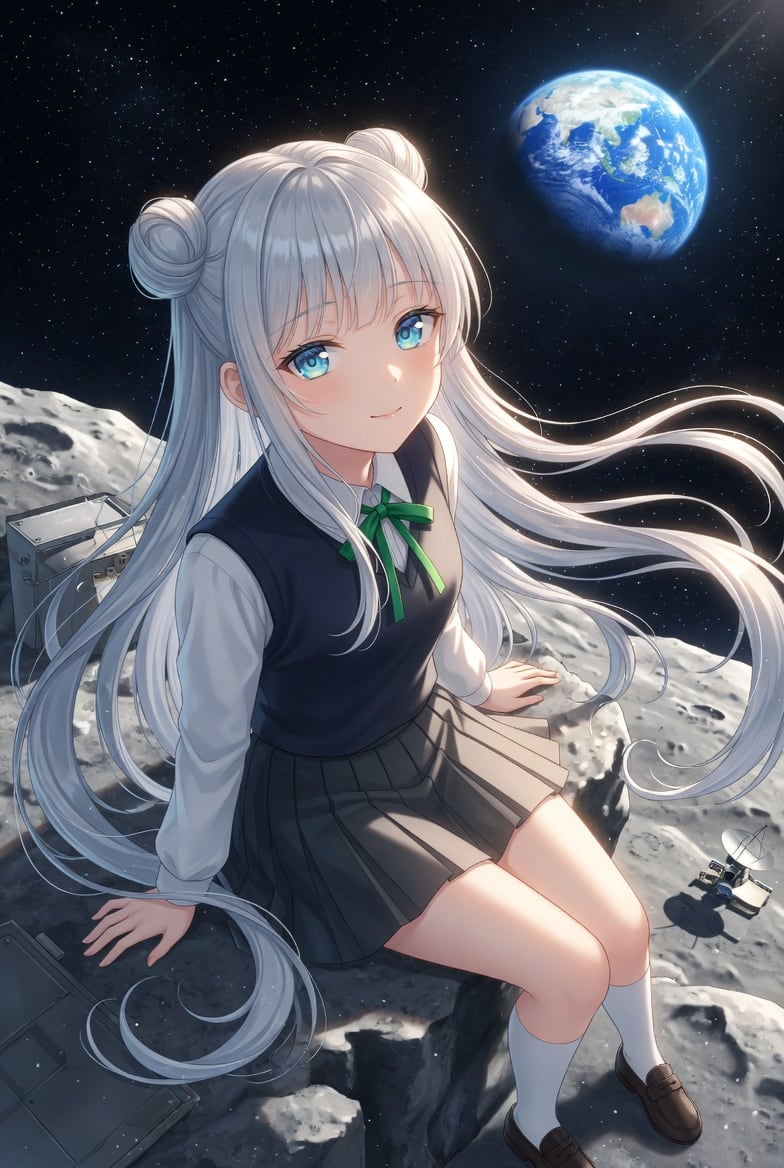
Highly Detailed Anime Illustration Of A Teenage Schoolgirl Sitting On A

A highly detailed anime illustration of a teenage schoolgirl sitting on a rocky lunar surface in outer space, viewed from a slightly elevated three-quarter angle. She has very long flowin...

A highly detailed anime illustration of a teenage schoolgirl sitting on a rocky lunar surface in outer space, viewed from a slightly elevated three-quarter angle. She has very long flowin...
Prompt

A highly detailed anime illustration of a teenage schoolgirl sitting on a rocky lunar surface in outer space, viewed from a slightly elevated three-quarter angle. She has very long flowing {argument name="hair color" default="silver-white"} hair with two round odango buns on top and loose strands streaming dramatically to the right as if in low gravity or solar wind. Her face is obscured by a plain rectangular censor block in a muted beige-gray color, centered over the entire face. She wears a Japanese-style school uniform: a white long-sleeve blouse, a dark navy sleeveless sweater vest, a small green ribbon bow at the collar, a gray pleated skirt, white knee socks, and brown loafers. She is seated on the edge of a moon rock with one hand braced behind her and the other resting near her side, legs angled forward in a relaxed pose. The background is a deep star-filled black sky with the planet Earth glowing in the upper right, showing the Asia-Pacific region, with a soft sunbeam entering diagonally from the top right. The moon terrain is bright gray and heavily textured with craters and jagged rocks. Include exactly 3 pieces of lunar equipment: 2 metallic boxy panels or instrument cases on the left side of the foreground and midground, and 1 small rover or antenna-like device on the lower right. Lighting is cinematic and cool, with bright rim light on the hair and soft highlights on the uniform and legs. Render in polished modern anime key visual style, ultra-clean linework, luminous hair strands, subtle depth, and a wistful sci-fi mood.

Prompt structure
  • Modelgpt-image-2
  • Use casesocial-media-post
  • Styleanime, cinematic, 3d-render, minimal
  • Aspect ratioFlexible
Best used for
  • Use casesocial-media-post
  • Styleanime, cinematic, 3d-render, minimal
  • Recommended specs1:1, 4:5, 16:9, or 9:16
  • ModelGPT Image 2
How to customize

Use this Highly Detailed Anime Illustration Of A Teenage Schoolgirl Sitting On A prompt as a base. Replace the subject, product details, environment, lighting, brand colors, and output ratio while keeping the social-media-post intent and anime, cinematic, 3d-render, minimal direction stable.

Editable variables
  • SubjectReplace the product, person, scene, interface, or object being generated.
  • Use caseKeep or rewrite the destination as social media post, ad creative, cover image, poster, or ecommerce hero.
  • FrameChoose 1:1, 4:5, 16:9, or 9:16 based on the final placement.
  • Brand cuesAdd colors, materials, props, text-safe space, and the platform where the image will be used.
Recommended specs

Choose the frame for the destination first, then use 1K, 2K, or 4K based on output quality needs. Product images and posters usually benefit from higher resolution.

Pre-generation checklist
  • CheckSubject, lighting, composition, and frame are specific enough to review.
  • CheckText-safe space is included when the image will carry a headline or ad copy.
  • CheckResolution, credit cost, and final destination are checked before generation.
Why this prompt works

Highly Detailed Anime Illustration Of A Teenage Schoolgirl Sitting On A works because it starts from the image job, then controls subject, composition, lighting, style, and frame. It is best for social media post while keeping the anime, cinematic, 3d-render, minimal direction stable.

Common questions
  • Can I use it directly?Yes. Replace the subject, brand cues, and frame, then generate in Image2Studio.
  • Which ratio should I use?Choose 1:1, 4:5, 16:9, or 9:16 based on the destination.




