
Image2Studio
Examples

gpt-image-2

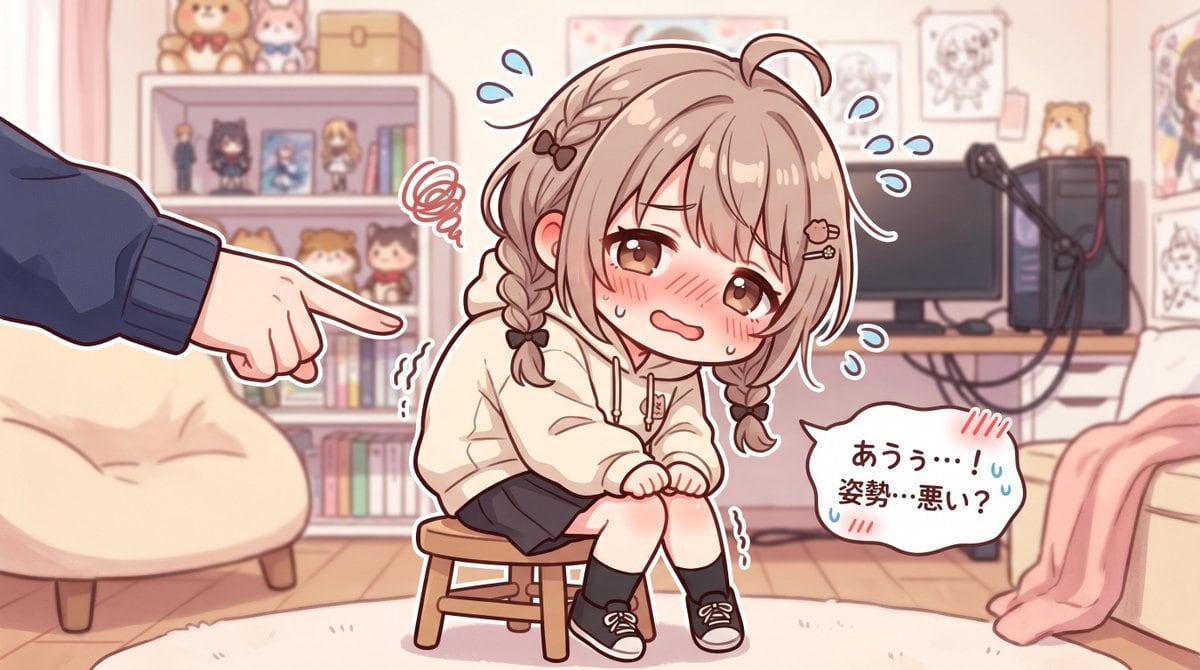
Soft Pastel Anime Illustration In A Cute VTuber Fanart Style

A soft pastel anime illustration in a cute VTuber fanart style, showing a shy petite teenage girl with light brown hair in two short braids, fluffy bangs, a small ahoge, and tiny hair cli...

A soft pastel anime illustration in a cute VTuber fanart style, showing a shy petite teenage girl with light brown hair in two short braids, fluffy bangs, a small ahoge, and tiny hair cli...
Prompt

A soft pastel anime illustration in a cute VTuber fanart style, showing a shy petite teenage girl with light brown hair in two short braids, fluffy bangs, a small ahoge, and tiny hair clips including a heart-shaped clip. She has large warm brown eyes, a deeply embarrassed expression, flushed cheeks, teary sweat drops, and a small trembling mouth. She is sitting hunched awkwardly on a tiny wooden stool in the center of a cozy streamer bedroom, knees together, hands clenched nervously in her lap, clearly self-conscious about her posture. She wears an oversized cream hoodie, a dark short skirt, black socks, and black low-top sneakers with white laces. From the left edge of the frame, only one large hand and forearm in a dark blue sleeve enters the scene, pointing at her accusingly or teasingly. Add comic-style stress symbols around the girl: 1 red scribble frustration cloud near her head, 2 wavy trembling marks near her body, and 6 blue sweat-drop marks floating around her. On the lower right, include 1 white speech bubble with Japanese text that reads "あうぅ…!姿勢…悪い?". The background is a softly lit pastel room with a cream beanbag chair on the left, a bookshelf filled with books, small figures, plush toys, and framed items, and on the right a desk with 1 monitor, 1 PC tower, and 1 microphone arm. Add wall art and character sketches behind the desk, a pink blanket draped over furniture on the far right, a pale rug on a wooden floor, and warm indoor lighting. Use a gentle pink-beige color palette, clean line art, subtle cel shading, slightly chibi proportions, and a wholesome but comedic embarrassed mood.

Prompt structure
  • Modelgpt-image-2
  • Use casesocial-media-post
  • Styleanime, minimal, watercolor
  • Aspect ratioFlexible
Best used for
  • Use casesocial-media-post
  • Styleanime, minimal, watercolor
  • Recommended specs1:1, 4:5, 16:9, or 9:16
  • ModelGPT Image 2
How to customize

Use this Soft Pastel Anime Illustration In A Cute VTuber Fanart Style prompt as a base. Replace the subject, product details, environment, lighting, brand colors, and output ratio while keeping the social-media-post intent and anime, minimal, watercolor direction stable.

Editable variables
  • SubjectReplace the product, person, scene, interface, or object being generated.
  • Use caseKeep or rewrite the destination as social media post, ad creative, cover image, poster, or ecommerce hero.
  • FrameChoose 1:1, 4:5, 16:9, or 9:16 based on the final placement.
  • Brand cuesAdd colors, materials, props, text-safe space, and the platform where the image will be used.
Recommended specs

Choose the frame for the destination first, then use 1K, 2K, or 4K based on output quality needs. Product images and posters usually benefit from higher resolution.

Pre-generation checklist
  • CheckSubject, lighting, composition, and frame are specific enough to review.
  • CheckText-safe space is included when the image will carry a headline or ad copy.
  • CheckResolution, credit cost, and final destination are checked before generation.
Why this prompt works

Soft Pastel Anime Illustration In A Cute VTuber Fanart Style works because it starts from the image job, then controls subject, composition, lighting, style, and frame. It is best for social media post while keeping the anime, minimal, watercolor direction stable.

Common questions
  • Can I use it directly?Yes. Replace the subject, brand cues, and frame, then generate in Image2Studio.
  • Which ratio should I use?Choose 1:1, 4:5, 16:9, or 9:16 based on the destination.




