
Image2Studio
Examples

gpt-image-2

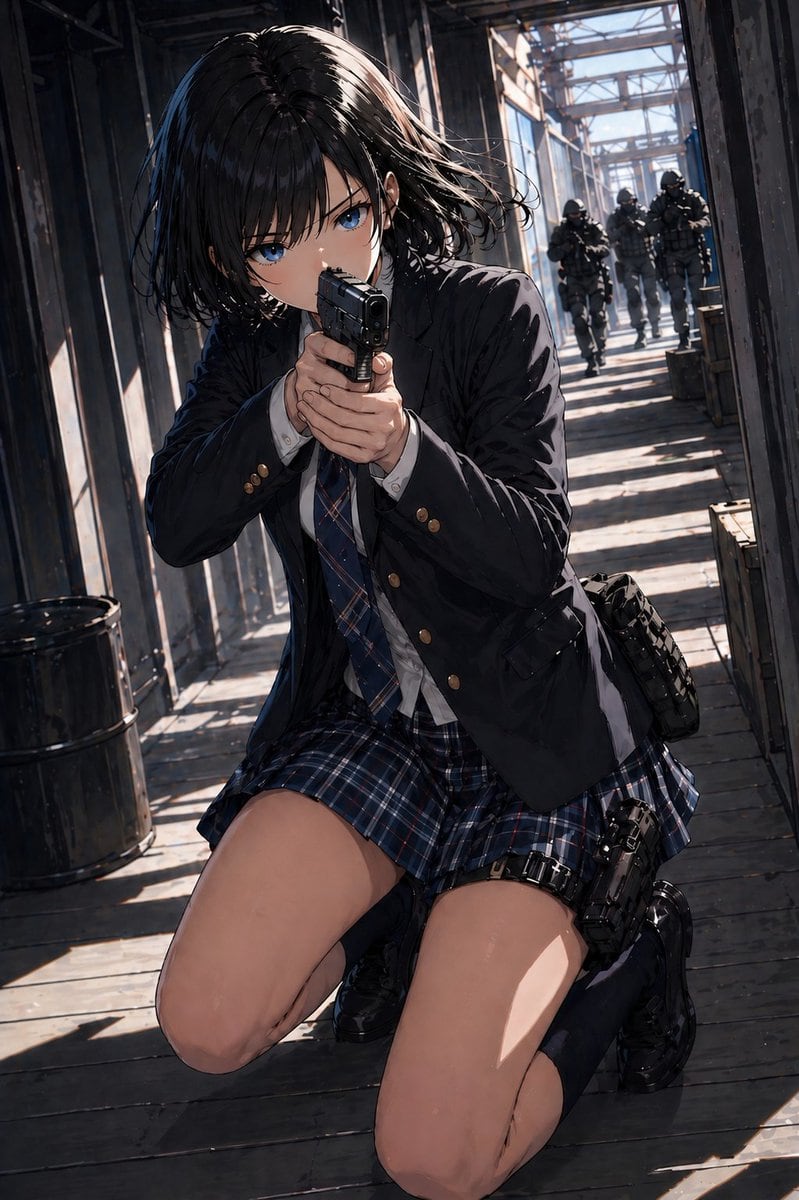
Cinematic Anime-style Action Illustration Of A High-school Girl In A Dar

A cinematic anime-style action illustration of a high-school girl in a dark navy school uniform kneeling on a sunlit industrial catwalk and aiming a compact black handgun straight toward...

A cinematic anime-style action illustration of a high-school girl in a dark navy school uniform kneeling on a sunlit industrial catwalk and aiming a compact black handgun straight toward...
Prompt

A cinematic anime-style action illustration of a {argument name="character age/style" default="high-school girl"} in a dark navy school uniform kneeling on a sunlit industrial catwalk and aiming a compact black handgun straight toward the viewer with a two-handed grip. She has a short messy bob with {argument name="hair color" default="black"}, loose strands blown sideways, and a tense forward-leaning posture as if taking cover while returning fire. Her outfit consists of 5 clearly visible clothing pieces: a black school blazer with brass buttons, a white dress shirt, a blue plaid necktie, a matching blue plaid pleated skirt, and black knee-high socks with glossy black loafers. She also carries 2 tactical accessories: a black thigh holster strapped to her right leg with a pistol inserted, and a dark side pouch on her hip. Place her low in the frame in a dramatic foreshortened perspective, with her bent knees dominating the foreground and the gun centered. The setting is a narrow elevated walkway inside an industrial steel structure with beams, railings, weathered wooden floorboards, crates, and 1 black metal barrel on the left. In the deep background, show exactly 4 heavily armed tactical soldiers in dark gear and helmets advancing down the corridor toward her. Use strong diagonal shadows and bright afternoon sunlight streaming through the metal framework, creating alternating bands of light and shade across the floor and figures. Render with detailed linework, semi-realistic anime proportions, glossy hair highlights, crisp fabric folds, subtle grit, and a dramatic blue-gray action palette with realistic depth, tension, and motion.

Prompt structure
  • Modelgpt-image-2
  • Use casesocial-media-post
  • Stylecinematic, photorealistic, anime, 3d-render
  • Aspect ratioFlexible
Best used for
  • Use casesocial-media-post
  • Stylecinematic, photorealistic, anime, 3d-render
  • Recommended specs1:1, 4:5, 16:9, or 9:16
  • ModelGPT Image 2
How to customize

Use this Cinematic Anime-style Action Illustration Of A High-school Girl In A Dar prompt as a base. Replace the subject, product details, environment, lighting, brand colors, and output ratio while keeping the social-media-post intent and cinematic, photorealistic, anime, 3d-render direction stable.

Editable variables
  • SubjectReplace the product, person, scene, interface, or object being generated.
  • Use caseKeep or rewrite the destination as social media post, ad creative, cover image, poster, or ecommerce hero.
  • FrameChoose 1:1, 4:5, 16:9, or 9:16 based on the final placement.
  • Brand cuesAdd colors, materials, props, text-safe space, and the platform where the image will be used.
Recommended specs

Choose the frame for the destination first, then use 1K, 2K, or 4K based on output quality needs. Product images and posters usually benefit from higher resolution.

Pre-generation checklist
  • CheckSubject, lighting, composition, and frame are specific enough to review.
  • CheckText-safe space is included when the image will carry a headline or ad copy.
  • CheckResolution, credit cost, and final destination are checked before generation.
Why this prompt works

Cinematic Anime-style Action Illustration Of A High-school Girl In A Dar works because it starts from the image job, then controls subject, composition, lighting, style, and frame. It is best for social media post while keeping the cinematic, photorealistic, anime, 3d-render direction stable.

Common questions
  • Can I use it directly?Yes. Replace the subject, brand cues, and frame, then generate in Image2Studio.
  • Which ratio should I use?Choose 1:1, 4:5, 16:9, or 9:16 based on the destination.




