
Image2Studio
Prompts

gpt-image-2

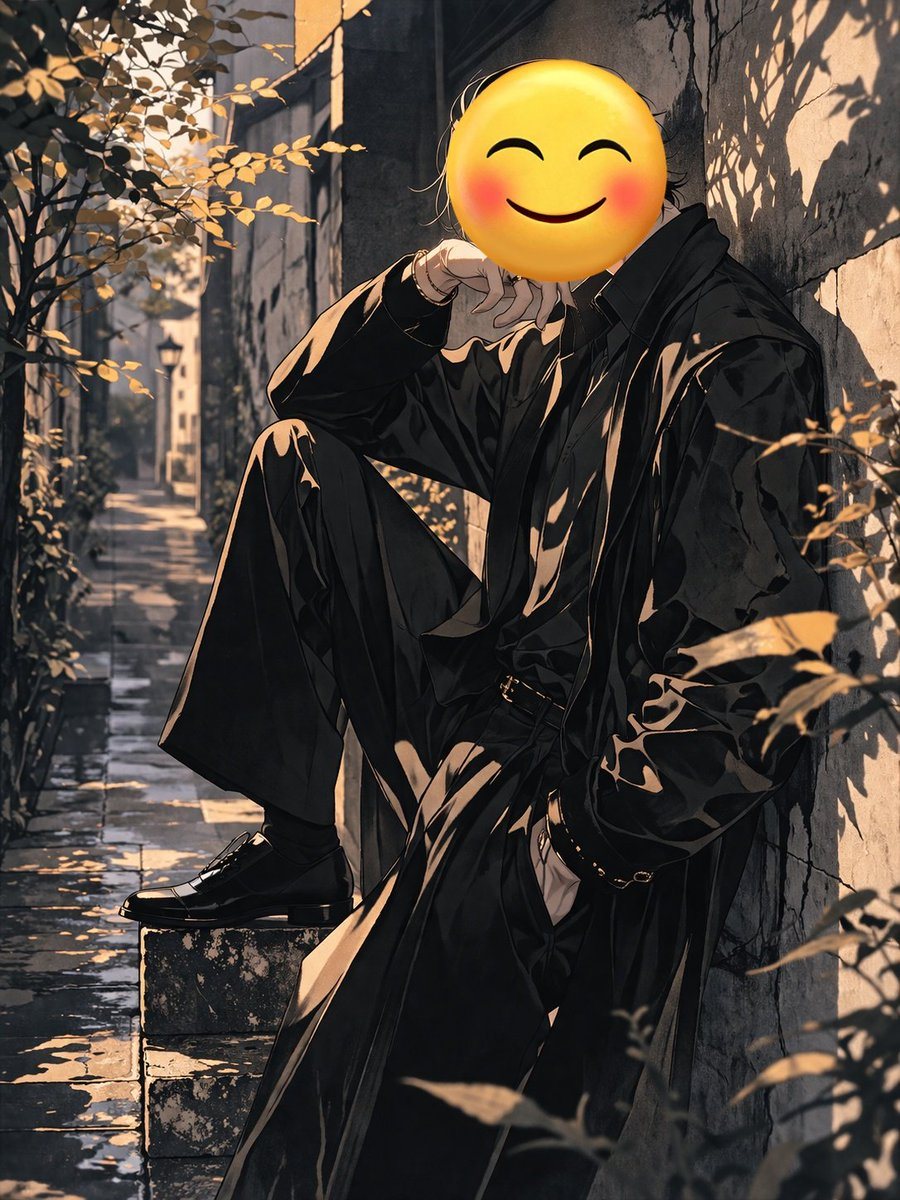
Anime-style Illustration Of A Figure Leaning Against A Textured Stone Wa

An anime-style illustration of a figure leaning against a textured stone wall in a narrow, sunlit alleyway. The figure has a large yellow smiling emoji with rosy cheeks for a head. They w...

An anime-style illustration of a figure leaning against a textured stone wall in a narrow, sunlit alleyway. The figure has a large yellow smiling emoji with rosy cheeks for a head. They w...
Prompt

An anime-style illustration of a figure leaning against a textured stone wall in a narrow, sunlit alleyway. The figure has a {argument name="head type" default="large yellow smiling emoji with rosy cheeks"} for a head. They wear a {argument name="outfit" default="loose black overcoat, black shirt, wide-leg black trousers, and black dress shoes"}. The character's left foot rests on a stone block, right hand in pocket, and left hand near the neck. The scene includes reflective stone pavement, a distant streetlamp, and golden-lit foliage. The lighting features dramatic chiaroscuro and sharp shadows.

Prompt structure
  • Modelgpt-image-2
  • Use casesocial-media-post
  • Stylecinematic, anime, watercolor
  • Aspect ratioFlexible
Best used for
  • Use casesocial-media-post
  • Stylecinematic, anime, watercolor
  • Recommended specs1:1, 4:5, 16:9, or 9:16
  • ModelGPT Image 2
How to customize

Use this Anime-style Illustration Of A Figure Leaning Against A Textured Stone Wa prompt as a base. Replace the subject, product details, environment, lighting, brand colors, and output ratio while keeping the social-media-post intent and cinematic, anime, watercolor direction stable.

Editable variables
  • SubjectReplace the product, person, scene, interface, or object being generated.
  • Use caseKeep or rewrite the destination as social media post, ad creative, cover image, poster, or ecommerce hero.
  • FrameChoose 1:1, 4:5, 16:9, or 9:16 based on the final placement.
  • Brand cuesAdd colors, materials, props, text-safe space, and the platform where the image will be used.
Recommended specs

Choose the frame for the destination first, then use 1K, 2K, or 4K based on output quality needs. Product images and posters usually benefit from higher resolution.

Pre-generation checklist
  • CheckSubject, lighting, composition, and frame are specific enough to review.
  • CheckText-safe space is included when the image will carry a headline or ad copy.
  • CheckResolution, credit cost, and final destination are checked before generation.
Why this prompt works

Anime-style Illustration Of A Figure Leaning Against A Textured Stone Wa works because it starts from the image job, then controls subject, composition, lighting, style, and frame. It is best for social media post while keeping the cinematic, anime, watercolor direction stable.

Common questions
  • Can I use it directly?Yes. Replace the subject, brand cues, and frame, then generate in Image2Studio.
  • Which ratio should I use?Choose 1:1, 4:5, 16:9, or 9:16 based on the destination.