
Image2Studio
Prompts

gpt-image-2

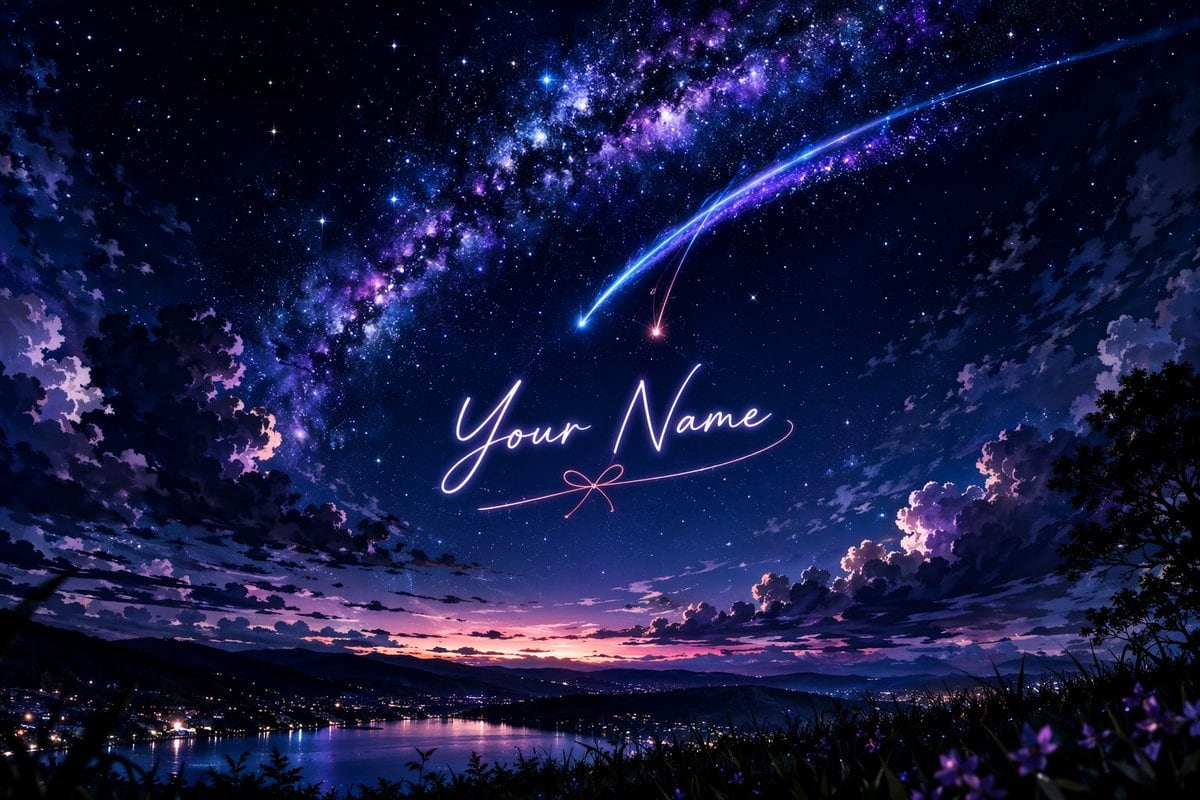
动漫风格星空与自定义文字

生成令人惊叹的动漫风格风景,包含星空、彗星以及发光的自定义文字。

Copy this GPT Image 2 prompt for social media post and social ads with Cinematic, Anime, Cyberpunk, Luxury styling. Use it in Image2Studio to generate,.
Prompt

A breathtaking anime-style landscape featuring a vibrant, starry night sky dominated by a brilliant, sweeping Milky Way in hues of deep purple, blue, and magenta. Two prominent shooting stars, one glowing bright blue and the other a softer pinkish-red, streak downwards across the sky, their tails intersecting. In the center of the sky, written in elegant, glowing cursive neon-like script, is the text "{argument name="custom text" default="Your Name"}", underlined by a delicate pink line that forms a small bow in the middle. Below, a serene landscape unfolds with dark, silhouetted clouds framing the edges. A distant town with glowing city lights sits nestled along the shores of a calm lake, reflecting the twilight colors of the horizon where the sun has just set, leaving a gradient of pink and orange. The foreground features dark silhouettes of grassy hills and subtle hints of purple flowers, adding depth to this magical, cinematic scene reminiscent of Makoto Shinkai's art style.

Prompt structure
  • Modelgpt-image-2
  • Use casesocial-media-post
  • Stylecinematic, anime, cyberpunk, luxury
  • Aspect ratioFlexible
Best used for
  • Use casesocial-media-post
  • Stylecinematic, anime, cyberpunk, luxury
  • Recommended specs1:1, 4:5, 16:9, or 9:16
  • ModelGPT Image 2
How to customize

Use this 动漫风格星空与自定义文字 prompt as a base. Replace the subject, product details, environment, lighting, brand colors, and output ratio while keeping the social-media-post intent and cinematic, anime, cyberpunk, luxury direction stable.

Editable variables
  • SubjectReplace the product, person, scene, interface, or object being generated.
  • Use caseKeep or rewrite the destination as social media post, ad creative, cover image, poster, or ecommerce hero.
  • FrameChoose 1:1, 4:5, 16:9, or 9:16 based on the final placement.
  • Brand cuesAdd colors, materials, props, text-safe space, and the platform where the image will be used.
Recommended specs

Choose the frame for the destination first, then use 1K, 2K, or 4K based on output quality needs. Product images and posters usually benefit from higher resolution.

Pre-generation checklist
  • CheckSubject, lighting, composition, and frame are specific enough to review.
  • CheckText-safe space is included when the image will carry a headline or ad copy.
  • CheckResolution, credit cost, and final destination are checked before generation.
Why this prompt works

动漫风格星空与自定义文字 works because it starts from the image job, then controls subject, composition, lighting, style, and frame. It is best for social media post while keeping the cinematic, anime, cyberpunk, luxury direction stable.

Common questions
  • Can I use it directly?Yes. Replace the subject, brand cues, and frame, then generate in Image2Studio.
  • Which ratio should I use?Choose 1:1, 4:5, 16:9, or 9:16 based on the destination.