
Image2Studio
Examples

gpt-image-2

Create A 4

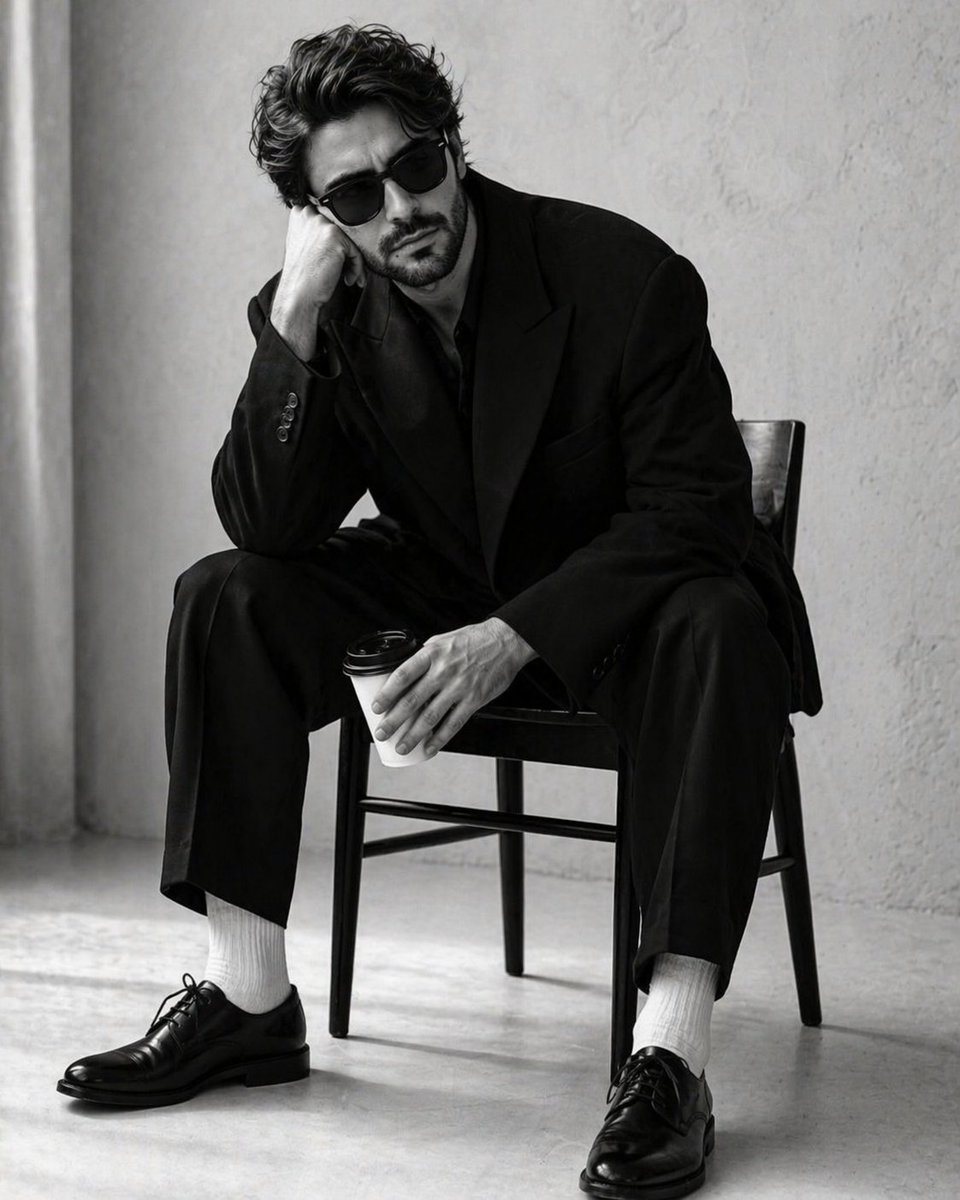
Create a 4:5 high-contrast, black-and-white studio portrait of a handsome man in the uploaded image. He is seated in a slumped, pensive posture on a minimalist dark wooden chair. His righ...

Create a 4:5 high-contrast, black-and-white studio portrait of a handsome man in the uploaded image. He is seated in a slumped, pensive posture on a minimalist dark wooden chair. His righ...
Prompt

Create a 4:5 high-contrast, black-and-white studio portrait of a {argument name="subject" default="handsome man"} in the uploaded image. He is seated in a slumped, pensive posture on a {argument name="furniture" default="minimalist dark wooden chair"}. His right elbow rests on his knee, with his head leaning heavily into his palm, while his left hand loosely grips a white disposable coffee cup with a black plastic lid. He is wearing classic black Wayfarer-style sunglasses, hiding his eyes and adding to the stoic, moody atmosphere.Suit: An oversized, structured black blazer and matching wide-leg trousers. The fabric is a heavy, matte wool. Four small black buttons are visible on the sleeve cuff. Footwear: Crisp, bright white ribbed cotton socks creating a sharp visual break between the dark trousers and shoes. Shoes: Highly polished black leather Oxford shoes with thin laces and a slight sheen on the toe box. Background: A minimalist, sterile studio setting with a {argument name="background" default="light grey or off-white textured plaster wall"}. A soft, vertical shadow or curtain edge is visible on the far left. Lighting: Soft, diffused side-lighting that creates gentle gradients on the man's face and deep, dramatic folds in the oversized suit. The lighting emphasizes the high-contrast "black on white" aesthetic. Floor: A light, seamless studio floor that catches the soft shadows cast by the chair legs and the man's shoes. Color Grade: Pure monochrome (black and white) with a wide dynamic range—deep blacks and bright, clean whites. Film Quality: Sharp focus on the subject with a very subtle film grain, mimicking professional editorial fashion photography (reminiscent of 1990s minimalist campaigns).

Prompt structure
  • Modelgpt-image-2
  • Use casesocial-media-post
  • Stylecinematic, photorealistic, editorial, minimal
  • Aspect ratioFlexible
Best used for
  • Use casesocial-media-post
  • Stylecinematic, photorealistic, editorial, minimal
  • Recommended specs1:1, 4:5, 16:9, or 9:16
  • ModelGPT Image 2
How to customize

Use this Create A 4 prompt as a base. Replace the subject, product details, environment, lighting, brand colors, and output ratio while keeping the social-media-post intent and cinematic, photorealistic, editorial, minimal direction stable.

Editable variables
  • SubjectReplace the product, person, scene, interface, or object being generated.
  • Use caseKeep or rewrite the destination as social media post, ad creative, cover image, poster, or ecommerce hero.
  • FrameChoose 1:1, 4:5, 16:9, or 9:16 based on the final placement.
  • Brand cuesAdd colors, materials, props, text-safe space, and the platform where the image will be used.
Recommended specs

Choose the frame for the destination first, then use 1K, 2K, or 4K based on output quality needs. Product images and posters usually benefit from higher resolution.

Pre-generation checklist
  • CheckSubject, lighting, composition, and frame are specific enough to review.
  • CheckText-safe space is included when the image will carry a headline or ad copy.
  • CheckResolution, credit cost, and final destination are checked before generation.
Why this prompt works

Create A 4 works because it starts from the image job, then controls subject, composition, lighting, style, and frame. It is best for social media post while keeping the cinematic, photorealistic, editorial, minimal direction stable.

Common questions
  • Can I use it directly?Yes. Replace the subject, brand cues, and frame, then generate in Image2Studio.
  • Which ratio should I use?Choose 1:1, 4:5, 16:9, or 9:16 based on the destination.




