
Image2Studio
Examples

gpt-image-2

Using The Provided Reference Image As The Visual Civilization Seed

Using the provided reference image as the visual civilization seed, expand it into a new cinematic world scene that keeps the same grand East Asian fantasy design language, monumental sca...

Using the provided reference image as the visual civilization seed, expand it into a new cinematic world scene that keeps the same grand East Asian fantasy design language, monumental sca...
Prompt

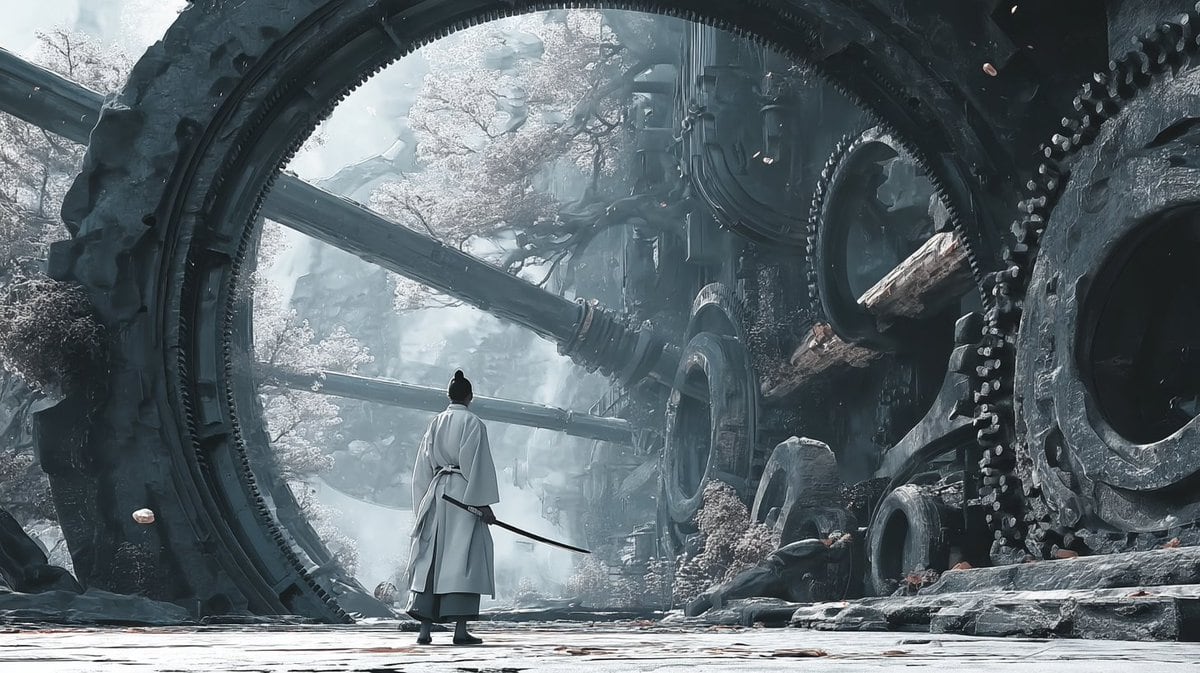
Using the provided reference image as the visual civilization seed, expand it into a new cinematic world scene that keeps the same grand East Asian fantasy design language, monumental scale, intricate architecture-first worldbuilding, and ultra-detailed realism, but shift the setting from a luminous cloud palace into an ancient mechanical ruin on the ground. Replace the gilded celestial temple environment with colossal circular ring structures, giant embedded gears, heavy industrial stone-and-metal architecture, broken conduits, and overgrown ruins with pale flowering trees. Change the mood to cold, misty, desaturated blue-gray lighting with soft atmospheric fog, while preserving the epic, awe-inspiring worldbuilding feel from the reference. Add 1 lone wandering swordsman seen from behind in the foreground, wearing flowing white robes and carrying a sheathed sword, centered beneath the largest ring to emphasize scale. Make it feel like a frame from a high-budget fantasy film, with extremely rich environmental detail and a cohesive visual language derived from the reference image.

Prompt structure
  • Modelgpt-image-2
  • Use casesocial-media-post
  • Stylecinematic
  • Aspect ratioFlexible
Best used for
  • Use casesocial-media-post
  • Stylecinematic
  • Recommended specs1:1, 4:5, 16:9, or 9:16
  • ModelGPT Image 2
How to customize

Use this Using The Provided Reference Image As The Visual Civilization Seed prompt as a base. Replace the subject, product details, environment, lighting, brand colors, and output ratio while keeping the social-media-post intent and cinematic direction stable.

Editable variables
  • SubjectReplace the product, person, scene, interface, or object being generated.
  • Use caseKeep or rewrite the destination as social media post, ad creative, cover image, poster, or ecommerce hero.
  • FrameChoose 1:1, 4:5, 16:9, or 9:16 based on the final placement.
  • Brand cuesAdd colors, materials, props, text-safe space, and the platform where the image will be used.
Recommended specs

Choose the frame for the destination first, then use 1K, 2K, or 4K based on output quality needs. Product images and posters usually benefit from higher resolution.

Pre-generation checklist
  • CheckSubject, lighting, composition, and frame are specific enough to review.
  • CheckText-safe space is included when the image will carry a headline or ad copy.
  • CheckResolution, credit cost, and final destination are checked before generation.
Why this prompt works

Using The Provided Reference Image As The Visual Civilization Seed works because it starts from the image job, then controls subject, composition, lighting, style, and frame. It is best for social media post while keeping the cinematic direction stable.

Common questions
  • Can I use it directly?Yes. Replace the subject, brand cues, and frame, then generate in Image2Studio.
  • Which ratio should I use?Choose 1:1, 4:5, 16:9, or 9:16 based on the destination.




