
Image2Studio
Examples

gpt-image-2

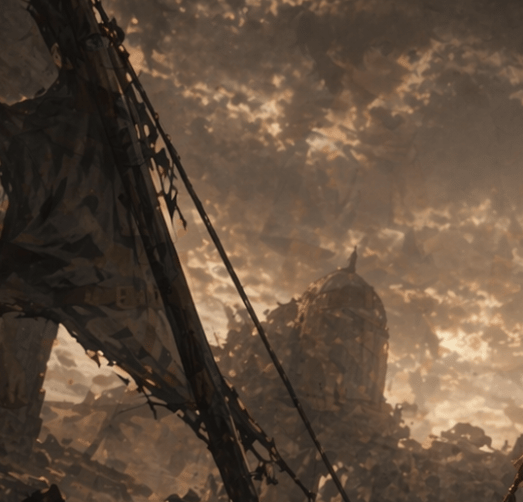
Moody Post-apocalyptic Cinematic Landscape At Dusk

A moody post-apocalyptic cinematic landscape at dusk, painted in a dark sepia and amber palette, showing the ruins of an industrial or urban structure beneath a turbulent sky filled with...

A moody post-apocalyptic cinematic landscape at dusk, painted in a dark sepia and amber palette, showing the ruins of an industrial or urban structure beneath a turbulent sky filled with...
Prompt

A moody post-apocalyptic cinematic landscape at dusk, painted in a dark sepia and amber palette, showing the ruins of an industrial or urban structure beneath a turbulent sky filled with dense, glowing clouds. In the left foreground, a large diagonal collapsed metal beam or crane arm rises from the bottom left toward the upper left, draped with torn fabric or shredded sheeting and tangled cables. A single long cable stretches diagonally downward across the frame toward the center. In the hazy midground, slightly right of center, stands a damaged domed tower or observatory-like building, partially obscured by dust, smoke, and drifting debris. The ground is filled with jagged rubble, broken structures, and silhouetted wreckage. Use dramatic backlighting from the cloud breaks near the horizon, soft volumetric haze, atmospheric perspective, painterly textures, and a ruined-world epic tone. The composition should feel vertical, solemn, desolate, and cinematic, with no people visible.

Prompt structure
  • Modelgpt-image-2
  • Use casesocial-media-post
  • Stylecinematic, watercolor
  • Aspect ratioFlexible
Best used for
  • Use casesocial-media-post
  • Stylecinematic, watercolor
  • Recommended specs1:1, 4:5, 16:9, or 9:16
  • ModelGPT Image 2
How to customize

Use this Moody Post-apocalyptic Cinematic Landscape At Dusk prompt as a base. Replace the subject, product details, environment, lighting, brand colors, and output ratio while keeping the social-media-post intent and cinematic, watercolor direction stable.

Editable variables
  • SubjectReplace the product, person, scene, interface, or object being generated.
  • Use caseKeep or rewrite the destination as social media post, ad creative, cover image, poster, or ecommerce hero.
  • FrameChoose 1:1, 4:5, 16:9, or 9:16 based on the final placement.
  • Brand cuesAdd colors, materials, props, text-safe space, and the platform where the image will be used.
Recommended specs

Choose the frame for the destination first, then use 1K, 2K, or 4K based on output quality needs. Product images and posters usually benefit from higher resolution.

Pre-generation checklist
  • CheckSubject, lighting, composition, and frame are specific enough to review.
  • CheckText-safe space is included when the image will carry a headline or ad copy.
  • CheckResolution, credit cost, and final destination are checked before generation.
Why this prompt works

Moody Post-apocalyptic Cinematic Landscape At Dusk works because it starts from the image job, then controls subject, composition, lighting, style, and frame. It is best for social media post while keeping the cinematic, watercolor direction stable.

Common questions
  • Can I use it directly?Yes. Replace the subject, brand cues, and frame, then generate in Image2Studio.
  • Which ratio should I use?Choose 1:1, 4:5, 16:9, or 9:16 based on the destination.




