
Image2Studio
Examples

gpt-image-2

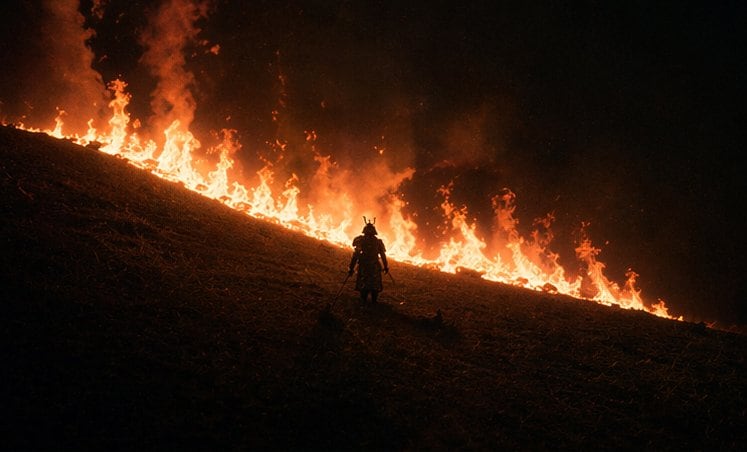
Cinematic Night Scene On A Steep Grassy Hillside During A Wildfire Burn

A cinematic night scene on a steep grassy hillside during a wildfire burn line, with one lone samurai standing near the center-lower part of the frame in dark silhouette. The hill runs di...

A cinematic night scene on a steep grassy hillside during a wildfire burn line, with one lone samurai standing near the center-lower part of the frame in dark silhouette. The hill runs di...
Prompt

A cinematic night scene on a steep grassy hillside during a wildfire burn line, with one lone samurai standing near the center-lower part of the frame in dark silhouette. The hill runs diagonally from upper left down to lower right, and a continuous line of bright orange flames stretches across the slope behind the figure, forming a glowing border between the dark ground and the black smoky sky. The samurai wears traditional armor and a horned kabuto helmet, holding two swords at his sides, facing uphill toward the fire. Keep the figure small compared to the landscape to emphasize scale and isolation. Use extremely low-key lighting, strong backlighting from the flames, deep blacks, heavy smoke, drifting embers, and a moody high-contrast palette of black, ember red, and fiery orange. The image should feel like an epic historical Japanese war film, wide composition, minimalist framing, dramatic negative space, realistic texture, and intense atmospheric smoke.

Prompt structure
  • Modelgpt-image-2
  • Use casesocial-media-post
  • Stylecinematic, minimal, photorealistic
  • Aspect ratioFlexible
Best used for
  • Use casesocial-media-post
  • Stylecinematic, minimal, photorealistic
  • Recommended specs1:1, 4:5, 16:9, or 9:16
  • ModelGPT Image 2
How to customize

Use this Cinematic Night Scene On A Steep Grassy Hillside During A Wildfire Burn prompt as a base. Replace the subject, product details, environment, lighting, brand colors, and output ratio while keeping the social-media-post intent and cinematic, minimal, photorealistic direction stable.

Editable variables
  • SubjectReplace the product, person, scene, interface, or object being generated.
  • Use caseKeep or rewrite the destination as social media post, ad creative, cover image, poster, or ecommerce hero.
  • FrameChoose 1:1, 4:5, 16:9, or 9:16 based on the final placement.
  • Brand cuesAdd colors, materials, props, text-safe space, and the platform where the image will be used.
Recommended specs

Choose the frame for the destination first, then use 1K, 2K, or 4K based on output quality needs. Product images and posters usually benefit from higher resolution.

Pre-generation checklist
  • CheckSubject, lighting, composition, and frame are specific enough to review.
  • CheckText-safe space is included when the image will carry a headline or ad copy.
  • CheckResolution, credit cost, and final destination are checked before generation.
Why this prompt works

Cinematic Night Scene On A Steep Grassy Hillside During A Wildfire Burn works because it starts from the image job, then controls subject, composition, lighting, style, and frame. It is best for social media post while keeping the cinematic, minimal, photorealistic direction stable.

Common questions
  • Can I use it directly?Yes. Replace the subject, brand cues, and frame, then generate in Image2Studio.
  • Which ratio should I use?Choose 1:1, 4:5, 16:9, or 9:16 based on the destination.




