
Image2Studio
Examples

gpt-image-2

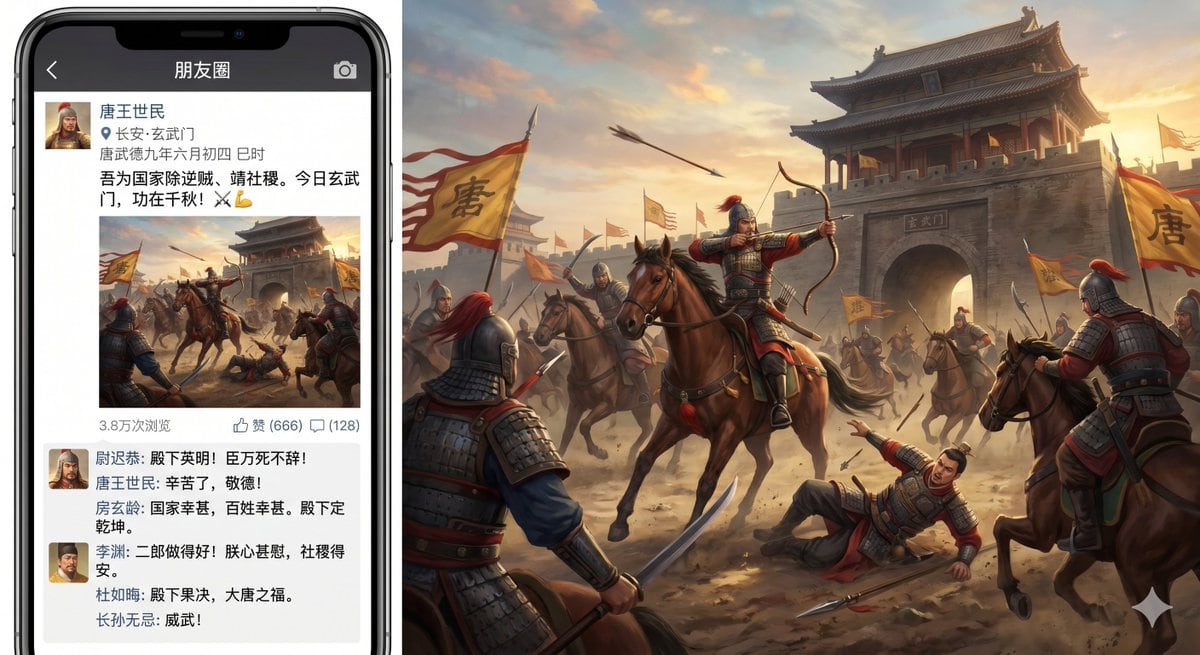
Humorous Highly Detailed Composite Image

A humorous, highly detailed composite image showing a modern smartphone displaying a Chinese social-media Moments post about the Xuanwu Gate Incident, placed on the left side of the frame...

A humorous, highly detailed composite image showing a modern smartphone displaying a Chinese social-media Moments post about the Xuanwu Gate Incident, placed on the left side of the frame...
Prompt

A humorous, highly detailed composite image showing a modern smartphone displaying a Chinese social-media Moments post about the Xuanwu Gate Incident, placed on the left side of the frame, with the posted battle image expanded into a large cinematic historical scene filling the right side. The phone should look like a black iPhone with thin bezels and a top notch, shown front-facing. On the phone screen, the app header bar is dark gray-black and reads “朋友圈” in white, with a back arrow on the left and a camera icon on the right. Below it is a social post from {argument name="poster name" default="唐王世民"}, with a small square profile avatar of an ancient Chinese warrior in armor and helmet. Under the name is a location pin and the text “长安·玄武门”, and a timestamp line “唐武德九年六月初四 巳时”. The main post text in Chinese says: “吾为国家除逆贼,请社稷。今日玄武门,功在千秋!⚔️💪”. Beneath the text is a square battle image preview matching the large scene on the right. Below the image is a metadata row showing exactly three items: “3.8万次浏览”, “赞 (666)”, and “(128)” beside a comment icon. Under that is a comments box with exactly 5 visible commenters, each with a tiny avatar and Chinese text styled like supportive social-media replies from historical figures. The comments should include these names in Chinese: “尉迟恭”, “房玄龄”, “李渊”, “杜如晦”, and “长孙无忌”, with the tone praising the success of the action; one comment line should suggest the emperor is shocked and the state is secured. The right side is a dramatic Tang-dynasty battle painting at sunset outside {argument name="gate name" default="玄武门"}, with a massive gray stone gate tower and the gate plaque reading “玄武门”. In the center foreground, a mounted armored archer in red-plumed helmet draws a bow while riding a brown horse; around him are exactly 7 clearly visible mounted or standing soldiers in Tang armor, plus 1 fallen armored figure on the ground pointing upward. Multiple yellow battle flags with the large black character “唐” wave through the dust; show at least 4 visible flags. Arrows fly through the sky, horses rear and turn, and the air is filled with dust, warm sunset light, and battlefield motion. The visual style is realistic historical epic key art with painterly detail, but the overall concept is comedic and anachronistic because it presents an ancient coup as a social-media朋友圈 post. Keep all visible interface text in Chinese, maintain believable mobile UI spacing, and blend the phone mockup with the expanded battle artwork in one widescreen composition.

Prompt structure
  • Modelgpt-image-2
  • Use casesocial-media-post
  • Stylecinematic, photorealistic
  • Aspect ratioFlexible
Best used for
  • Use casesocial-media-post
  • Stylecinematic, photorealistic
  • Recommended specs1:1, 4:5, 16:9, or 9:16
  • ModelGPT Image 2
How to customize

Use this Humorous Highly Detailed Composite Image prompt as a base. Replace the subject, product details, environment, lighting, brand colors, and output ratio while keeping the social-media-post intent and cinematic, photorealistic direction stable.

Editable variables
  • SubjectReplace the product, person, scene, interface, or object being generated.
  • Use caseKeep or rewrite the destination as social media post, ad creative, cover image, poster, or ecommerce hero.
  • FrameChoose 1:1, 4:5, 16:9, or 9:16 based on the final placement.
  • Brand cuesAdd colors, materials, props, text-safe space, and the platform where the image will be used.
Recommended specs

Choose the frame for the destination first, then use 1K, 2K, or 4K based on output quality needs. Product images and posters usually benefit from higher resolution.

Pre-generation checklist
  • CheckSubject, lighting, composition, and frame are specific enough to review.
  • CheckText-safe space is included when the image will carry a headline or ad copy.
  • CheckResolution, credit cost, and final destination are checked before generation.
Why this prompt works

Humorous Highly Detailed Composite Image works because it starts from the image job, then controls subject, composition, lighting, style, and frame. It is best for social media post while keeping the cinematic, photorealistic direction stable.

Common questions
  • Can I use it directly?Yes. Replace the subject, brand cues, and frame, then generate in Image2Studio.
  • Which ratio should I use?Choose 1:1, 4:5, 16:9, or 9:16 based on the destination.




