
Image2Studio
Prompts

gpt-image-2

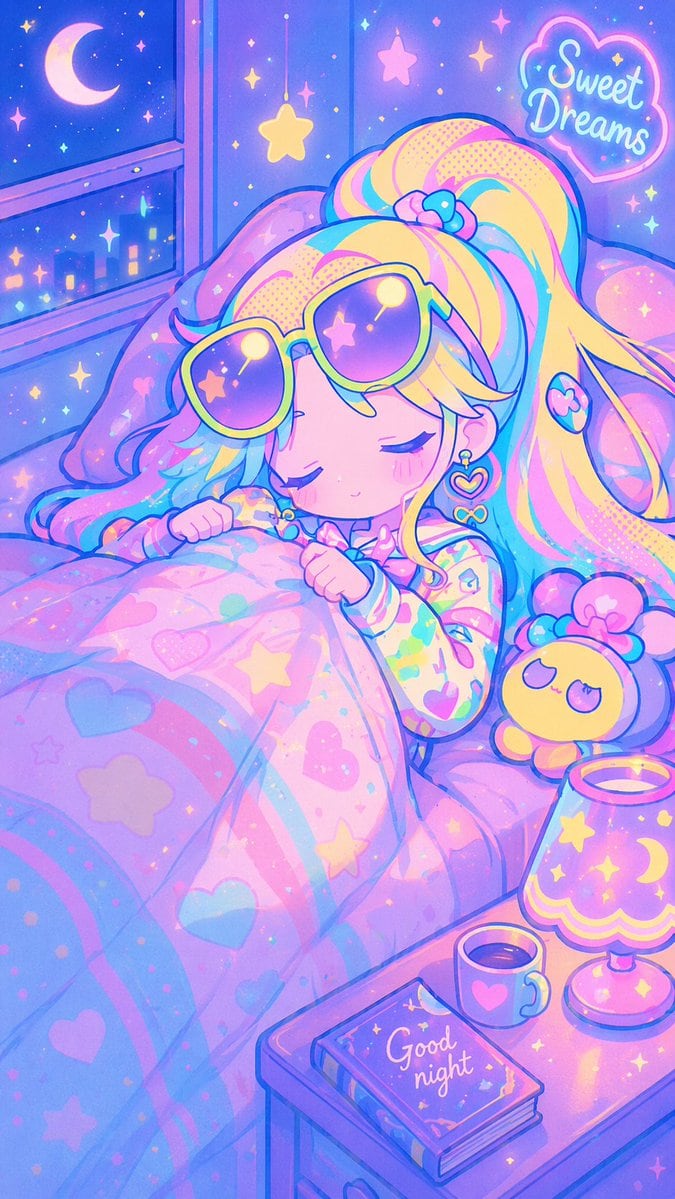
复古动漫风柔和色调睡眠场景

生成一张充满活力的 90 年代动漫风格插画,描绘一个角色在舒适的柔和色调卧室中入睡,支持自定义文字和颜色。

Copy this GPT Image 2 prompt for social media post and social ads with Cyberpunk, Anime, Watercolor styling. Use it in Image2Studio to generate, edit, and.
Prompt

An illustration in a {argument name="art style" default="90s retro anime aesthetic"} featuring a cute girl sleeping peacefully in bed. She has voluminous {argument name="hair color" default="pastel rainbow"} hair and is wearing large retro sunglasses with yellow frames and purple gradient lenses resting on her forehead. She wears colorful patterned pajamas and heart-shaped earrings, clutching a pink blanket decorated with pastel rainbows, hearts, and stars. The bedroom is bathed in a {argument name="color palette" default="vibrant neon pastel"} color palette with soft glowing lighting and sparkles. In the top right corner, a glowing cloud-shaped sign reads "{argument name="neon sign text" default="Sweet Dreams"}". A window on the left shows a dark blue night sky with a crescent moon and stars over a city silhouette. Hanging star ornaments dangle from the ceiling. On the bed next to her is 1 small yellow plushie with a pink bow. On a nightstand in the bottom right corner, there is 1 star-patterned lamp, 1 mug with a heart design, and 1 book titled "{argument name="book title" default="Good night"}".

Prompt structure
  • Modelgpt-image-2
  • Use casesocial-media-post
  • Stylecyberpunk, anime, watercolor
  • Aspect ratioFlexible
Best used for
  • Use casesocial-media-post
  • Stylecyberpunk, anime, watercolor
  • Recommended specs1:1, 4:5, 16:9, or 9:16
  • ModelGPT Image 2
How to customize

Use this 复古动漫风柔和色调睡眠场景 prompt as a base. Replace the subject, product details, environment, lighting, brand colors, and output ratio while keeping the social-media-post intent and cyberpunk, anime, watercolor direction stable.

Editable variables
  • SubjectReplace the product, person, scene, interface, or object being generated.
  • Use caseKeep or rewrite the destination as social media post, ad creative, cover image, poster, or ecommerce hero.
  • FrameChoose 1:1, 4:5, 16:9, or 9:16 based on the final placement.
  • Brand cuesAdd colors, materials, props, text-safe space, and the platform where the image will be used.
Recommended specs

Choose the frame for the destination first, then use 1K, 2K, or 4K based on output quality needs. Product images and posters usually benefit from higher resolution.

Pre-generation checklist
  • CheckSubject, lighting, composition, and frame are specific enough to review.
  • CheckText-safe space is included when the image will carry a headline or ad copy.
  • CheckResolution, credit cost, and final destination are checked before generation.
Why this prompt works

复古动漫风柔和色调睡眠场景 works because it starts from the image job, then controls subject, composition, lighting, style, and frame. It is best for social media post while keeping the cyberpunk, anime, watercolor direction stable.

Common questions
  • Can I use it directly?Yes. Replace the subject, brand cues, and frame, then generate in Image2Studio.
  • Which ratio should I use?Choose 1:1, 4:5, 16:9, or 9:16 based on the destination.