
Image2Studio
Examples

gpt-image-2

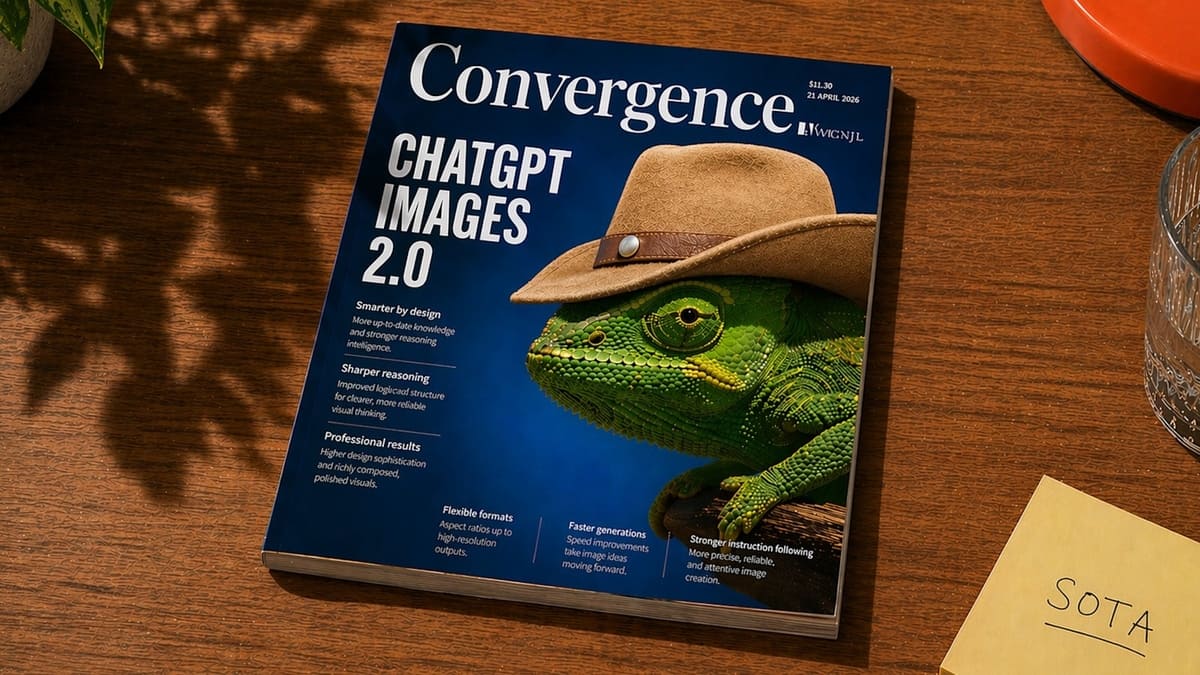
Realistic Editorial Product Photo Of A Glossy Magazine Lying Diagonally

A realistic editorial product photo of a glossy magazine lying diagonally on a warm medium-brown wooden table, viewed from above at a slight angle. The magazine dominates the frame and ha...

A realistic editorial product photo of a glossy magazine lying diagonally on a warm medium-brown wooden table, viewed from above at a slight angle. The magazine dominates the frame and ha...
Prompt

A realistic editorial product photo of a glossy magazine lying diagonally on a warm medium-brown wooden table, viewed from above at a slight angle. The magazine dominates the frame and has a deep cobalt-blue cover with a large elegant serif masthead reading {argument name="magazine title" default="Convergence"} across the top. On the left side of the cover, a huge stacked white sans-serif headline reads {argument name="cover headline" default="CHATGPT IMAGES 2.0"}. The main cover image is a highly detailed green chameleon in close-up profile facing left, wearing a tan cowboy hat with a brown leather band and metal stud, creating a surreal but polished magazine-cover concept. Add small editorial cover lines in white text beneath and along the bottom, arranged in neat columns like a technology or design magazine, with tiny issue details in the upper right including a price and date. The magazine should look physically printed, with visible page thickness, subtle edge wear, and realistic reflections on the glossy cover. Surrounding environment: soft leafy shadows fall across the tabletop from the upper left, a clear faceted drinking glass is partially visible on the right edge, an orange-red plate peeks in from the top right corner, a pale yellow sticky note in the lower right reads {argument name="sticky note text" default="SOTA"} in handwritten uppercase letters, and a hint of a green houseplant appears in the upper left. Use warm natural afternoon sunlight, cinematic shadows, crisp focus, and photorealistic materials for a premium lifestyle desk scene.

Prompt structure
  • Modelgpt-image-2
  • Use casesocial-media-post
  • Styleeditorial, photorealistic, luxury, cinematic
  • Aspect ratioFlexible
Best used for
  • Use casesocial-media-post
  • Styleeditorial, photorealistic, luxury, cinematic
  • Recommended specs1:1, 4:5, 16:9, or 9:16
  • ModelGPT Image 2
How to customize

Use this Realistic Editorial Product Photo Of A Glossy Magazine Lying Diagonally prompt as a base. Replace the subject, product details, environment, lighting, brand colors, and output ratio while keeping the social-media-post intent and editorial, photorealistic, luxury, cinematic direction stable.

Editable variables
  • SubjectReplace the product, person, scene, interface, or object being generated.
  • Use caseKeep or rewrite the destination as social media post, ad creative, cover image, poster, or ecommerce hero.
  • FrameChoose 1:1, 4:5, 16:9, or 9:16 based on the final placement.
  • Brand cuesAdd colors, materials, props, text-safe space, and the platform where the image will be used.
Recommended specs

Choose the frame for the destination first, then use 1K, 2K, or 4K based on output quality needs. Product images and posters usually benefit from higher resolution.

Pre-generation checklist
  • CheckSubject, lighting, composition, and frame are specific enough to review.
  • CheckText-safe space is included when the image will carry a headline or ad copy.
  • CheckResolution, credit cost, and final destination are checked before generation.
Why this prompt works

Realistic Editorial Product Photo Of A Glossy Magazine Lying Diagonally works because it starts from the image job, then controls subject, composition, lighting, style, and frame. It is best for social media post while keeping the editorial, photorealistic, luxury, cinematic direction stable.

Common questions
  • Can I use it directly?Yes. Replace the subject, brand cues, and frame, then generate in Image2Studio.
  • Which ratio should I use?Choose 1:1, 4:5, 16:9, or 9:16 based on the destination.




