
Image2Studio
Prompts

gpt-image-2

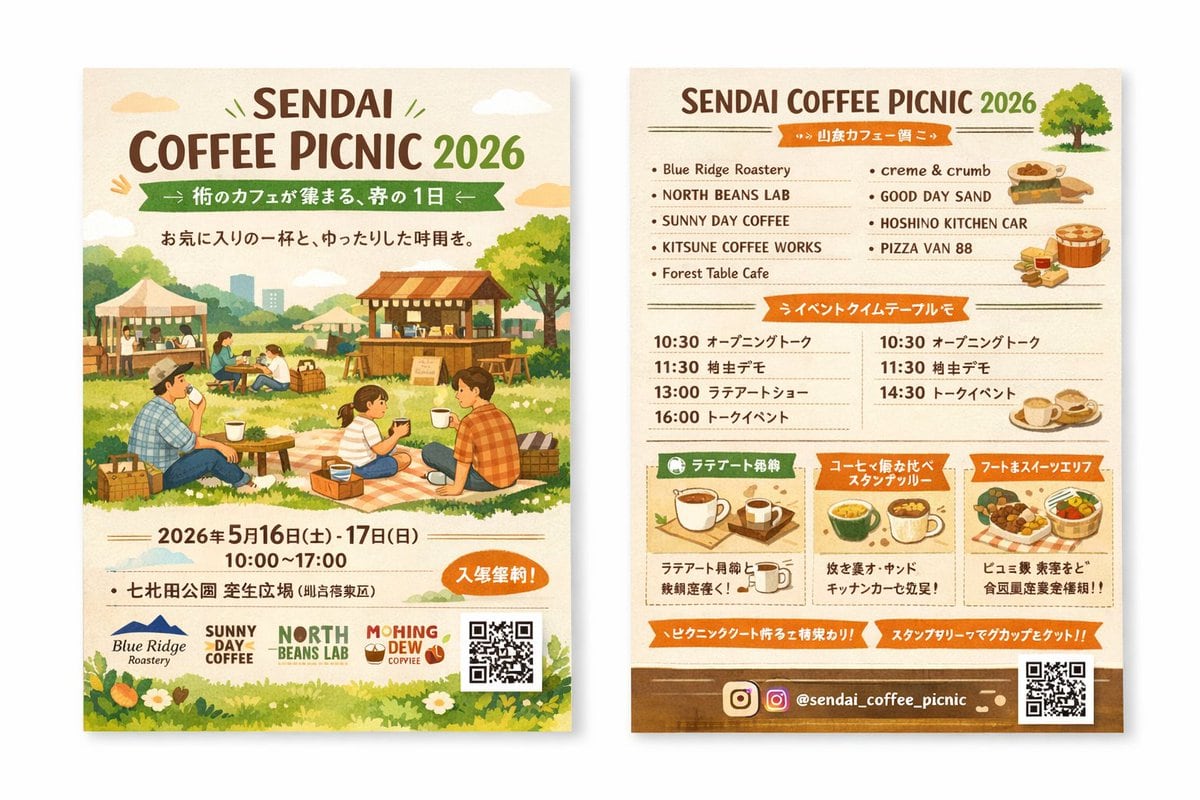
双面水彩风格活动传单样机

生成一款温馨的水彩风格双面活动传单样机,适用于咖啡野餐活动,包含插画、参展商列表和活动日程。

Copy this GPT Image 2 prompt for social media post and food photography with Editorial, Watercolor styling. Use it in Image2Studio to generate, edit, and.
Prompt

{ "type": "two-sided event flyer mockup", "style": "watercolor illustration, warm earthy tones, cozy, inviting, rustic", "left_side_front": { "header": { "title": "{argument name=\"event name\" default=\"SENDAI COFFEE PICNIC 2026\"}", "subtitle": "{argument name=\"subtitle\" default=\"街のカフェが集まる、春の1日\"}", "tagline": "A relaxing time with your favorite cup" }, "main_illustration": "People enjoying a picnic on a grassy field. A family sitting on a checkered blanket drinking coffee. Background features wooden coffee stalls, tents, trees, and a distant city skyline.", "event_info": { "date": "{argument name=\"event date\" default=\"2026年5月16日(土) - 17日(日)\"}", "time": "10:00 - 17:00", "location": "{argument name=\"location\" default=\"七北田公園 芝生広場\"}", "badge": "Orange oval badge with text for free entry" }, "footer": { "sponsor_logos": 4, "elements": ["QR code", "grass and white flowers border"] } }, "right_side_back": { "header": { "title": "{argument name=\"event name\" default=\"SENDAI COFFEE PICNIC 2026\"}", "illustration": "small green tree" }, "sections": [ { "title": "Vendor List", "layout": "2 columns", "count": 9, "labels": ["Blue Ridge Roastery", "NORTH BEANS LAB", "SUNNY DAY COFFEE", "KITSUNE COFFEE WORKS", "Forest Table Cafe", "creme & crumb", "GOOD DAY SAND", "HOSHINO KITCHEN CAR", "PIZZA VAN 88"], "illustrations": ["sandwiches", "pizza", "coffee cups"] }, { "title": "Event Timetable", "layout": "2 columns", "count": 7, "description": "Schedule with times like 10:30, 11:30, 13:00, 14:30, 16:00 and event names" }, { "title": "Feature Highlights", "layout": "3 horizontal boxes", "count": 3, "labels": ["Latte Art Experience", "Coffee Tasting Stamp Rally", "Food & Sweets Area"], "illustrations": ["single coffee cup", "multiple coffee cups", "food basket"] } ], "footer": { "social_media": "{argument name=\"social handle\" default=\"@sendai_coffee_picnic\"}", "icons": ["Instagram logo"], "elements": ["QR code", "brown background strip"] } } }

Prompt structure
  • Modelgpt-image-2
  • Use casesocial-media-post
  • Styleeditorial, watercolor
  • Aspect ratioFlexible
Best used for
  • Use casesocial-media-post
  • Styleeditorial, watercolor
  • Recommended specs1:1, 4:5, 16:9, or 9:16
  • ModelGPT Image 2
How to customize

Use this 双面水彩风格活动传单样机 prompt as a base. Replace the subject, product details, environment, lighting, brand colors, and output ratio while keeping the social-media-post intent and editorial, watercolor direction stable.

Editable variables
  • SubjectReplace the product, person, scene, interface, or object being generated.
  • Use caseKeep or rewrite the destination as social media post, ad creative, cover image, poster, or ecommerce hero.
  • FrameChoose 1:1, 4:5, 16:9, or 9:16 based on the final placement.
  • Brand cuesAdd colors, materials, props, text-safe space, and the platform where the image will be used.
Recommended specs

Choose the frame for the destination first, then use 1K, 2K, or 4K based on output quality needs. Product images and posters usually benefit from higher resolution.

Pre-generation checklist
  • CheckSubject, lighting, composition, and frame are specific enough to review.
  • CheckText-safe space is included when the image will carry a headline or ad copy.
  • CheckResolution, credit cost, and final destination are checked before generation.
Why this prompt works

双面水彩风格活动传单样机 works because it starts from the image job, then controls subject, composition, lighting, style, and frame. It is best for social media post while keeping the editorial, watercolor direction stable.

Common questions
  • Can I use it directly?Yes. Replace the subject, brand cues, and frame, then generate in Image2Studio.
  • Which ratio should I use?Choose 1:1, 4:5, 16:9, or 9:16 based on the destination.




