
Image2Studio
Examples

gpt-image-2

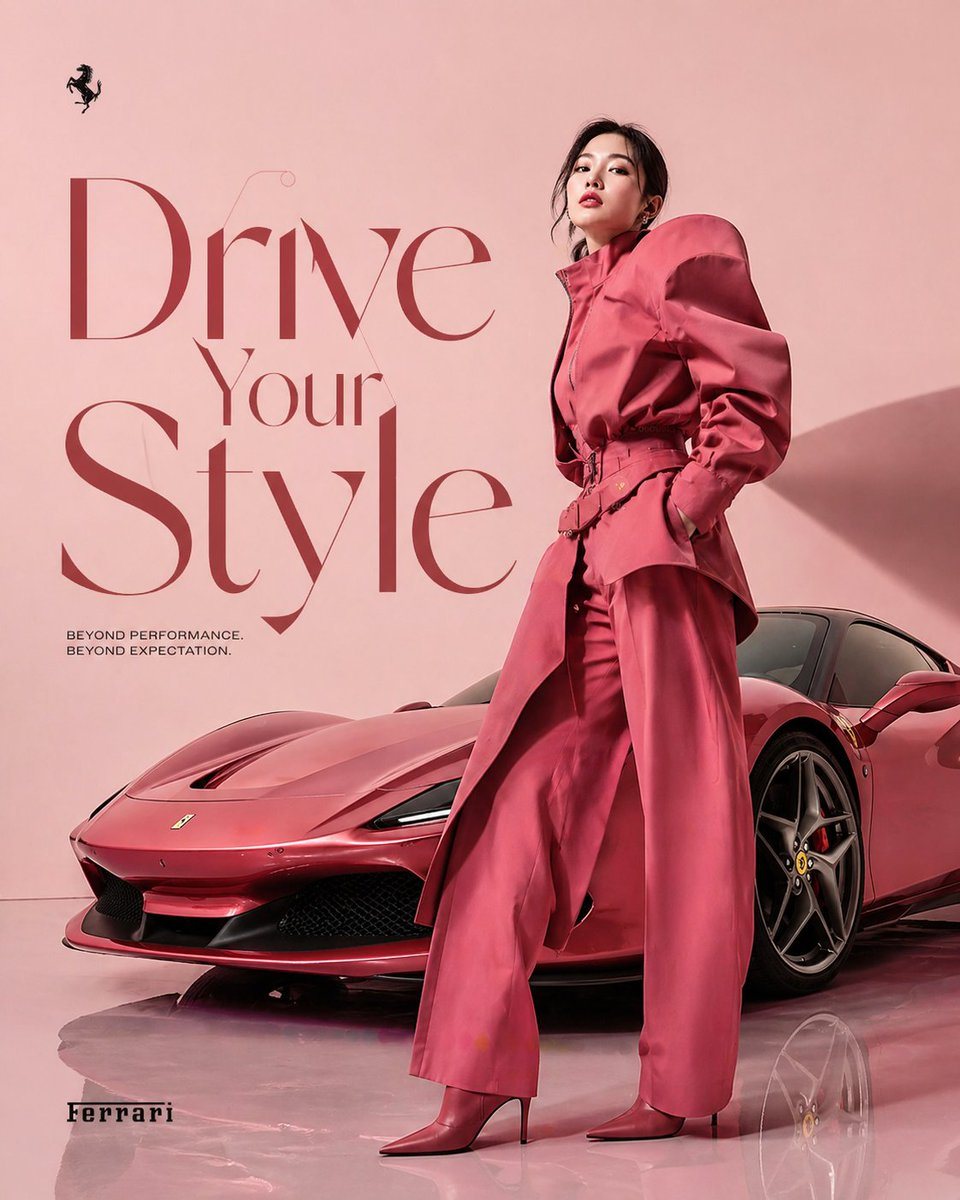
Create A High-fashioned Editorial Advertisement

Create a high-fashioned editorial advertisement featuring a Korean female model. The model should be striking a dynamic pose that exudes confidence and elegance, while wearing an avant-ga...

Create a high-fashioned editorial advertisement featuring a Korean female model. The model should be striking a dynamic pose that exudes confidence and elegance, while wearing an avant-ga...
Prompt

Create a high-fashioned editorial advertisement featuring a {argument name="model" default="Korean female model"}. The model should be striking a dynamic pose that exudes confidence and elegance, while wearing an avant-garde outfit perfectly color-matched to a {argument name="car" default="sleek Ferrari car"} displayed prominently in the scene. The setting is minimalist, with a {argument name="background" default="powder pastel background"} and a reflective floor to enhance a clean, sophisticated aesthetic. Bold, artistic typography should showcase the tagline “Drive Your Style” integrated within the composition. The overall style is modern and artistic, suitable for a high-end magazine spread.

Prompt structure
  • Modelgpt-image-2
  • Use casesocial-media-post
  • Styleeditorial, photorealistic, minimal, luxury
  • Aspect ratioFlexible
Best used for
  • Use casesocial-media-post
  • Styleeditorial, photorealistic, minimal, luxury
  • Recommended specs1:1, 4:5, 16:9, or 9:16
  • ModelGPT Image 2
How to customize

Use this Create A High-fashioned Editorial Advertisement prompt as a base. Replace the subject, product details, environment, lighting, brand colors, and output ratio while keeping the social-media-post intent and editorial, photorealistic, minimal, luxury direction stable.

Editable variables
  • SubjectReplace the product, person, scene, interface, or object being generated.
  • Use caseKeep or rewrite the destination as social media post, ad creative, cover image, poster, or ecommerce hero.
  • FrameChoose 1:1, 4:5, 16:9, or 9:16 based on the final placement.
  • Brand cuesAdd colors, materials, props, text-safe space, and the platform where the image will be used.
Recommended specs

Choose the frame for the destination first, then use 1K, 2K, or 4K based on output quality needs. Product images and posters usually benefit from higher resolution.

Pre-generation checklist
  • CheckSubject, lighting, composition, and frame are specific enough to review.
  • CheckText-safe space is included when the image will carry a headline or ad copy.
  • CheckResolution, credit cost, and final destination are checked before generation.
Why this prompt works

Create A High-fashioned Editorial Advertisement works because it starts from the image job, then controls subject, composition, lighting, style, and frame. It is best for social media post while keeping the editorial, photorealistic, minimal, luxury direction stable.

Common questions
  • Can I use it directly?Yes. Replace the subject, brand cues, and frame, then generate in Image2Studio.
  • Which ratio should I use?Choose 1:1, 4:5, 16:9, or 9:16 based on the destination.




