
Image2Studio
Examples

gpt-image-2

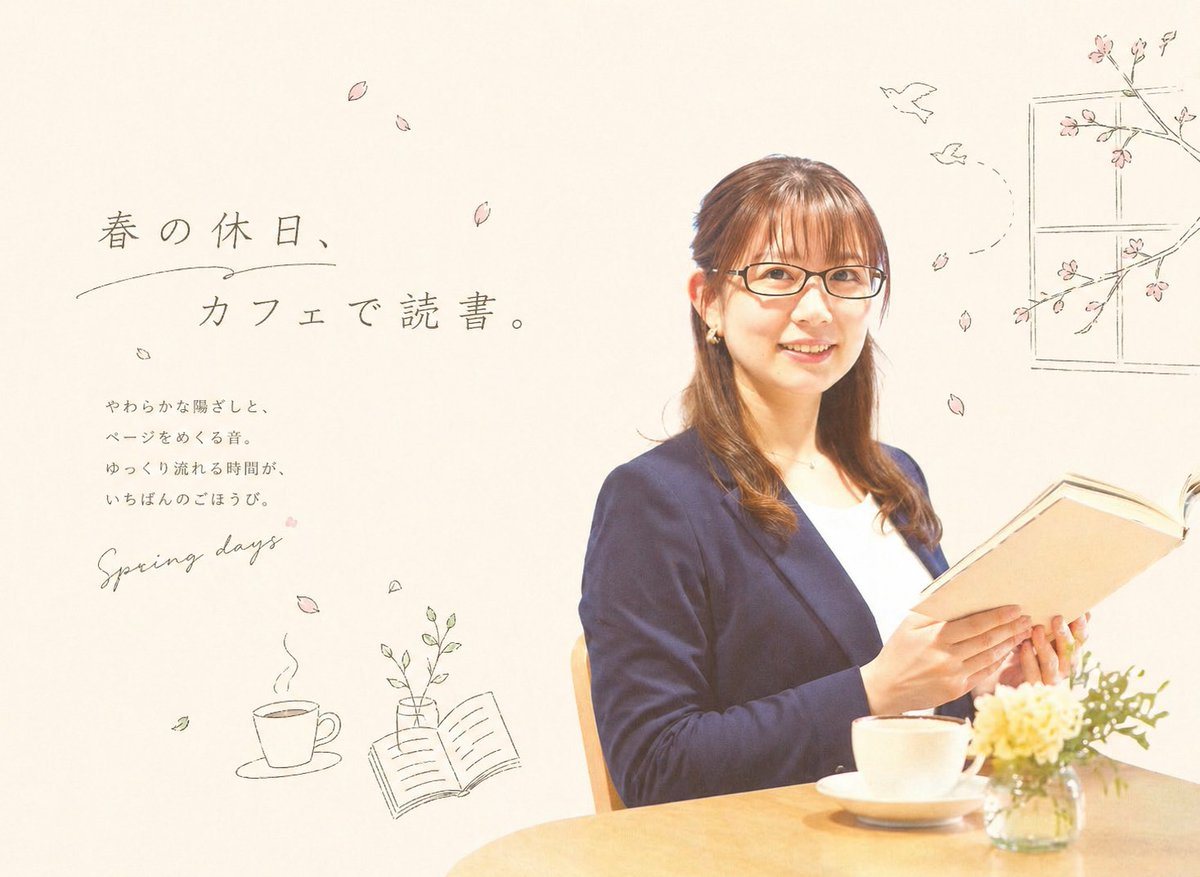
Soft Airy Lifestyle Editorial Image

A soft, airy lifestyle editorial image with a warm spring cafe mood. Place a Japanese woman in her late 20s to 30s on the right half of the frame, seated at a light wooden table and holdi...

A soft, airy lifestyle editorial image with a warm spring cafe mood. Place a Japanese woman in her late 20s to 30s on the right half of the frame, seated at a light wooden table and holdi...
Prompt

A soft, airy lifestyle editorial image with a warm spring cafe mood. Place a Japanese woman in her late 20s to 30s on the right half of the frame, seated at a light wooden table and holding an open hardcover book as if quietly reading. She has {argument name="hair color" default="medium brown"} hair styled half-up with gentle curls at the ends, small earrings, and a calm, refined presence. Dress her in a navy blazer over a white top for an elegant casual-office look. On the table in front of her, show exactly 3 tabletop items: 1 white coffee cup on a saucer near the center front, 1 small clear glass vase filled with pale yellow and white flowers at the lower right, and 1 open book in her hands. Use bright natural lighting, soft shadows, a high-key cream background, and a clean minimalist composition with lots of negative space. On the left side, add Japanese editorial typography in a delicate, hand-drawn style: a large headline reading {argument name="headline text" default="春の休日、カフェで読書。"}, a smaller vertical-style body copy block below it reading "やわらかな陽ざしと、ページをめくる音。ゆっくり流れる時間が、いちばんのごほうび。", and a handwritten English phrase reading {argument name="accent text" default="Spring days"}. Surround the layout with subtle sketch-like spring doodles in muted gray ink and pale pink accents. Include exactly 9 falling cherry blossom petals scattered across the page, 2 simple line-drawn birds flying near the upper right, 1 outlined window frame with cherry blossom branches in the top right corner, 1 line drawing of a steaming coffee cup at the lower left, 1 line drawing of an open book with a small vase and leaves near the lower middle-left, and a few tiny leaf doodles. The overall style should blend real photography with delicate hand-drawn editorial illustrations, evoking a calm, feminine Japanese magazine advertisement about reading at a cafe in spring.

Prompt structure
  • Modelgpt-image-2
  • Use casesocial-media-post
  • Styleeditorial, minimal, photorealistic, luxury
  • Aspect ratioFlexible
Best used for
  • Use casesocial-media-post
  • Styleeditorial, minimal, photorealistic, luxury
  • Recommended specs1:1, 4:5, 16:9, or 9:16
  • ModelGPT Image 2
How to customize

Use this Soft Airy Lifestyle Editorial Image prompt as a base. Replace the subject, product details, environment, lighting, brand colors, and output ratio while keeping the social-media-post intent and editorial, minimal, photorealistic, luxury direction stable.

Editable variables
  • SubjectReplace the product, person, scene, interface, or object being generated.
  • Use caseKeep or rewrite the destination as social media post, ad creative, cover image, poster, or ecommerce hero.
  • FrameChoose 1:1, 4:5, 16:9, or 9:16 based on the final placement.
  • Brand cuesAdd colors, materials, props, text-safe space, and the platform where the image will be used.
Recommended specs

Choose the frame for the destination first, then use 1K, 2K, or 4K based on output quality needs. Product images and posters usually benefit from higher resolution.

Pre-generation checklist
  • CheckSubject, lighting, composition, and frame are specific enough to review.
  • CheckText-safe space is included when the image will carry a headline or ad copy.
  • CheckResolution, credit cost, and final destination are checked before generation.
Why this prompt works

Soft Airy Lifestyle Editorial Image works because it starts from the image job, then controls subject, composition, lighting, style, and frame. It is best for social media post while keeping the editorial, minimal, photorealistic, luxury direction stable.

Common questions
  • Can I use it directly?Yes. Replace the subject, brand cues, and frame, then generate in Image2Studio.
  • Which ratio should I use?Choose 1:1, 4:5, 16:9, or 9:16 based on the destination.




