
Image2Studio
Examples

gpt-image-2

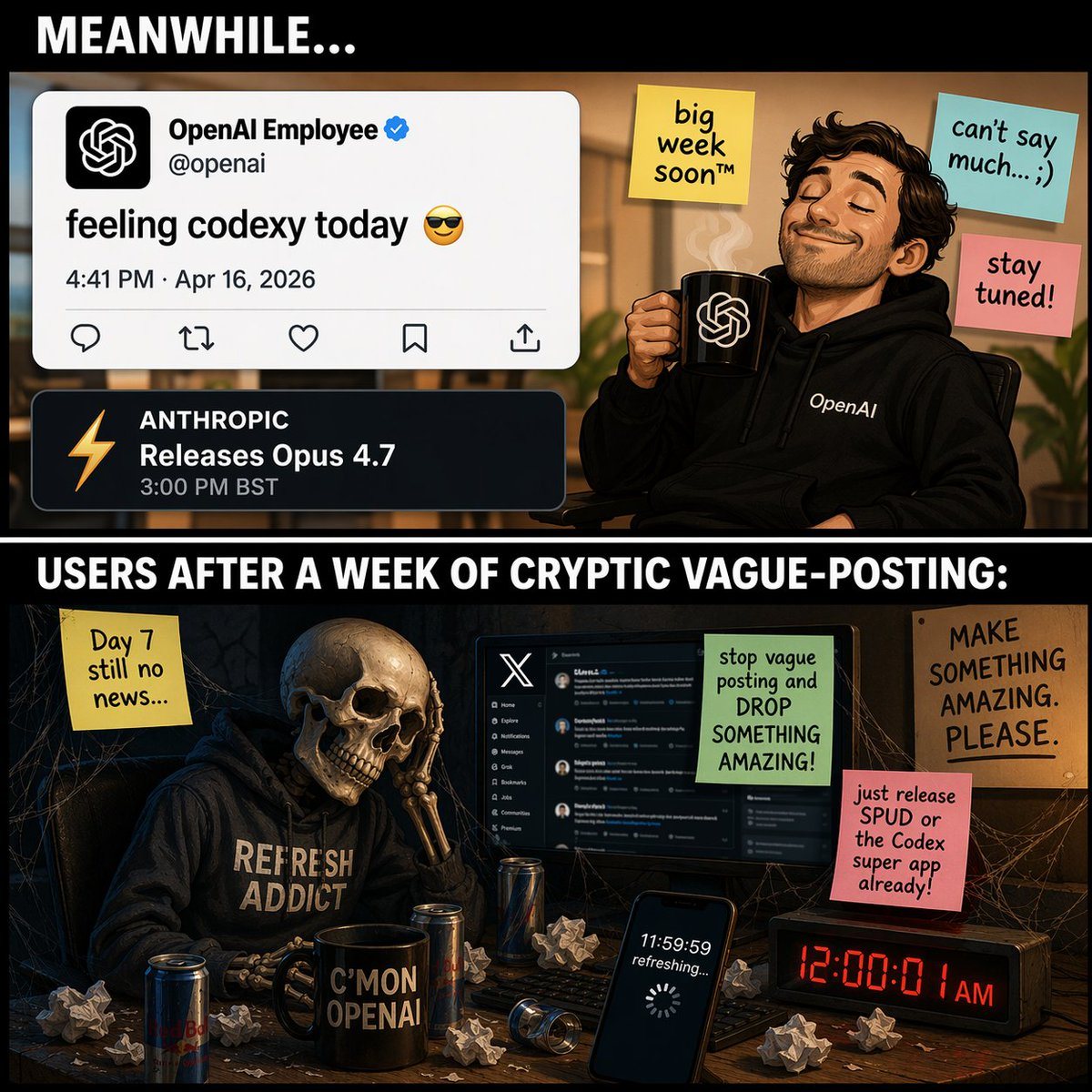
Two-panel Meme Comic

Ready-to-edit two-panel meme comic image prompt.

Ready-to-edit two-panel meme comic image prompt.
Prompt

{ "type": "two-panel meme comic", "layout": { "structure": "vertical split with black divider bars containing white text", "top_header_text": "{argument name=\"top panel header\" default=\"MEANWHILE...\"}", "middle_divider_text": "{argument name=\"bottom panel header\" default=\"USERS AFTER A WEEK OF CRYPTIC VAGUE-POSTING:\"}" }, "panels": [ { "position": "top", "setting": "bright office environment", "character": "smug man with a beard, wearing a black hoodie with 'OpenAI' text, eyes closed, smiling, holding a black mug with the OpenAI logo and rising steam", "ui_elements": { "count": 2, "items": [ "Tweet mockup: Profile 'OpenAI Employee' with verified checkmark, handle '@openai', text '{argument name=\"tweet text\" default=\"feeling codexy today 😎\"}', date '4:41 PM · Apr 16, 2026'", "Notification mockup: Dark theme, orange lightning bolt icon, text 'ANTHROPIC Releases Opus 4.7 3:00 PM BST'" ] }, "sticky_notes": { "count": 3, "items": [ "Yellow note: 'big week soon™'", "Light blue note: 'can't say much... ;)'", "Pink note: 'stay tuned!'" ] } }, { "position": "bottom", "setting": "dark, cobweb-filled room at a messy desk", "character": "skeleton wearing a dark hoodie with '{argument name=\"skeleton hoodie text\" default=\"REFRESH ADDICT\"}', resting its skull on its bony hand in despair", "desk_objects": { "count": 6, "items": [ "Computer monitor displaying the X (Twitter) dark mode interface", "Black mug with text 'C'MON OPENAI'", "Smartphone screen showing '11:59:59 refreshing...' with a loading spinner", "Digital clock displaying red text '12:00:01 AM'", "3 energy drink cans", "Scattered crumpled paper balls" ] }, "sticky_notes_and_signs": { "count": 4, "items": [ "Yellow note (left): 'Day 7 still no news...'", "Green note (on monitor): 'stop vague posting and DROP SOMETHING AMAZING!'", "Pink note (right): '{argument name=\"user complaint note\" default=\"just release SPUD or the Codex super app already!\"}'", "Cardboard sign (far right): 'MAKE SOMETHING AMAZING. PLEASE.'" ] } } ] }

Prompt structure
  • Modelgpt-image-2
  • Use casesocial-media-post
  • Styleeditorial
  • Aspect ratioFlexible
Best used for
  • Use casesocial-media-post
  • Styleeditorial
  • Recommended specs1:1, 4:5, 16:9, or 9:16
  • ModelGPT Image 2
How to customize

Use this Two-panel Meme Comic prompt as a base. Replace the subject, product details, environment, lighting, brand colors, and output ratio while keeping the social-media-post intent and editorial direction stable.

Editable variables
  • SubjectReplace the product, person, scene, interface, or object being generated.
  • Use caseKeep or rewrite the destination as social media post, ad creative, cover image, poster, or ecommerce hero.
  • FrameChoose 1:1, 4:5, 16:9, or 9:16 based on the final placement.
  • Brand cuesAdd colors, materials, props, text-safe space, and the platform where the image will be used.
Recommended specs

Choose the frame for the destination first, then use 1K, 2K, or 4K based on output quality needs. Product images and posters usually benefit from higher resolution.

Pre-generation checklist
  • CheckSubject, lighting, composition, and frame are specific enough to review.
  • CheckText-safe space is included when the image will carry a headline or ad copy.
  • CheckResolution, credit cost, and final destination are checked before generation.
Why this prompt works

Two-panel Meme Comic works because it starts from the image job, then controls subject, composition, lighting, style, and frame. It is best for social media post while keeping the editorial direction stable.

Common questions
  • Can I use it directly?Yes. Replace the subject, brand cues, and frame, then generate in Image2Studio.
  • Which ratio should I use?Choose 1:1, 4:5, 16:9, or 9:16 based on the destination.




