
Image2Studio
Examples

gpt-image-2

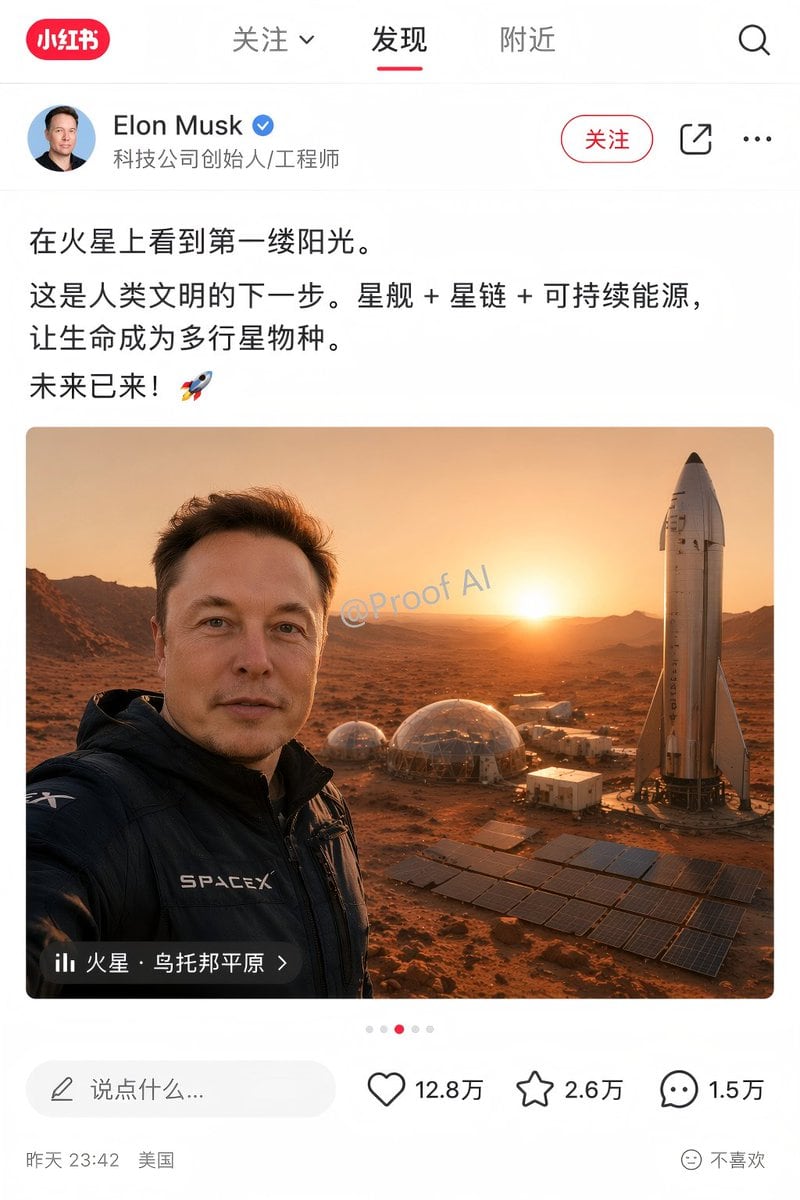
Social Media App Interface Mockup

Ready-to-edit social media app interface mockup image prompt.

Ready-to-edit social media app interface mockup image prompt.
Prompt

{ "type": "social media app interface mockup", "platform_style": "Xiaohongshu", "layout": { "header": { "logo": "red pill with '小红书'", "tabs": ["关注 v", "发现", "附近"], "active_tab": "发现", "icons": 1, "icon_types": ["search"] }, "user_profile": { "avatar": "portrait of Elon Musk", "name": "{argument name=\"user name\" default=\"Elon Musk\"}", "verified_badge": "blue checkmark", "subtitle": "科技公司创始人/工程师", "action_buttons": 3, "button_labels": ["关注", "share icon", "ellipsis icon"] }, "post_content": { "text": "{argument name=\"post text\" default=\"在火星上看到第一缕阳光。这是人类文明的下一步。星舰 + 星链 + 可持续能源,让生命成为多行星物种。未来已来!🚀\"}", "image": { "description": "{argument name=\"image subject\" default=\"Elon Musk taking a selfie on Mars\"}", "clothing": "black jacket with SPACEX logo", "background": "{argument name=\"background elements\" default=\"Starship rocket, geodesic habitat domes, solar panel arrays, Martian landscape at sunrise\"}", "watermark": "@Proof AI", "location_overlay": { "icon": "bar chart", "text": "{argument name=\"location tag\" default=\"火星 · 乌托邦平原 >\"}" } }, "pagination_dots": 5 }, "footer": { "comment_input": "说点什么...", "interaction_stats": 3, "stats_details": [ {"icon": "heart", "count": "12.8万"}, {"icon": "star", "count": "2.6万"}, {"icon": "speech bubble", "count": "1.5万"} ], "metadata": "昨天 23:42 美国", "feedback_button": "不喜欢" } } }

Prompt structure
  • Modelgpt-image-2
  • Use casesocial-media-post
  • Styleeditorial
  • Aspect ratioFlexible
Best used for
  • Use casesocial-media-post
  • Styleeditorial
  • Recommended specs1:1, 4:5, 16:9, or 9:16
  • ModelGPT Image 2
How to customize

Use this Social Media App Interface Mockup prompt as a base. Replace the subject, product details, environment, lighting, brand colors, and output ratio while keeping the social-media-post intent and editorial direction stable.

Editable variables
  • SubjectReplace the product, person, scene, interface, or object being generated.
  • Use caseKeep or rewrite the destination as social media post, ad creative, cover image, poster, or ecommerce hero.
  • FrameChoose 1:1, 4:5, 16:9, or 9:16 based on the final placement.
  • Brand cuesAdd colors, materials, props, text-safe space, and the platform where the image will be used.
Recommended specs

Choose the frame for the destination first, then use 1K, 2K, or 4K based on output quality needs. Product images and posters usually benefit from higher resolution.

Pre-generation checklist
  • CheckSubject, lighting, composition, and frame are specific enough to review.
  • CheckText-safe space is included when the image will carry a headline or ad copy.
  • CheckResolution, credit cost, and final destination are checked before generation.
Why this prompt works

Social Media App Interface Mockup works because it starts from the image job, then controls subject, composition, lighting, style, and frame. It is best for social media post while keeping the editorial direction stable.

Common questions
  • Can I use it directly?Yes. Replace the subject, brand cues, and frame, then generate in Image2Studio.
  • Which ratio should I use?Choose 1:1, 4:5, 16:9, or 9:16 based on the destination.




