
Image2Studio
Examples

gpt-image-2

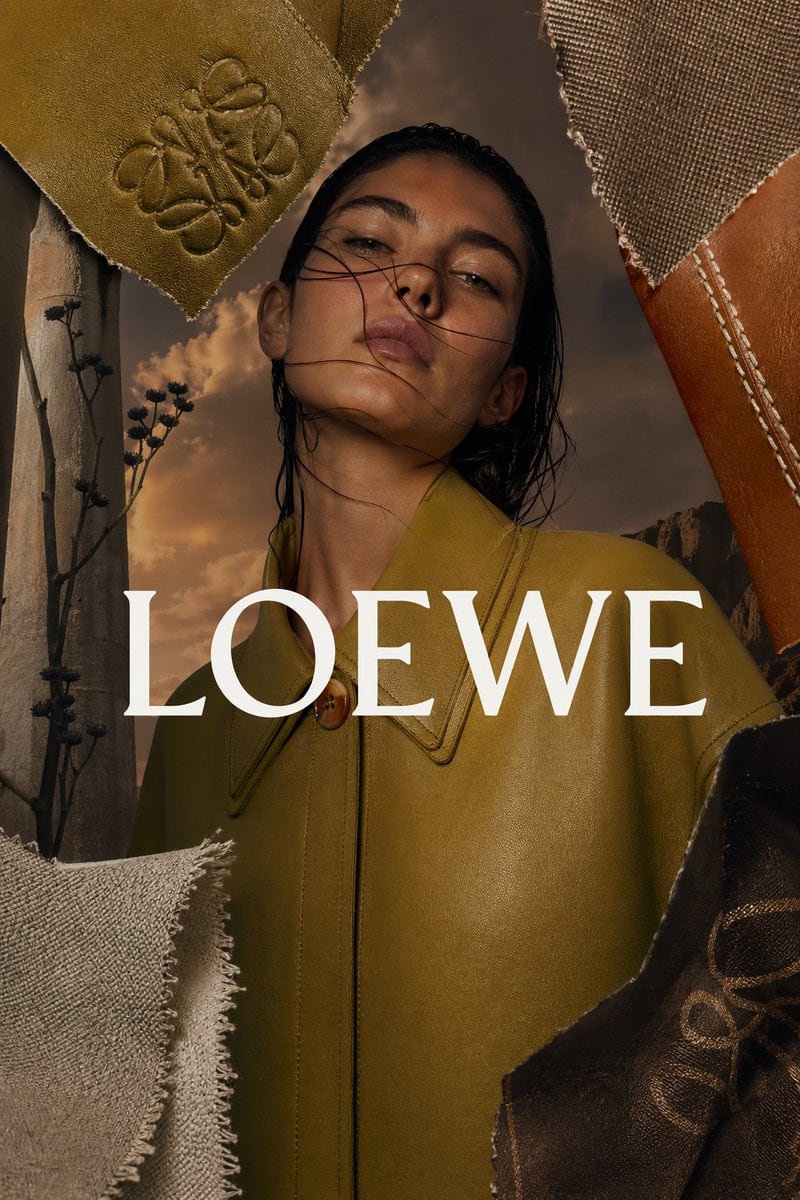
Luxury Fashion Editorial Advertisement Poster In A Vertical Smartphone F

A luxury fashion editorial advertisement poster in a vertical smartphone format, centered on a female model from chest-up wearing a structured olive green leather coat with a sharp pointe...

A luxury fashion editorial advertisement poster in a vertical smartphone format, centered on a female model from chest-up wearing a structured olive green leather coat with a sharp pointe...
Prompt

A luxury fashion editorial advertisement poster in a vertical smartphone format, centered on a female model from chest-up wearing a structured olive green leather coat with a sharp pointed collar and a single visible round brown button at the neck. Her dark wet-look hair is slicked back and slightly messy, her head tilted upward with an elegant elongated neck, and her face mostly obscured by framing and shadow to create a mysterious high-fashion mood. Across the center, place the brand name {argument name="brand name" default="LOEWE"} in very large white high-contrast serif capital letters, spanning nearly the full width of the image. Build the composition as a collage framed by 5 torn material swatches: 1 embossed olive suede piece in the top left with a luxury monogram pressed into it, 1 coarse taupe-beige canvas fabric piece in the top right attached to a warm tan leather strip with visible white stitching, 1 pale textured fabric scrap with frayed edges in the bottom left, 1 dark brown glossy leather piece in the bottom right with a subtle embossed monogram, and 1 narrow vertical weathered beige panel along the left edge. Inside that left panel, include thin dark desert plant stems with small seed heads. In the background behind the model, use a dramatic golden-brown sunset sky with soft clouds and a faint rocky desert landscape near the lower right, creating a warm earthy palette. Lighting should be cinematic, moody, and directional, with rich shadows, tactile material detail, premium fashion-magazine styling, and an elegant artisan-luxury aesthetic. Use a color palette of olive green, camel, tan, beige, chocolate brown, and sunset gold. The overall feeling is sophisticated, handcrafted, minimal, and expensive, like a heritage luxury leather-goods campaign.

Prompt structure
  • Modelgpt-image-2
  • Use casesocial-media-post
  • Styleluxury, cinematic, editorial, photorealistic
  • Aspect ratioFlexible
Best used for
  • Use casesocial-media-post
  • Styleluxury, cinematic, editorial, photorealistic
  • Recommended specs1:1, 4:5, 16:9, or 9:16
  • ModelGPT Image 2
How to customize

Use this Luxury Fashion Editorial Advertisement Poster In A Vertical Smartphone F prompt as a base. Replace the subject, product details, environment, lighting, brand colors, and output ratio while keeping the social-media-post intent and luxury, cinematic, editorial, photorealistic direction stable.

Editable variables
  • SubjectReplace the product, person, scene, interface, or object being generated.
  • Use caseKeep or rewrite the destination as social media post, ad creative, cover image, poster, or ecommerce hero.
  • FrameChoose 1:1, 4:5, 16:9, or 9:16 based on the final placement.
  • Brand cuesAdd colors, materials, props, text-safe space, and the platform where the image will be used.
Recommended specs

Choose the frame for the destination first, then use 1K, 2K, or 4K based on output quality needs. Product images and posters usually benefit from higher resolution.

Pre-generation checklist
  • CheckSubject, lighting, composition, and frame are specific enough to review.
  • CheckText-safe space is included when the image will carry a headline or ad copy.
  • CheckResolution, credit cost, and final destination are checked before generation.
Why this prompt works

Luxury Fashion Editorial Advertisement Poster In A Vertical Smartphone F works because it starts from the image job, then controls subject, composition, lighting, style, and frame. It is best for social media post while keeping the luxury, cinematic, editorial, photorealistic direction stable.

Common questions
  • Can I use it directly?Yes. Replace the subject, brand cues, and frame, then generate in Image2Studio.
  • Which ratio should I use?Choose 1:1, 4:5, 16:9, or 9:16 based on the destination.




