
Image2Studio
Examples

gpt-image-2

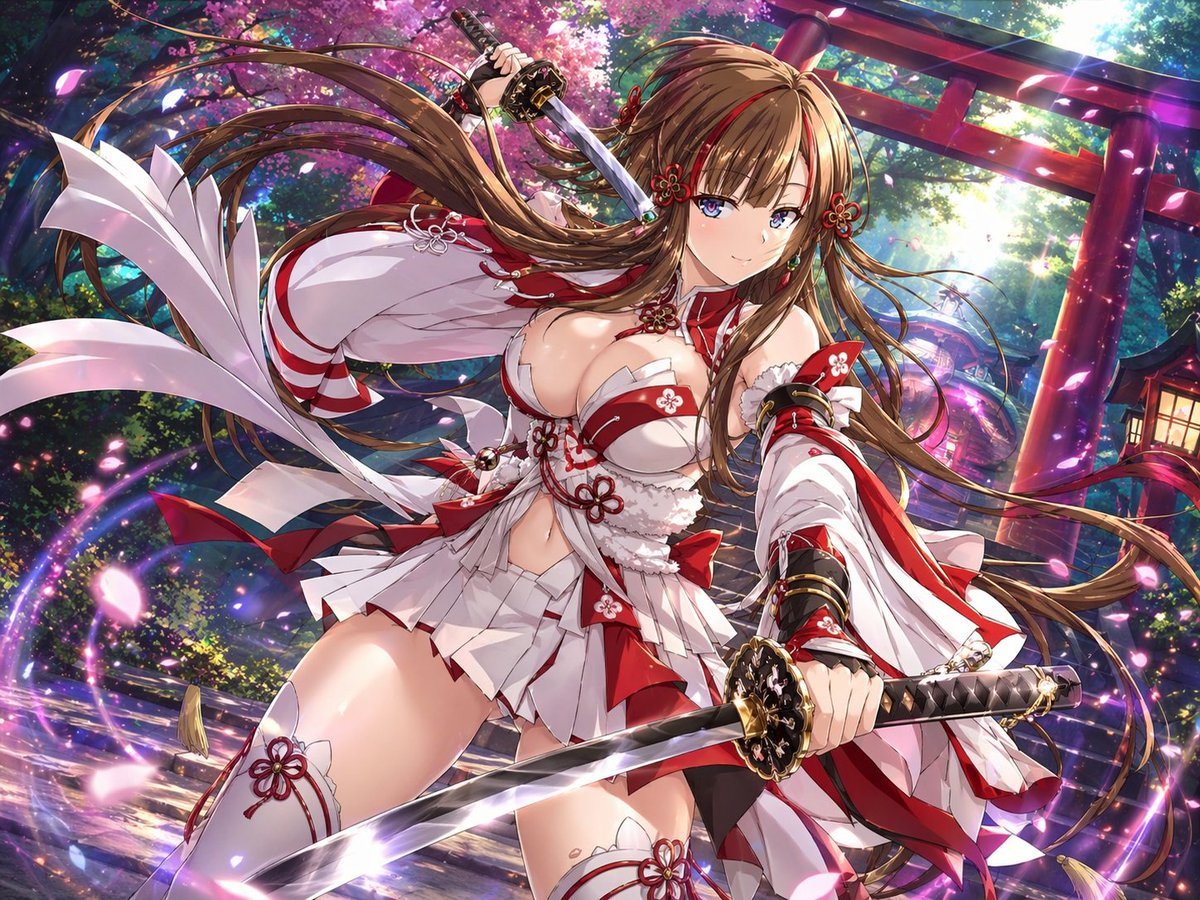
Highly Detailed Anime Fantasy Illustration Of A Shrine Maiden Swordswoma

A highly detailed anime fantasy illustration of a shrine maiden swordswoman in a dynamic low-angle action pose at a Japanese shrine during spring. She is a beautiful young woman with ligh...

A highly detailed anime fantasy illustration of a shrine maiden swordswoman in a dynamic low-angle action pose at a Japanese shrine during spring. She is a beautiful young woman with ligh...
Prompt

A highly detailed anime fantasy illustration of {argument name="character name" default="a shrine maiden swordswoman"} in a dynamic low-angle action pose at a Japanese shrine during spring. She is a beautiful young woman with {argument name="hair color" default="light brown"} very long flowing hair, blue eyes, a confident gentle smile, and ornate red floral hair ornaments. She holds 2 katana: one sword raised behind her head in her right hand and one sword extended forward toward the viewer in her left hand, with polished steel blades and elaborate black-and-gold hilts. Her outfit is a stylized, revealing red-and-white shrine maiden battle costume with 1 short pleated skirt, 1 cropped top with floral knot decorations, 2 oversized detached sleeves, 2 thigh-high stockings with red flower emblems, multiple red bows, white ribbons, and intricate ornamental trim. The scene is filled with motion: her hair and ribbons sweep dramatically through the air, cherry blossom petals fly around her, and glowing magical purple-pink light trails spiral around her body and swords. In the background, show 1 large red torii gate, 1 stone shrine path, dense green forest, blooming {argument name="tree type" default="cherry blossom"} trees, and 1 warm lantern on the right side. Use brilliant cinematic lighting with sunbeams filtering through the trees, sparkling particles, glossy highlights, saturated colors, depth, and a polished premium gacha-game key visual aesthetic. Emphasize energetic composition, fantasy atmosphere, sharp linework, ultra-detailed costume design, and a vivid heroic shrine guardian vibe.

Prompt structure
  • Modelgpt-image-2
  • Use casesocial-media-post
  • Styleluxury, cinematic, anime, watercolor
  • Aspect ratioFlexible
Best used for
  • Use casesocial-media-post
  • Styleluxury, cinematic, anime, watercolor
  • Recommended specs1:1, 4:5, 16:9, or 9:16
  • ModelGPT Image 2
How to customize

Use this Highly Detailed Anime Fantasy Illustration Of A Shrine Maiden Swordswoma prompt as a base. Replace the subject, product details, environment, lighting, brand colors, and output ratio while keeping the social-media-post intent and luxury, cinematic, anime, watercolor direction stable.

Editable variables
  • SubjectReplace the product, person, scene, interface, or object being generated.
  • Use caseKeep or rewrite the destination as social media post, ad creative, cover image, poster, or ecommerce hero.
  • FrameChoose 1:1, 4:5, 16:9, or 9:16 based on the final placement.
  • Brand cuesAdd colors, materials, props, text-safe space, and the platform where the image will be used.
Recommended specs

Choose the frame for the destination first, then use 1K, 2K, or 4K based on output quality needs. Product images and posters usually benefit from higher resolution.

Pre-generation checklist
  • CheckSubject, lighting, composition, and frame are specific enough to review.
  • CheckText-safe space is included when the image will carry a headline or ad copy.
  • CheckResolution, credit cost, and final destination are checked before generation.
Why this prompt works

Highly Detailed Anime Fantasy Illustration Of A Shrine Maiden Swordswoma works because it starts from the image job, then controls subject, composition, lighting, style, and frame. It is best for social media post while keeping the luxury, cinematic, anime, watercolor direction stable.

Common questions
  • Can I use it directly?Yes. Replace the subject, brand cues, and frame, then generate in Image2Studio.
  • Which ratio should I use?Choose 1:1, 4:5, 16:9, or 9:16 based on the destination.




