
Image2Studio
Examples

gpt-image-2

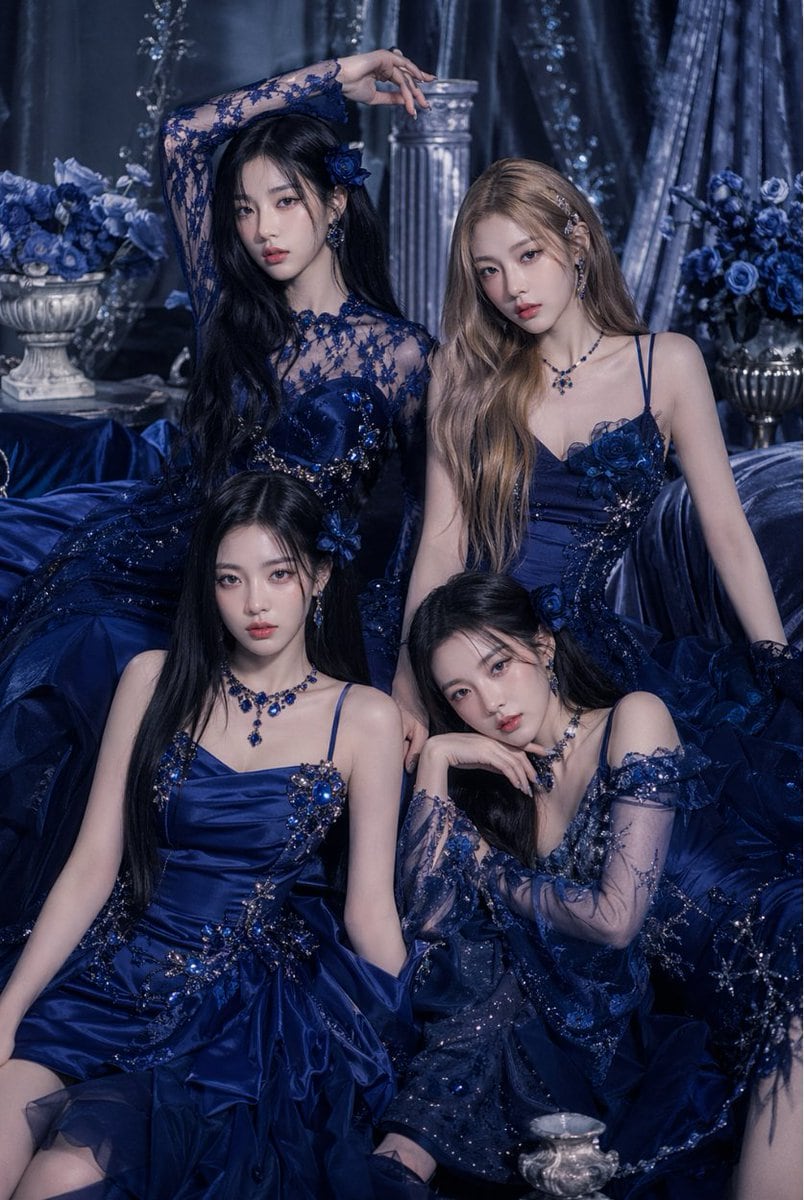
Luxurious Studio Fashion Portrait Of Four Elegant Young Women Posed Clos

A luxurious studio fashion portrait of four elegant young women posed closely together in a dramatic royal-blue fantasy setting, all wearing coordinated deep sapphire and midnight-navy co...

A luxurious studio fashion portrait of four elegant young women posed closely together in a dramatic royal-blue fantasy setting, all wearing coordinated deep sapphire and midnight-navy co...
Prompt

A luxurious studio fashion portrait of {argument name="group size" default="four"} elegant young women posed closely together in a dramatic royal-blue fantasy setting, all wearing coordinated deep sapphire and midnight-navy couture evening gowns with glittering beadwork, floral appliqué, sequins, lace sleeves, sheer mesh details, and voluminous layered skirts. The scene is monochromatic blue with a cool, moody, high-end editorial color grade. Arrange the women in a tight triangular composition: two standing or elevated in the back and two seated in front on draped fabric, with varied graceful poses, one woman raising an arm above her head, one leaning slightly, one seated upright, and one resting her chin on her hand. Their dresses should each be distinct but harmonized, featuring ornate crystal embellishments, embroidered flowers, and fitted bodices. Add matching sapphire jewelry including dangling earrings, gemstone necklaces, and floral hair accessories. Use long flowing hair in mixed dark black and soft light brown tones, styled smooth and glamorous. Surround them with opulent set dressing: 2 classical urn vases filled with blue roses, 1 fluted stone column in the background, heavy shimmering velvet curtains, and abundant draped satin fabric pooling around them. Lighting should be soft and diffused with subtle highlights on satin and jewels, creating a regal, mysterious, romantic atmosphere. Shoot as a vertical fashion editorial portrait, waist-up to full seated composition, highly detailed fabric textures, polished luxury beauty campaign aesthetic, no visible text.

Prompt structure
  • Modelgpt-image-2
  • Use casesocial-media-post
  • Styleluxury, editorial, cinematic, photorealistic
  • Aspect ratioFlexible
Best used for
  • Use casesocial-media-post
  • Styleluxury, editorial, cinematic, photorealistic
  • Recommended specs1:1, 4:5, 16:9, or 9:16
  • ModelGPT Image 2
How to customize

Use this Luxurious Studio Fashion Portrait Of Four Elegant Young Women Posed Clos prompt as a base. Replace the subject, product details, environment, lighting, brand colors, and output ratio while keeping the social-media-post intent and luxury, editorial, cinematic, photorealistic direction stable.

Editable variables
  • SubjectReplace the product, person, scene, interface, or object being generated.
  • Use caseKeep or rewrite the destination as social media post, ad creative, cover image, poster, or ecommerce hero.
  • FrameChoose 1:1, 4:5, 16:9, or 9:16 based on the final placement.
  • Brand cuesAdd colors, materials, props, text-safe space, and the platform where the image will be used.
Recommended specs

Choose the frame for the destination first, then use 1K, 2K, or 4K based on output quality needs. Product images and posters usually benefit from higher resolution.

Pre-generation checklist
  • CheckSubject, lighting, composition, and frame are specific enough to review.
  • CheckText-safe space is included when the image will carry a headline or ad copy.
  • CheckResolution, credit cost, and final destination are checked before generation.
Why this prompt works

Luxurious Studio Fashion Portrait Of Four Elegant Young Women Posed Clos works because it starts from the image job, then controls subject, composition, lighting, style, and frame. It is best for social media post while keeping the luxury, editorial, cinematic, photorealistic direction stable.

Common questions
  • Can I use it directly?Yes. Replace the subject, brand cues, and frame, then generate in Image2Studio.
  • Which ratio should I use?Choose 1:1, 4:5, 16:9, or 9:16 based on the destination.




