
Image2Studio
Examples

gpt-image-2

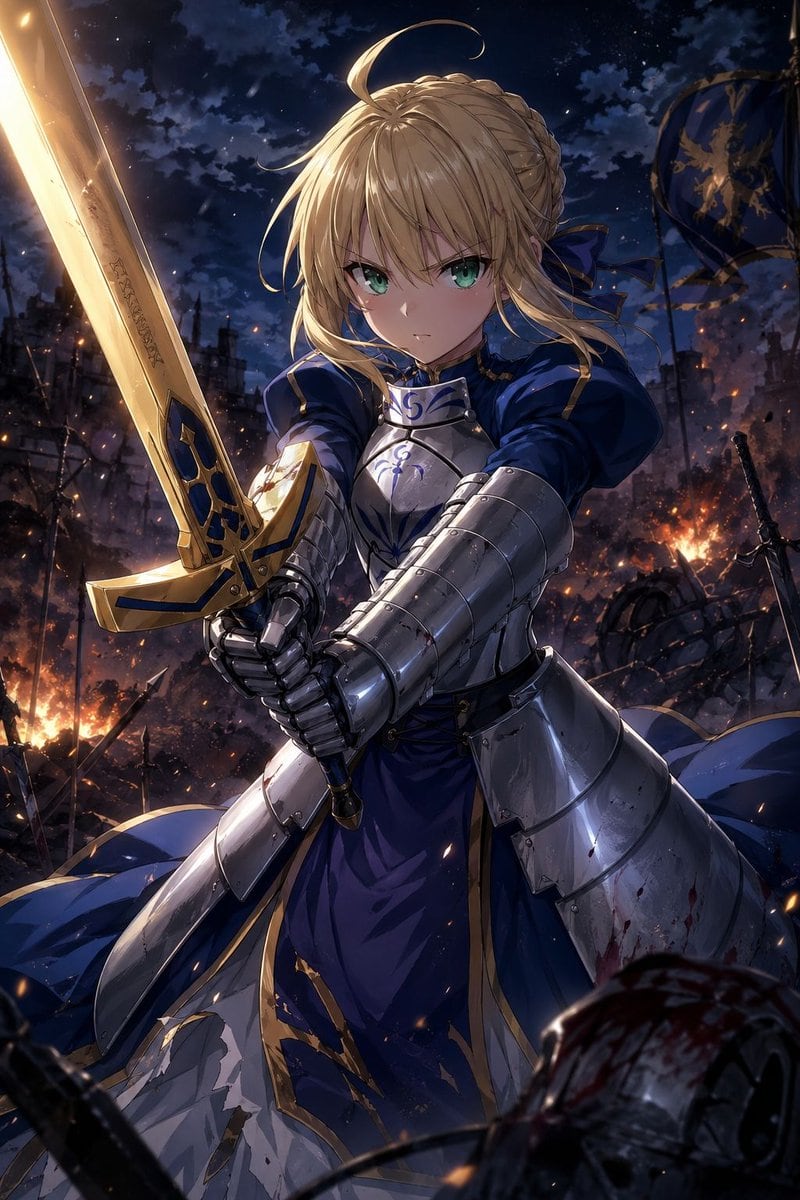
Dramatic Anime-style Fantasy Battle Illustration Of Artoria Pendragon

A dramatic anime-style fantasy battle illustration of Artoria Pendragon, a young female knight with emerald green eyes and blonde hair styled in a braided bun with loose bangs and a singl...

A dramatic anime-style fantasy battle illustration of Artoria Pendragon, a young female knight with emerald green eyes and blonde hair styled in a braided bun with loose bangs and a singl...
Prompt

A dramatic anime-style fantasy battle illustration of {argument name="character name" default="Artoria Pendragon"}, a young female knight with emerald green eyes and blonde hair styled in a braided bun with loose bangs and a single ahoge, shown in a powerful low-angle medium full-body shot. She stands in the center of the frame gripping a large glowing golden sword with both hands, the blade angled upward along the left side of the image, with ornate blue inlays and faint runic engraving. She wears blue and silver royal armor: a dark cobalt blue dress with gold trim, polished steel breastplate and faulds, heavy armored gauntlets, and layered plate armor over the torso and hips, with parts of the white underskirt torn and dirty from combat. Her expression is stern, focused, and determined, looking directly forward as if facing an enemy. The background is a burning nighttime battlefield under a deep navy sky with heavy clouds and faint stars, filled with embers, flames, ruined structures, broken spears, scattered swords, and wreckage. Include 2 visible flags in the background with blue fabric and gold heraldic emblems, partially tattered and waving in the smoke. Add subtle blood stains and battle damage on the lower armor, sparks drifting through the air, strong cinematic rim lighting from fires behind her, reflective highlights on the metal, and high-contrast heroic composition. Ultra-detailed polished anime illustration, Fate-inspired knight king aesthetic, intense atmosphere, sharp linework, rich blue-and-gold palette, vertical composition, SFW.

Prompt structure
  • Modelgpt-image-2
  • Use casesocial-media-post
  • Styleluxury, cinematic, anime, watercolor
  • Aspect ratioFlexible
Best used for
  • Use casesocial-media-post
  • Styleluxury, cinematic, anime, watercolor
  • Recommended specs1:1, 4:5, 16:9, or 9:16
  • ModelGPT Image 2
How to customize

Use this Dramatic Anime-style Fantasy Battle Illustration Of Artoria Pendragon prompt as a base. Replace the subject, product details, environment, lighting, brand colors, and output ratio while keeping the social-media-post intent and luxury, cinematic, anime, watercolor direction stable.

Editable variables
  • SubjectReplace the product, person, scene, interface, or object being generated.
  • Use caseKeep or rewrite the destination as social media post, ad creative, cover image, poster, or ecommerce hero.
  • FrameChoose 1:1, 4:5, 16:9, or 9:16 based on the final placement.
  • Brand cuesAdd colors, materials, props, text-safe space, and the platform where the image will be used.
Recommended specs

Choose the frame for the destination first, then use 1K, 2K, or 4K based on output quality needs. Product images and posters usually benefit from higher resolution.

Pre-generation checklist
  • CheckSubject, lighting, composition, and frame are specific enough to review.
  • CheckText-safe space is included when the image will carry a headline or ad copy.
  • CheckResolution, credit cost, and final destination are checked before generation.
Why this prompt works

Dramatic Anime-style Fantasy Battle Illustration Of Artoria Pendragon works because it starts from the image job, then controls subject, composition, lighting, style, and frame. It is best for social media post while keeping the luxury, cinematic, anime, watercolor direction stable.

Common questions
  • Can I use it directly?Yes. Replace the subject, brand cues, and frame, then generate in Image2Studio.
  • Which ratio should I use?Choose 1:1, 4:5, 16:9, or 9:16 based on the destination.




